Magical Creative Tools
🟡 Updated this year⚠️ Install Order · 2 steps
Install in this order, then this mod last — most mods fail to load without their framework and dependencies in place.
🖼️ Gallery (2 images)
🔍 Analysis
- 👍 0.4% endorsement rate
- 🏆 #187 of 401 forge mods in this game by downloads
📋 About This Mod
# Introduction This is a set of tools aimed to help testing mod elements, building structures and administrating SMPs. # Features ## Day And Weather Cycles Switch Key bind (default F10) Requires command permission to use Can be turned off etirely in the config file _Useful while generating dozens of new worlds while testing something._ ------------------------------------------------------- ## Air To Structure Void Staff On right-click: Changes air to structure void in 10 block radius around you. _Useful while creating custom structures. ------------------------------------------------------- ## Anvil Staff On right-click: Reapair the item in your off-hand to full durability... ...or damage a full durabiliy item down to 1 durability. _Useful for testing mod elements that revolve around damaging or repairing items. ------------------------------------------------------- ## Cave Air Staff On right-click: Changes air to cave air in 10 block radius around you. _Useful while creating custom underground structures. ------------------------------------------------------- ## Clock Staff On right-click: Turn day time 1000 ticks forwards On sneak + right-click: Turn day time 1000 ticks backwards* *it technically turns it 23000 ticks forwards _Useful for testing daytime-releated mod elements. ------------------------------------------------------- ## Config Staff On right-click: Opens the Magical Creative Tools mod config GUI. _In the GUI you can: _-choose one of two sounds for the tools or turn off their sounds _-turn off particles of the tools ------------------------------------------------------- ## Death Staff Upon hitting an entity: Sets the hit entity's health to 0. _Useful for testing mod elements related to mobs. ------------------------------------------------------- ## Depoisonous Staff On right-click: Removes all effects from you. _Useful for testing mod elements related to effects. ------------------------------------------------------- ## Destroyer 3000 Huge knockback. Makes the BONK meme sound on hit. _Zero damage + Knockback X. _Useful for punishing troublesome players on a server. ------------------------------------------------------- ## Earth Staff On right-click: Teleports you to the Overworld. You may end up in a wall or in the air... ...as it teleports you to the same coordinates as your current ones. _Useful for fast travel. ------------------------------------------------------- ## Egg Staff Right-click a mob: Copy its ID. Right-click a block: Spawn the mob on the block. Right-click in the air: Spawn the mob at your position. Sneak while using this staff: Spawn the mob with its AI toggled off. _Useful for testing and placing mobs. ------------------------------------------------------- ## End Staff On right-click: Teleports you to the End. You may end up in a wall or in the air... ...as it teleports you to the same coordinates as your current ones. _Useful for fast travel. ------------------------------------------------------- ## Experienced Staff On right-click: Gain 30 levels of experience. On sneak + right-click: Loose all your levels of experience. _Useful for testing experience-related mod elements. ------------------------------------------------------- ## Food Staff On right-click: If you're hungry - it fills the hunger and saturation bars. If you're not hungry - it empties the hunger and saturation bars. _Useful for testing food-related mod elements. ------------------------------------------------------- ## Healing Staff If you're hurt - you regain full health. If you have full health - it sets your health to 1. _Useful for testing health-related mod elements. ------------------------------------------------------- ## Horizontal Block Rotation Staff On right-click on block: Rotate the block horizontally in clockwise direction. Sneak + right-click on block: Rotate the block horizontally in counter-clockwise direction. _Useful for building. ------------------------------------------------------- ## Lava Staff On right-click: Teleports you to the Nether. You may end up in a wall or in the air... ...as it teleports you to the same coordinates as your current ones. _Useful for fast travel. ------------------------------------------------------- ## Mob Screenshot Staff On right-clicking a mob: Turn off its AI and make it look at you. Right-click the mob while sneaking: Turn its AI back on. _Useful for screenshots with mobs and building maps with NPCs. ------------------------------------------------------- ## Night Vision Staff On right-click: Turns infinite Night Vision on or off for you. _Useful for testing things in darkness and building in darkness. ------------------------------------------------------- ## Registry Name Staff On right-click: Opens a GUI for checking registry names of blocks and items. The registry name can be copied - click on it and use: [Ct
# Introduction
This is a set of tools aimed to help testing mod elements, building structures and administrating SMPs.
## Day And Weather Cycles Switch
Key bind (default F10)
Requires command permission to use
Can be turned off etirely in the config file
_Useful while generating dozens of new worlds while testing something._
-------------------------------------------------------
## Air To Structure Void Staff
On right-click:
Changes air to structure void in 10 block radius around you.
_Useful while creating custom structures.
-------------------------------------------------------
## Anvil Staff
On right-click:
Reapair the item in your off-hand to full durability...
...or damage a full durabiliy item down to 1 durability.
_Useful for testing mod elements that revolve around damaging or repairing items.
-------------------------------------------------------
## Cave Air Staff
On right-click:
Changes air to cave air in 10 block radius around you.
_Useful while creating custom underground structures.
-------------------------------------------------------
## Clock Staff
On right-click:
Turn day time 1000 ticks forwards
On sneak + right-click:
Turn day time 1000 ticks backwards
it technically turns it 23000 ticks forwards
_Useful for testing daytime-releated mod elements.
-------------------------------------------------------
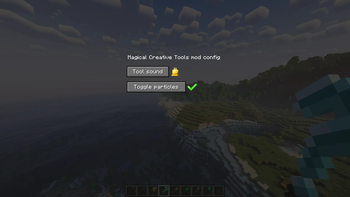
## Config Staff
On right-click:
Opens the Magical Creative Tools mod config GUI.
_In the GUI you can:
_-choose one of two sounds for the tools or turn off their sounds
_-turn off particles of the tools
-------------------------------------------------------
## Death Staff
Upon hitting an entity:
Sets the hit entity's health to 0.
_Useful for testing mod elements related to mobs.
-------------------------------------------------------
## Depoisonous Staff
On right-click:
Removes all effects from you.
_Useful for testing mod elements related to effects.
-------------------------------------------------------
## Destroyer 3000
Huge knockback.
Makes the BONK meme sound on hit.
_Zero damage + Knockback X.
_Useful for punishing troublesome players on a server.
-------------------------------------------------------
## Earth Staff
On right-click:
Teleports you to the Overworld.
You may end up in a wall or in the air...
...as it teleports you to the same coordinates as your current ones.
_Useful for fast travel.
-------------------------------------------------------
## Egg Staff
Right-click a mob:
Copy its ID.
Right-click a block:
Spawn the mob on the block.
Right-click in the air:
Spawn the mob at your position.
Sneak while using this staff:
Spawn the mob with its AI toggled off.
_Useful for testing and placing mobs.
-------------------------------------------------------
## End Staff
On right-click:
Teleports you to the End.
You may end up in a wall or in the air...
...as it teleports you to the same coordinates as your current ones.
_Useful for fast travel.
-------------------------------------------------------
## Experienced Staff
On right-click:
Gain 30 levels of experience.
On sneak + right-click:
Loose all your levels of experience.
_Useful for testing experience-related mod elements.
-------------------------------------------------------
## Food Staff
On right-click:
If you're hungry - it fills the hunger and saturation bars.
If you're not hungry - it empties the hunger and saturation bars.
_Useful for testing food-related mod elements.
-------------------------------------------------------
## Healing Staff
If you're hurt - you regain full health.
If you have full health - it sets your health to 1.
_Useful for testing health-related mod elements.
-------------------------------------------------------
## Horizontal Block Rotation Staff
On right-click on block:
Rotate the block horizontally in clockwise direction.
Sneak + right-click on block:
Rotate the block horizontally in counter-clockwise direction.
_Useful for building.
-------------------------------------------------------
## Lava Staff
On right-click:
Teleports you to the Nether.
You may end up in a wall or in the air...
...as it teleports you to the same coordinates as your current ones.
_Useful for fast travel.
-------------------------------------------------------
## Mob Screenshot Staff
On right-clicking a mob:
Turn off its AI and make it look at you.
Right-click the mob while sneaking:
Turn its AI back on.
_Useful for screenshots with mobs and building maps with NPCs.
-------------------------------------------------------
## Night Vision Staff
On right-click:
Turns infinite Night Vision on or off for you.
_Useful for testing things in darkness and building in darkness.
-------------------------------------------------------
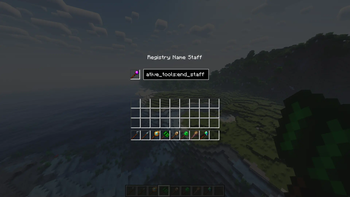
## Registry Name Staff
On right-click:
Opens a GUI for checking registry names of blocks and items.
The registry name can be copied - click on it and use:
📊 Mod Details
- Game
- Minecraft Mods
- Author
- LordDDiamond
- Version
- 1.42
- Downloads
- 1,857
- Endorsements
- 7
- Category
- forge
- Created
- 6/23/2024
- Updated
- 3/23/2026
- Game Versions
- 1.21.1
- Tags
- utility
🔧 How to Install Minecraft Mods Mods
Download from Modrinth. Use Prism Launcher or drop into your mods folder.
📖 Full step-by-step install guide for Minecraft Mods →
Visit the official mod page for specific installation instructions for this mod.
🎮 Need cheat codes or console commands? Check ur gaming wiki for Minecraft Mods commands, item IDs, and more.
❓ Frequently Asked Questions
Which Minecraft Mods versions does Magical Creative Tools support?
The author lists 1.21.1. Other versions may work but are untested by the author.
What is the latest version of Magical Creative Tools?
Version 1.42, published 2026-03-23 with 1,857 downloads recorded at the source.
Keep browsing — more Minecraft Mods mods await