Magic Moon
🟡 Updated this year⚠️ Install Order · 2 steps
Install in this order, then this mod last — most mods fail to load without their framework and dependencies in place.
🖼️ Gallery (5 images)


🔍 Analysis
- 👍 0.1% endorsement rate
- 🏆 #173 of 611 adventure mods in this game by downloads
📋 About This Mod
### 🌐 Language / 语言选择 <details> <summary>English(expand/collapse)</summary> If the light and shadow effect is turned on, the special moon color-changing effect will not be displayed. Added 4 types of moons: Blood Month: Thunderstorm weather during the day and a large number of monsters at night. Magic Moon:Thunderstorm weather during the day ,and spawns hell monsters, predators, etc. at night Yellow moon: There is a double chance of harvesting crops at night. Blue moon: At night, the ground hardly brushes monsters. Commands: day(/time setDay <startDay>),night(/time setDayNight <startDay>) Time command: /time setDay <days>, /time setDaySleeping <dayss>, /time setDayNight <days>, etc Configure the file at the path: .minecraft\versions\saveWorld\config\magicmoon.json ``` { "magic_moon": { "custom_model": { "desc1:": "大于等于4; startDay greater than or equal to 4 ", "startDay": 4, "desc2:": "大于等于2;perDay greater than or equal to 2 ", "perDay": 2 } } } ``` </details> <details> <summary>中文(展开/收起)</summary> 如果开了光影,则不显示特殊月亮变色效果. 添加了4种月亮: 血月:白天雷暴天气,晚上大量怪物。 幻月:白天雷暴天气,晚上生成地狱怪物、掠夺者等 黄月:晚上收获农作物有几率双倍。 蓝月:晚上地面几乎不刷怪。 可用指令:白天(/time setDay <startDay>),晚上(/time setDayNight <startDay>) time指令修改: /time setDay <天数>, /time setDaySleeping <天数>, /time setDayNight <天数>等 配置文件路径为 .minecraft\versions\saveWorld\config\magicmoon.json ``` { "magic_moon": { "custom_model": { "desc1:": "大于等于4; startDay greater than or equal to 4 ", "startDay": 4, "desc2:": "大于等于2;perDay greater than or equal to 2 ", "perDay": 2 } } } ``` </details> <img src="https://cdn.modrinth.com/data/O7m3DxOi/images/5897be69d8af1c8efd2a3d65b24ac2848ca253c8.png" alt="Shockbyte">
### 🌐 Language / 语言选择
English(expand/collapse)
If the light and shadow effect is turned on, the special moon color-changing effect will not be displayed.
Added 4 types of moons:
Blood Month: Thunderstorm weather during the day and a large number of monsters at night.
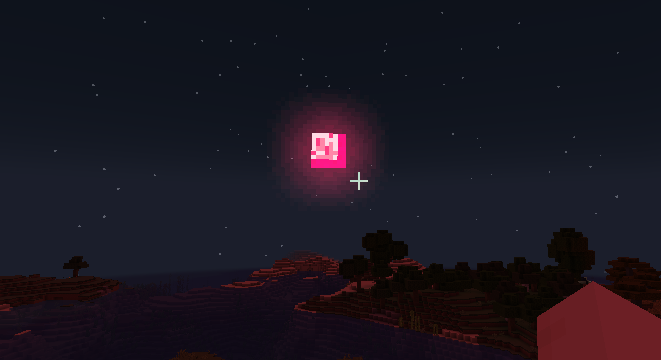
Magic Moon:Thunderstorm weather during the day ,and spawns hell monsters, predators, etc. at night
Yellow moon: There is a double chance of harvesting crops at night.
Blue moon: At night, the ground hardly brushes monsters.
Commands: day(/time setDay
Time command:
/time setDay
/time setDaySleeping
/time setDayNight
Configure the file at the path: .minecraft\versions\saveWorld\config\magicmoon.json
``` { "magic_moon": { "custom_model": { "desc1:": "大于等于4; startDay greater than or equal to 4 ", "startDay": 4, "desc2:": "大于等于2;perDay greater than or equal to 2 ", "perDay": 2 } } } ```
中文(展开/收起)
如果开了光影,则不显示特殊月亮变色效果.
血月:白天雷暴天气,晚上大量怪物。
幻月:白天雷暴天气,晚上生成地狱怪物、掠夺者等
黄月:晚上收获农作物有几率双倍。
蓝月:晚上地面几乎不刷怪。
可用指令:白天(/time setDay
/time setDay <天数>,
/time setDaySleeping <天数>,
/time setDayNight <天数>等
配置文件路径为 .minecraft\versions\saveWorld\config\magicmoon.json ``` { "magic_moon": { "custom_model": { "desc1:": "大于等于4; startDay greater than or equal to 4 ", "startDay": 4, "desc2:": "大于等于2;perDay greater than or equal to 2 ", "perDay": 2 } } } ```
📊 Mod Details
- Game
- Minecraft Mods
- Author
- ChongYu668
- Version
- 1.1.0
- Downloads
- 66,483
- Endorsements
- 35
- Category
- adventure
- Created
- 5/28/2024
- Updated
- 8/24/2026
- Game Versions
- 26.2
- Tags
- adventure
🔧 How to Install Minecraft Mods Mods
Download from Modrinth. Use Prism Launcher or drop into your mods folder.
📖 Full step-by-step install guide for Minecraft Mods →
Visit the official mod page for specific installation instructions for this mod.
🎮 Need cheat codes or console commands? Check ur gaming wiki for Minecraft Mods commands, item IDs, and more.
❓ Frequently Asked Questions
Which Minecraft Mods versions does Magic Moon support?
The author lists 26.2. Other versions may work but are untested by the author.
What is the latest version of Magic Moon?
Version 1.1.0, published 2026-08-24 with 66,483 downloads recorded at the source.
Keep browsing — more Minecraft Mods mods await