MaceUtils
🟡 Updated this year⚠️ Install Order · 2 steps
Install in this order, then this mod last — most mods fail to load without their framework and dependencies in place.
🖼️ Gallery (2 images)

🔍 Analysis
- 👍 0.1% endorsement rate
- 🏆 #545 of 920 fabric mods in this game by downloads
📋 About This Mod
<a href="https://modrinth.com/mod/fabric-api"> <img src="https://img.shields.io/badge/Requires-Fabric_API-2b2b2b?style=for-the-badge&logo=fabric&logoColor=white&labelColor=1f1f1f"> </a> <a href="https://modrinth.com/mod/astudiolib"> <img src="https://img.shields.io/badge/Requires-AStudioLib-2b2b2b?style=for-the-badge&logoColor=white&labelColor=1f1f1f"> </a> <a href="https://youtube.com/@AttackStudioYT"> <img src="https://img.shields.io/badge/YouTuber-AttackStudioYT-2b2b2b?style=for-the-badge&logo=youtube&logoColor=ff4444&labelColor=1f1f1f"> </a> --- # MaceUtils ### A Fabric HUD & GUI mod built for Mace PVP on Minecraft 1.21.11 --- ## Getting Started Press **Escape** in-game and click the small **`M`** button next to the Options button to open the MaceUtils menu. The menu has three tabs: **Mace**, **Spear**, and **Combat** — each controlling a different set of features. A **Settings** button in the top-right of the menu gives access to advanced options. --- ## Mace Tab ### Mace Hit Sound Plays a bow-hit ding sound whenever you land a mace hit. Volume and pitch are configurable in Settings. ### Damage HUD Displays a panel in the **top-left corner** when you're holding a mace showing your current **fall height** and the **estimated mace damage** it would deal. Color-coded bar — red when fall isn't enough, green when it is. Fades out gradually after you switch off the mace, and snaps back if you pick it back up. --- ## Spear Tab ### Spear HUD A left-side panel that appears while holding any spear. Shows: - **Velocity meter** — bar showing your current horizontal speed as a percentage of max charge damage, with the estimated damage value - **Speed readout** — current blocks/tick - **Jab cooldown bar** — shows exactly when your attack is ready again - **Target analysis** — when your crosshair is on a living entity, shows their current HP, a health bar, and whether your current speed is **LETHAL** or how much more speed you need - **Reach warning** — flashes `TOO CLOSE!` if your target is within 2 blocks ### Velocity Meter toggle Hides/shows the velocity bar portion if you just want the cooldown and target info.



### A Fabric HUD & GUI mod built for Mace PVP on Minecraft 1. 21. 11 --- ## Getting Started
Press Escape in-game and click the small `M` button next to the Options button to open the MaceUtils menu.
The menu has three tabs: Mace, Spear, and Combat — each controlling a different set of features. A Settings button in the top-right of the menu gives access to advanced options.
## Mace Tab
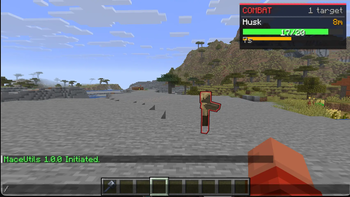
### Mace Hit Sound Plays a bow-hit ding sound whenever you land a mace hit. Volume and pitch are configurable in Settings. ### Damage HUD Displays a panel in the top-left corner when you're holding a mace showing your current fall height and the estimated mace damage it would deal. Color-coded bar — red when fall isn't enough, green when it is. Fades out gradually after you switch off the mace, and snaps back if you pick it back up. --- ## Spear Tab
### Spear HUD A left-side panel that appears while holding any spear. Shows:
- Velocity meter — bar showing your current horizontal speed as a percentage of max charge damage, with the estimated damage value
- - Speed readout — current blocks/tick
- - Jab cooldown bar — shows exactly when your attack is ready again
- - Target analysis — when your crosshair is on a living entity, shows their current HP, a health bar, and whether your current speed is LETHAL or how much more speed you need
- - Reach warning — flashes `TOO CLOSE!` if your target is within 2 blocks
- ### Velocity Meter toggle
- Hides/shows the velocity bar portion if you just want the cooldown and target info.
📊 Mod Details
- Game
- Minecraft Mods
- Author
- AttackStudioYT
- Version
- 1.3.0
- Downloads
- 4,812
- Endorsements
- 4
- Category
- fabric
- Created
- 3/1/2026
- Updated
- 6/20/2026
- Game Versions
- 26.1, 26.1.1, 26.1.2
- Tags
- technology, utility
🔧 How to Install Minecraft Mods Mods
Download from Modrinth. Use Prism Launcher or drop into your mods folder.
📖 Full step-by-step install guide for Minecraft Mods →
Visit the official mod page for specific installation instructions for this mod.
🎮 Need cheat codes or console commands? Check ur gaming wiki for Minecraft Mods commands, item IDs, and more.
❓ Frequently Asked Questions
Which Minecraft Mods versions does MaceUtils support?
The author lists 26.1, 26.1.1, 26.1.2. Other versions may work but are untested by the author.
What is the latest version of MaceUtils?
Version 1.3.0, published 2026-06-20 with 4,812 downloads recorded at the source.
Keep browsing — more Minecraft Mods mods await