LowExposure
🟠 Updated over a year ago⚠️ Install Order · 2 steps
Install in this order, then this mod last — most mods fail to load without their framework and dependencies in place.
🖼️ Gallery (2 images)
🔍 Analysis
- 👍 1.0% endorsement rate
- 🏆 #459 of 556 adventure mods in this game by downloads
📋 About This Mod
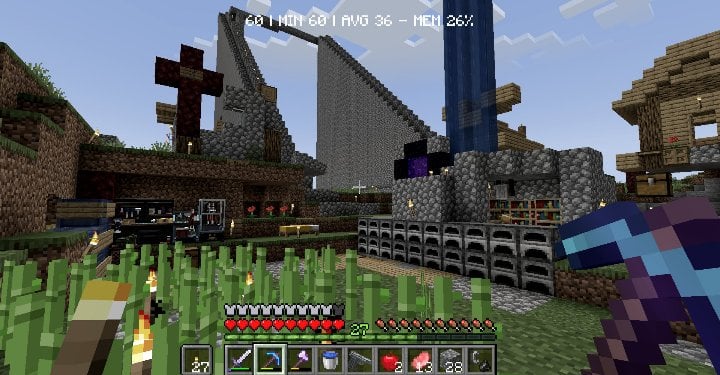
# Low Exposure Transform your Minecraft world with a moody, cinematic aesthetic inspired by underexposed photography. ## What it does This shader mod applies real-time color grading to create that classic **underexposed look** - darker tones, enhanced contrast, and desaturated colors for a more dramatic and atmospheric visual experience. The shader adjusts: - **Brightness** - Subtle darkening for richer shadows - **Contrast** - Boosted contrast for more dramatic lighting - **Saturation** - Muted colors using proper perceptual luminance calculations Perfect for players who want a more cinematic, moody atmosphere without the performance impact of complex lighting shaders. ## Features - ⚡ Lightweight post-processing shader - 🔧 Configurable settings for fine-tuning (down to the luminance perception value ) ## Requirements - **NeoForge 1.21.1** - **Veil 1.2.0** or higher (get the veil-bundled version if you don't want to install Veil) - **Fzzy Config 0.6.0** or higher ## Installation 1. Install the required dependencies listed above 2. Download and place the mod file in your `mods` folder 3. Launch the game and enjoy the new atmospheric look! ------------- > Best used with (https://modrinth.com/mod/TocuaDpt)
# Low Exposure
Transform your Minecraft world with a moody, cinematic aesthetic inspired by underexposed photography.
## What it does
This shader mod applies real-time color grading to create that classic underexposed look - darker tones, enhanced contrast, and desaturated colors for a more dramatic and atmospheric visual experience.
The shader adjusts: - Brightness - Subtle darkening for richer shadows - Contrast - Boosted contrast for more dramatic lighting - Saturation - Muted colors using proper perceptual luminance calculations
Perfect for players who want a more cinematic, moody atmosphere without the performance impact of complex lighting shaders.
## Features
- ⚡ Lightweight post-processing shader
- 🔧 Configurable settings for fine-tuning (down to the luminance perception value )
## Requirements
- NeoForge 1. 21. 1
- Veil 1. 2. 0 or higher (get the veil-bundled version if you don't want to install Veil)
- Fzzy Config 0. 6. 0 or higher
## Installation
1. Install the required dependencies listed above 2. Download and place the mod file in your `mods` folder 3. Launch the game and enjoy the new atmospheric look!
-------------
> Best used with (https://modrinth.com/mod/TocuaDpt)
📊 Mod Details
- Game
- Minecraft Mods
- Author
- ThatMG393
- Version
- 0.0.1
- Downloads
- 608
- Endorsements
- 6
- Category
- adventure
- Created
- 6/8/2025
- Updated
- 6/22/2025
- Game Versions
- 1.21.1
- Tags
- adventure, technology
🔧 How to Install Minecraft Mods Mods
Download from Modrinth. Use Prism Launcher or drop into your mods folder.
📖 Full step-by-step install guide for Minecraft Mods →
Visit the official mod page for specific installation instructions for this mod.
🎮 Need cheat codes or console commands? Check ur gaming wiki for Minecraft Mods commands, item IDs, and more.
❓ Frequently Asked Questions
Which Minecraft Mods versions does LowExposure support?
The author lists 1.21.1. Other versions may work but are untested by the author.
What is the latest version of LowExposure?
Version 0.0.1, published 2025-06-22 with 608 downloads recorded at the source.
Keep browsing — more Minecraft Mods mods await