LOTR Info
🟡 Updated this year⚠️ Install Order · 2 steps
Install in this order, then this mod last — most mods fail to load without their framework and dependencies in place.
🖼️ Gallery (5 images)


🔍 Analysis
- 🏆 #285 of 387 forge mods in this game by downloads
📋 About This Mod
# Basic Info LOTR Info is a mod for (https://modrinth.com/project/wZ92Khcg) that adds highly customizable hover tooltips to pouches, kegs, and weapons with bane progress along with a HUD for the LOTR daylight cycle and additional information on waypoints. (https://modrinth.com/project/9s6osm5g) Is required for the in-game config menu, if that’s not an option you can use the custom command config, or edit `lotrinfo-client.toml` in your .minecraft/config folder. If you’re not using the GUI you should read the config section of this description so you can understand all the options. If you find an issue that isn't in "Known Issues" at the bottom of this page, let me know and I'll try to fix it. You can make suggestions or comment bugs in my (https://docs.google.com/document/d/1S165wii04mbz03jx32HV4-MCzrGzATqyy1dFTnUemyQ/edit?usp=sharing). ## Pouch Tooltips !(https://cdn.modrinth.com/data/cached_images/7672430342e452ea5471a0fe6bfdc83e64942735.png) You can turn off or customize the colored background, and show some default lines of lore. ## Bane Tracker Tooltips !(https://cdn.modrinth.com/data/cached_images/b91a580ff7d2b4c5ee1080017512b5dc67c94abe.png) The lines are always sorted by the number of kills, but you can customize how they will look. ## Keg Tooltips !(https://cdn.modrinth.com/data/cached_images/5c5633770143c50c626f116746b66bb3baab73c7.png) You can disable the drink’s lore, or require shift (rebindable) ## Time HUD !(https://cdn.modrinth.com/data/cached_images/f7064ce0f88ac6dd7578cafad66f78a38a1f9562.png) Time left is exactly when mobs will start or stop spawning, which I tested to be 26,375-45,625 out of the 48,000 tick cycle. ## Waypoint Info !(https://cdn.modrinth.com/data/cached_images/421b036202e3229d840ba19bdf7e3d50c066af52.png) By default, the listed unlock locations require holding Shift, but every line is customizable. (the locations can be matched with an area based on the text at the bottom of the screen when hovering over it) # Keybinds - **Open Config GUI** (default: Not Bound) - **Show Hidden Tooltips** (default: Left Shift) - **Toggle HUD** (Default: Control + H) - **Toggle Mod** (Default: Not Bound) - **Hover Inside Pouches** (default: Left Control) # Commands You can use **/lotrinfo**, or **/li** for short. The config file directory is used as the command directory, so you'll see each config tab show up as an argument, with specific config options or subdirectories after. There are also hard coded options, "**all**" and "**reset**". All flattens the directory so that every option will show up after /li all. Reset allows you to reset all the options in a given category, every single option, or the keybinds from this mod. When setting the value of a config option, there are always two other options, "**help**", and "**reset**". Help will send a message in chat with the display name, description, value type, and default value. Reset will reset this specific setting to it's default value. # Features and Configuration All text editing allows the use of (https://minecraft.wiki/w/Formatting_codes), so &e is yellow. ## General Settings `general_settings` - **Enable Mod** - Toggles all mod functionality. `enable_mod` default:`true` - **Percentage Rounding** - Choose what number to round the percentage displays to, for example 0.1 rounds to tenths. `percentage_rounding` default:`0.01`, range:`0.001-100` - **Numerical Alignment** - Forces the alignment display on the HUD to always use numbers. `numerical_alignment` default:`true` ## Pouch Tooltips `pouch_display` - **Enable Pouch Tooltips** - Toggles the pouch tooltips display. `enable_pouch` default:`true` - **Hold Key for Pouch Tooltips** - Requires the "Show Hidden Tooltips" keybind to be pressed for the pouch tooltips display. `pouch_key_required` default:`false` - **Deitalicize Pouch Names** - Removes the italic styling on pouch names in tooltips and above the hotbar. `deitalicize_name` default:`true` - **Return Mouse on Release** - Resets the cursor to where it was before you pressed the "Hover Items in Pouch" key. `mouse_reset` default:`true` - **Pouch Coloring** - Color background slots based on pouch color. `pouch_coloring` default:`true` - **Default Background Color** - Hex color for the background if Pouch Coloring is off or pouch isn't dyed (#RRGGBB). `default_bg_color` default:`"#FFFFFF"` ### Lore Hiding Options (First option is to hide a line, second is to invert that when the "Show Hidden Tooltips" key is held.) - **Default Item List** -
# Basic Info LOTR Info is a mod for (https://modrinth.com/project/wZ92Khcg) that adds highly customizable hover tooltips to pouches, kegs, and weapons with bane progress along with a HUD for the LOTR daylight cycle and additional information on waypoints.
(https://modrinth.com/project/9s6osm5g) Is required for the in-game config menu, if that’s not an option you can use the custom command config, or edit `lotrinfo-client.toml` in your .minecraft/config folder. If you’re not using the GUI you should read the config section of this description so you can understand all the options.
If you find an issue that isn't in "Known Issues" at the bottom of this page, let me know and I'll try to fix it. You can make suggestions or comment bugs in my (https://docs.google.com/document/d/1S165wii04mbz03jx32HV4-MCzrGzATqyy1dFTnUemyQ/edit?usp=sharing).
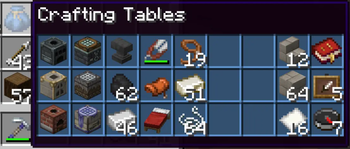
## Pouch Tooltips !(https://cdn.modrinth.com/data/cached_images/7672430342e452ea5471a0fe6bfdc83e64942735.png) You can turn off or customize the colored background, and show some default lines of lore.
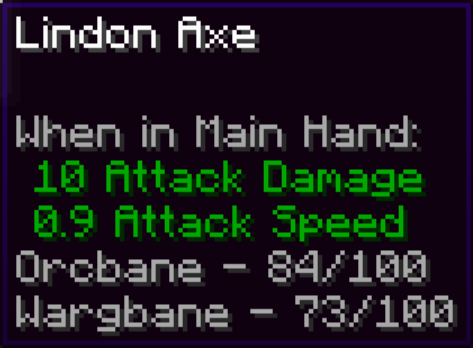
## Bane Tracker Tooltips !(https://cdn.modrinth.com/data/cached_images/b91a580ff7d2b4c5ee1080017512b5dc67c94abe.png)
The lines are always sorted by the number of kills, but you can customize how they will look.
## Keg Tooltips !(https://cdn.modrinth.com/data/cached_images/5c5633770143c50c626f116746b66bb3baab73c7.png) You can disable the drink’s lore, or require shift (rebindable)
## Time HUD !(https://cdn.modrinth.com/data/cached_images/f7064ce0f88ac6dd7578cafad66f78a38a1f9562.png)
Time left is exactly when mobs will start or stop spawning, which I tested to be 26,375-45,625 out of the 48,000 tick cycle.
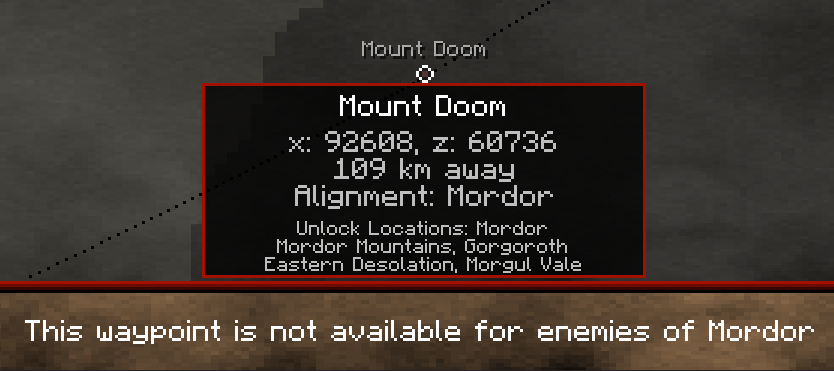
## Waypoint Info !(https://cdn.modrinth.com/data/cached_images/421b036202e3229d840ba19bdf7e3d50c066af52.png)
By default, the listed unlock locations require holding Shift, but every line is customizable. (the locations can be matched with an area based on the text at the bottom of the screen when hovering over it)
# Keybinds - Open Config GUI (default: Not Bound) - Show Hidden Tooltips (default: Left Shift) - Toggle HUD (Default: Control + H) - Toggle Mod (Default: Not Bound) - Hover Inside Pouches (default: Left Control)
# Commands You can use /lotrinfo, or /li for short. The config file directory is used as the command directory, so you'll see each config tab show up as an argument, with specific config options or subdirectories after.
There are also hard coded options, "all" and "reset". All flattens the directory so that every option will show up after /li all. Reset allows you to reset all the options in a given category, every single option, or the keybinds from this mod.
When setting the value of a config option, there are always two other options, "help", and "reset". Help will send a message in chat with the display name, description, value type, and default value. Reset will reset this specific setting to it's default value.
# Features and Configuration All text editing allows the use of (https://minecraft.wiki/w/Formatting_codes), so &e is yellow.
## General Settings `general_settings` - Enable Mod - Toggles all mod functionality. `enable_mod` default:`true` - Percentage Rounding - Choose what number to round the percentage displays to, for example 0. 1 rounds to tenths. `percentage_rounding` default:`0. 01`, range:`0. 001-100`
- Numerical Alignment - Forces the alignment display on the HUD to always use numbers. `numerical_alignment` default:`true`
## Pouch Tooltips `pouch_display` - Enable Pouch Tooltips - Toggles the pouch tooltips display. `enable_pouch` default:`true`
- Hold Key for Pouch Tooltips - Requires the "Show Hidden Tooltips" keybind to be pressed for the pouch tooltips display. `pouch_key_required` default:`false`
- Deitalicize Pouch Names - Removes the italic styling on pouch names in tooltips and above the hotbar. `deitalicize_name` default:`true`
- Return Mouse on Release - Resets the cursor to where it was before you pressed the "Hover Items in Pouch" key. `mouse_reset` default:`true`
- Pouch Coloring - Color background slots based on pouch color. `pouch_coloring` default:`true`
- Default Background Color - Hex color for the background if Pouch Coloring is off or pouch isn't dyed (#RRGGBB). `default_bg_color` default:`"#FFFFFF"`
### Lore Hiding Options (First option is to hide a line, second is to invert that when the "Show Hidden Tooltips" key is held.) - Default Item List -
📊 Mod Details
- Game
- Minecraft Mods
- Author
- Subway_Surfers
- Version
- 1.2.6
- Downloads
- 254
- Endorsements
- 2
- Category
- forge
- Created
- 5/1/2026
- Updated
- 8/23/2026
- Game Versions
- 1.16.5
- Tags
- storage, utility
🔧 How to Install Minecraft Mods Mods
Download from Modrinth. Use Prism Launcher or drop into your mods folder.
📖 Full step-by-step install guide for Minecraft Mods →
Visit the official mod page for specific installation instructions for this mod.
🎮 Need cheat codes or console commands? Check ur gaming wiki for Minecraft Mods commands, item IDs, and more.
❓ Frequently Asked Questions
Which Minecraft Mods versions does LOTR Info support?
The author lists 1.16.5. Other versions may work but are untested by the author.
What is the latest version of LOTR Info?
Version 1.2.6, published 2026-08-23 with 254 downloads recorded at the source.
Keep browsing — more Minecraft Mods mods await