Loot Explorer
🟡 Updated this year⚠️ Install Order · 2 steps
Install in this order, then this mod last — most mods fail to load without their framework and dependencies in place.
🖼️ Gallery (5 images)
🔍 Analysis
- 👍 0.1% endorsement rate
- 🏆 #837 of 940 fabric mods in this game by downloads
📋 About This Mod
Minecraft-LootExplorer =============== --------------- ## Overview The **Loot Explorer** Mod for Minecraft helps the Minecraft content developer by making containers containing loot tables appear in the creative inventory. Works in Minecraft 1.21 *Requires FabricAPI* --------------- ## Features ### Loot Chests - **Creative Inventory**: A new tab in the creative inventory with containers that have loot table nbt within them. - **Container Options**: The loot table containers include the three vanilla variants of chests, barrels, and trapped chests. - **Copy Loot Table**: With the use of the Copy Lore key bind, you can easy copy the lore of any item, allowing to copy the loot table location of the containers. - **Data Pack Compatibility**: Loot Tables that come from created data packs are also detected and created.* --------------- ## Installation 1. Download the **Loot Explorer** Mod file. 2. Ensure you have Minecraft Fabric Loader installed. 3. Place the mod file into your Minecraft `mods` folder. 4. Start Minecraft using the Fabric profile. ## Dependencies - Required: FabricAPI --------------- ## Configuration ### Mod Configuration File - There currently is no configuration file for this mod as it's fairly simple --------------- ## Usage ### Getting Containers - **Creative Inventory**: When in the creative inventory, there is now a new tab labeled Loot Tables that contains all variants of containers of each loot table found. - **Random Chests**: The chests will generate random loot based on the loot table whenever they are placed down. - **Lore Copying**: While holding a chest in your hand, press the Copy Lore keybind, and the lore of the chest will be copied into your clipboard. --------------- ## Contributions Contributions are welcome! If you have ideas for new features, optimizations, or bug fixes, please feel free to open an issue or submit a pull request on the mod's GitHub repository. *In order to detect the loot chest, the directory must be in the style of "namespace/loot_table/chests" or "namespace/loot_table/loot"
Minecraft-LootExplorer =============== ---------------
## Overview
The Loot Explorer Mod for Minecraft helps the Minecraft content developer by making containers containing loot tables appear in the creative inventory.
Works in Minecraft 1. 21
Requires FabricAPI
---------------
## Features
### Loot Chests
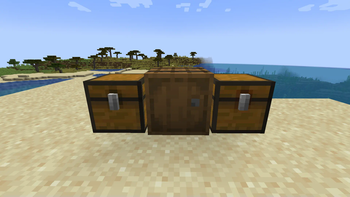
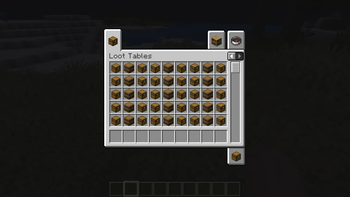
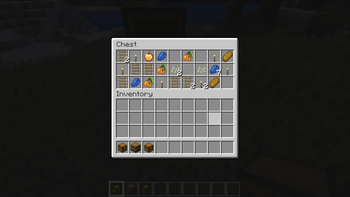
- Creative Inventory: A new tab in the creative inventory with containers that have loot table nbt within them.
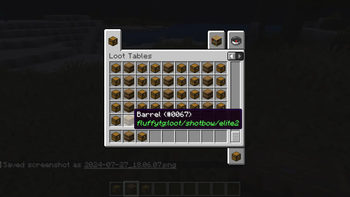
- Container Options: The loot table containers include the three vanilla variants of chests, barrels, and trapped chests.
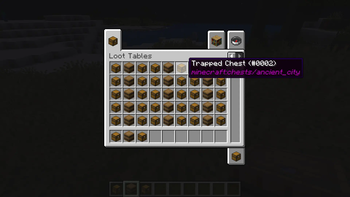
- Copy Loot Table: With the use of the Copy Lore key bind, you can easy copy the lore of any item, allowing to copy the loot table location of the containers.
- Data Pack Compatibility: Loot Tables that come from created data packs are also detected and created.
---------------
## Installation
1. Download the Loot Explorer Mod file. 2. Ensure you have Minecraft Fabric Loader installed. 3. Place the mod file into your Minecraft `mods` folder. 4. Start Minecraft using the Fabric profile.
## Dependencies - Required: FabricAPI
---------------
## Configuration
### Mod Configuration File
- There currently is no configuration file for this mod as it's fairly simple
---------------
### Getting Containers
- Creative Inventory: When in the creative inventory, there is now a new tab labeled Loot Tables that contains all variants of containers of each loot table found.
- Random Chests: The chests will generate random loot based on the loot table whenever they are placed down.
- Lore Copying: While holding a chest in your hand, press the Copy Lore keybind, and the lore of the chest will be copied into your clipboard.
---------------
## Contributions
Contributions are welcome! If you have ideas for new features, optimizations, or bug fixes, please feel free to open an issue or submit a pull request on the mod's GitHub repository.
In order to detect the loot chest, the directory must be in the style of "namespace/loot_table/chests" or "namespace/loot_table/loot"
📊 Mod Details
- Game
- Minecraft Mods
- Author
- VgLevelUp
- Version
- 1.0.1
- Downloads
- 18,165
- Endorsements
- 15
- Category
- fabric
- Created
- 7/29/2024
- Updated
- 6/30/2026
- Game Versions
- 26.1.2, 26.2
- Tags
- management, optimization, utility
🔧 How to Install Minecraft Mods Mods
Download from Modrinth. Use Prism Launcher or drop into your mods folder.
📖 Full step-by-step install guide for Minecraft Mods →
Visit the official mod page for specific installation instructions for this mod.
🎮 Need cheat codes or console commands? Check ur gaming wiki for Minecraft Mods commands, item IDs, and more.
❓ Frequently Asked Questions
Which Minecraft Mods versions does Loot Explorer support?
The author lists 26.1.2, 26.2. Other versions may work but are untested by the author.
What is the latest version of Loot Explorer?
Version 1.0.1, published 2026-06-30 with 18,165 downloads recorded at the source.
Keep browsing — more Minecraft Mods mods await