LogicLoom
🟡 Updated this year⚠️ Install Order · 2 steps
Install in this order, then this mod last — most mods fail to load without their framework and dependencies in place.
🖼️ Gallery (1 images)
🔍 Analysis
- 🏆 #776 of 909 fabric mods in this game by downloads
📋 About This Mod
# LogicLoom A Minecraft mod for creating logic circuits and computers from Verilog designs. # Tutorial ## Logic synthesis Make sure you have installed (https://yosyshq.readthedocs.io/projects/yosys/en/latest/getting_started/installation.html). First write the desired logic in Verilog 2001. Then take the Synth.ys script from this repo and add read_verilog commands to the top of the file to read your design. Run the script with >yosys Synth.ys The output JSON will be called `mc_chip_maker.json` load this file into MC using >`/logicloom load_json FILE_PATH ### Limitations Ports with Inout as direction are unsupported. The JSON file must only have one module. Only the first module is read all others are ignored. ## Setup parameters Maximum Iterations for the placement step >`/logicloom param max_iter NUMBER_HERE Size of the placement area along X and Y axis >`/logicloom param chip_size NUMBER_HERE Force initial force multiplier used during spreading cells during placement Should be a small value. Default is 0.05 >`/logicloom param force_const NUMBER_HERE Number by which to multiply the force multiplier every placement iteration Should be a small value. Default is 1.047 >`/logicloom param force_mul NUMBER_HERE When a straight wire between two point can't be run because of obstacles. A wave propagation algorithm is used. In order to sped up this algorithm a bounding box is constructed using the two points. The wave can go outside this box by a maximum of `router_max_search`. Default is 13 >`/logicloom param router_max_search NUMBER_HERE Path to the file made by Yosys >`/logicloom load_json FILE_PATH ### Fixed points Fixed points are like other cells, but they have a fixed position. They are used to move the design as needed. You will need to add at least one fixed point in order to get useful results. Currently, you can only add fixed points that are attached to every cell in the design. All ports in a design are a fixed point attached to the cells they are connected to with weights of 1. Position of fixed point is stored relative to the current starting point. If the starting point is changed after a fixed point is added the position of that fixed point in the world will change. To modify fixed points use >/logicloom fixed_points ## P&R Place the logic gates Make sure that the area is completely flat and on all ground blocks redstone wire and repeaters can be placed. >`/logicloom place Place the Wires >`/logicloom route ## Fixing bad wires Currently, the wire placing algorithm has bugs so run this command can be used to check for broken wires This command compares starting point of all wires and checks if the power is the same at all ends. If not problematic ones are printed in the chat. If there are any issues they are usually obvious. This command can find bad wires even if everything appears to behave correctly as those bad wires might not be currently affecting the output. You must wait for all signals to propagate otherwise you will get bad results. You can speed this up with /tick sprint >`/logicloom misc check_wires To make sure all wire are checked you can use this command to force all wire to be 1. Powered >`/logicloom misc force_power_wire ON 2. Unpowered >`/logicloom misc force_power_wire OFF 3. Returned to the normal state >`/logicloom misc force_power_wire Normal After running this command run the `check_wires` command. # Gallery <html lang="EN_US"> <img src="/imgs/2026-02-02_10.56.12.png" width="400" alt=""> <div></div> <img src="/imgs/2026-02-02_10.56.24.png" width="600" alt=""> </html> An 8-bit calculator that can do addition, subtraction, multiplication and division.
# LogicLoom A Minecraft mod for creating logic circuits and computers from Verilog designs.
# Tutorial ## Logic synthesis Make sure you have installed (https://yosyshq.readthedocs.io/projects/yosys/en/latest/getting_started/installation.html). First write the desired logic in Verilog 2001. Then take the Synth.ys script from this repo and add read_verilog commands to the top of the file to read your design.
Run the script with >yosys Synth.ys
The output JSON will be called `mc_chip_maker.json` load this file into MC using >`/logicloom load_json FILE_PATH
### Limitations Ports with Inout as direction are unsupported. The JSON file must only have one module. Only the first module is read all others are ignored.
## Setup parameters
Maximum Iterations for the placement step >`/logicloom param max_iter NUMBER_HERE
Size of the placement area along X and Y axis >`/logicloom param chip_size NUMBER_HERE
Force initial force multiplier used during spreading cells during placement Should be a small value. Default is 0. 05 >`/logicloom param force_const NUMBER_HERE
Number by which to multiply the force multiplier every placement iteration Should be a small value. Default is 1. 047 >`/logicloom param force_mul NUMBER_HERE
When a straight wire between two point can't be run because of obstacles. A wave propagation algorithm is used. In order to sped up this algorithm a bounding box is constructed using the two points. The wave can go outside this box by a maximum of `router_max_search`. Default is 13 >`/logicloom param router_max_search NUMBER_HERE
Path to the file made by Yosys >`/logicloom load_json FILE_PATH
### Fixed points
Fixed points are like other cells, but they have a fixed position. They are used to move the design as needed. You will need to add at least one fixed point in order to get useful results. Currently, you can only add fixed points that are attached to every cell in the design.
All ports in a design are a fixed point attached to the cells they are connected to with weights of 1.
Position of fixed point is stored relative to the current starting point. If the starting point is changed after a fixed point is added the position of that fixed point in the world will change.
To modify fixed points use >/logicloom fixed_points
## P&R Place the logic gates Make sure that the area is completely flat and on all ground blocks redstone wire and repeaters can be placed. >`/logicloom place Place the Wires >`/logicloom route
## Fixing bad wires Currently, the wire placing algorithm has bugs so run this command can be used to check for broken wires This command compares starting point of all wires and checks if the power is the same at all ends. If not problematic ones are printed in the chat. If there are any issues they are usually obvious.
This command can find bad wires even if everything appears to behave correctly as those bad wires might not be currently affecting the output. You must wait for all signals to propagate otherwise you will get bad results. You can speed this up with /tick sprint >`/logicloom misc check_wires
To make sure all wire are checked you can use this command to force all wire to be
1. Powered >`/logicloom misc force_power_wire ON
2. Unpowered >`/logicloom misc force_power_wire OFF
3. Returned to the normal state >`/logicloom misc force_power_wire Normal
After running this command run the `check_wires` command.
# Gallery

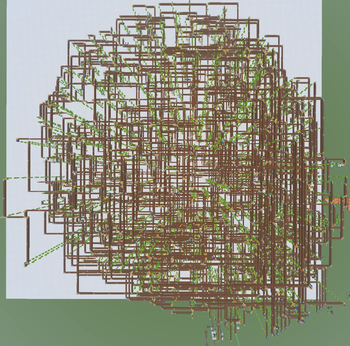
 An 8-bit calculator that can do addition, subtraction, multiplication and division.
📊 Mod Details
- Game
- Minecraft Mods
- Author
- MightyFilipns
- Version
- 26.2-1.0
- Downloads
- 248
- Endorsements
- 2
- Category
- fabric
- Created
- 3/22/2026
- Updated
- 7/2/2026
- Game Versions
- 26.2
- Tags
- utility
🔧 How to Install Minecraft Mods Mods
Download from Modrinth. Use Prism Launcher or drop into your mods folder.
📖 Full step-by-step install guide for Minecraft Mods →
Visit the official mod page for specific installation instructions for this mod.
🎮 Need cheat codes or console commands? Check ur gaming wiki for Minecraft Mods commands, item IDs, and more.
❓ Frequently Asked Questions
Which Minecraft Mods versions does LogicLoom support?
The author lists 26.2. Other versions may work but are untested by the author.
What is the latest version of LogicLoom?
Version 26.2-1.0, published 2026-07-02 with 248 downloads recorded at the source.
Keep browsing — more Minecraft Mods mods await