Locator Heads
🟡 Updated this year⚠️ Install Order · 2 steps
Install in this order, then this mod last — most mods fail to load without their framework and dependencies in place.
🖼️ Gallery (5 images)





🔍 Analysis
- 👍 0.1% endorsement rate
- 🏆 #1080 of 1284 fabric mods in this game by downloads
📋 About This Mod
<p align="center"><a href="https://haage.dev"><img src="https://cdn.modrinth.com/data/cached_images/44ff730831c4cd4353c5f7bd9c9bf809417e83d3.png" alt="Locator Heads" width="750"></a></p> <p align="center"><a href="https://modrinth.com/mod/locator-heads"><img src="https://img.shields.io/badge/Available%20on-Modrinth-00AF5C?logo=modrinth&logoColor=white"></a> <a href="https://www.curseforge.com/minecraft/mc-mods/locator-heads"><img src="https://img.shields.io/badge/Available%20on-CurseForge-F16436?logo=curseforge&logoColor=white"></a></p> --- # Locator Heads is a client-side Minecraft mod that displays nearby players as heads on your XP bar, making it easy to track their location and direction at a glance. Customize colors, borders, filtering options, and add a compass overlay to enhance your multiplayer experience. <div align="center"> <img src="https://cdn.modrinth.com/data/cached_images/47abf66f7bc76e0829011f30e4b9c8dff5534d58.png" width="700" /> <img src="https://cdn.modrinth.com/data/cached_images/a51701d2a35035a3f31e8c975dc0e482a610a801.png" width="700" /> <img src="https://cdn.modrinth.com/data/cached_images/e3308f20361463ee70042def49dfee8552781e9e.png" width="700" /> </div> --- <details> <summary><h3>⚙️ General Settings</h2></summary> - Enable/Disable Mod Chose weather or not mod is on or off. - Render Heads Choose if you want heads to be rendered (can be used to only show names) - Always show XP bar - Head Size Change the size of the heads - Show Player Names <div align="center"> | Player Name Option | Description | | -------------- | ---------------------------------------------------------------- | | **Never** | No names on the locator bar. _(default)_ | | **Always** | Names permanently visible above all player heads. | | **Looking At** | Names appear only when you look within a 30° | | **Player List**| Names show when the in-game player list is open. | <img src="https://cdn.modrinth.com/data/cached_images/47abf66f7bc76e0829011f30e4b9c8dff5534d58.png" alt="Player Heads" width="700" /> <img src="https://cdn.modrinth.com/data/cached_images/14e597f55c592e944529590ec4d4466125b02bdc.png" alt="Player Heads" width="700" /> <img src="https://cdn.modrinth.com/data/cached_images/e3308f20361463ee70042def49dfee8552781e9e.png" alt="Player Heads" width="700" /> <img src="https://cdn.modrinth.com/data/cached_images/d8d7b61b70d561e5a4e591dab57fcdd8462c3366.png" alt="Player Heads" width="700" /> </div> </details> <details> <summary><h3>🧭 Compass</h2></summary> - Show Compass Toggle the compass overlay on or off - Compass Colour Customize the color of the compass direction letters using hex color picker - Compass Shadow Toggle black outline around compass letters for better visibility <div align="center"> <img src="https://cdn.modrinth.com/data/cached_images/a51701d2a35035a3f31e8c975dc0e482a610a801.png" width="700" /> <img src="https://cdn.modrinth.com/data/cached_images/cf2357892740f9de2b682d0c76d589bf4c5d70d7.png" width="700" /> </div> </details> <details> <summary><h3>🎨 Borders</h2></summary> - Enable Border If enabled the border is on - Border Thickness How many pixels thick the border should be - Border Style Can be eithere "TEAM_COLOUR" or "STATIC_COLOUR" - Static Border Colour Choose what colour the static border will have <div align="center"> <img src="https://cdn.modrinth.com/data/cached_images/034086bbf3454d124e3b3485b9af49f3c2f167dd.png" alt="Team Borders" width="700" /> <img src="https://cdn.modrinth.com/data/cached_images/bffca3348bf2778ea64dd9b5540db6312a69a82c.png" alt="Team Borders" width="700" /> </div> </details> <details> <summary><h3>🎯 Advanced Player Filtering</h2></summary> choose who appear on your locator bar: - **All Players** _(default)_ Shows everyone. - **Include Only** Display only the players listed in your filter. - **Exclude Only** Hide only the players listed, showing all others. **Filter Syntax** - Separate names by commas (`,`), semicolons (`;`), colons (`:`), or periods (`.`). > **Example:** > ``Jeb_, Dinnerbone; LadyAgnes`` <div align="center"> <img src="https://cdn.modrinth.com/data/cached_images/b9f6657672214ebf3b27ac5d9735f28e1b34762a.png" alt="Filter" width="700" /> </div> </details> --- ## 🔗 Dependencies ### Required <a href="https://modrinth.com/mod/fabric-api"> <img src="https://cdn.modrinth.com/data/cached_images/b541ef52cf8c8e8d990ac261f745a0d405896096.png" alt="Fabric API" width="100" loading="lazy" /> </a> ### Optional (Recommended) <a href="https://modrinth.com/mod/modmenu"> <img src="https://cdn.modrinth.com/data/cached_images/14fa9c68a4448b31b3424f1eb55741b4de143348.png" alt="



# Locator Heads is a client-side Minecraft mod that displays nearby players as heads on your XP bar, making it easy to track their location and direction at a glance. Customize colors, borders, filtering options, and add a compass overlay to enhance your multiplayer experience.



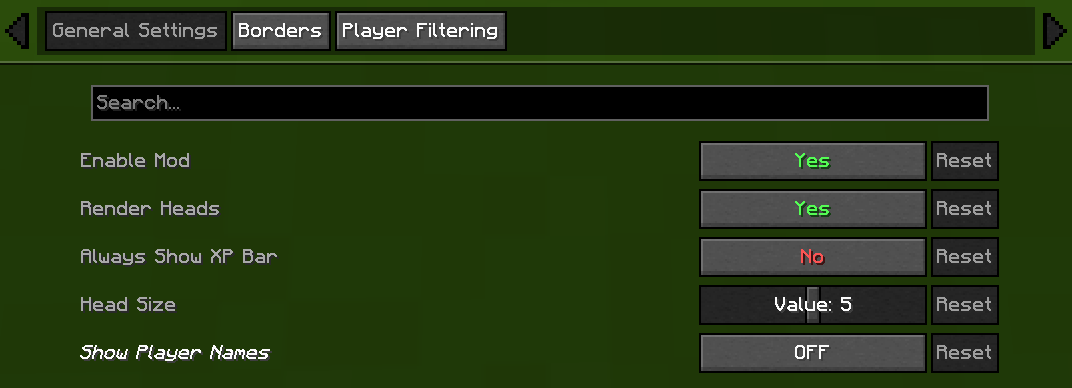
⚙️ General Settings
- Enable/Disable Mod
- Chose weather or not mod is on or off.
- Render Heads
- Choose if you want heads to be rendered (can be used to only show names)
- Always show XP bar
- Head Size
- Change the size of the heads
- Show Player Names
| Player Name Option | Description | | -------------- | ---------------------------------------------------------------- | | Never | No names on the locator bar. _(default)_ | | Always | Names permanently visible above all player heads. | | Looking At | Names appear only when you look within a 30° | | Player List| Names show when the in-game player list is open. |

🧭 Compass
- Show Compass
- Toggle the compass overlay on or off
- Compass Colour
- Customize the color of the compass direction letters using hex color picker
- Compass Shadow
- Toggle black outline around compass letters for better visibility

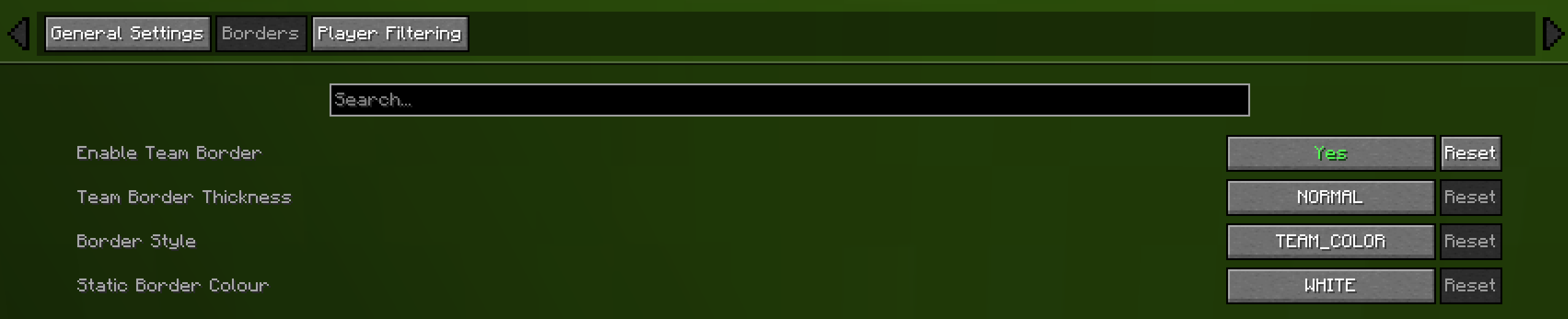
🎨 Borders
- Enable Border
- If enabled the border is on
- Border Thickness
- How many pixels thick the border should be
- Border Style
- Can be eithere "TEAM_COLOUR" or "STATIC_COLOUR"
- Static Border Colour
- Choose what colour the static border will have

🎯 Advanced Player Filtering
choose who appear on your locator bar:
- All Players _(default)_
- Shows everyone.
- Include Only
- Display only the players listed in your filter.
- Exclude Only
- Hide only the players listed, showing all others.
Filter Syntax - Separate names by commas (`,`), semicolons (`;`), colons (`:`), or periods (`.`).
> Example: > ``Jeb_, Dinnerbone; LadyAgnes``

## 🔗 Dependencies
### Required
### Optional (Recommended)
📊 Mod Details
- Game
- Minecraft Mods
- Author
- Haage
- Version
- 2.4.2
- Downloads
- 602,843
- Endorsements
- 609
- Category
- fabric
- Created
- 7/16/2025
- Updated
- 7/19/2026
- Game Versions
- 26.2
- Tags
- game-mechanics, social, utility
🔧 How to Install Minecraft Mods Mods
Download from Modrinth. Use Prism Launcher or drop into your mods folder.
📖 Full step-by-step install guide for Minecraft Mods →
Visit the official mod page for specific installation instructions for this mod.
🎮 Need cheat codes or console commands? Check ur gaming wiki for Minecraft Mods commands, item IDs, and more.
❓ Frequently Asked Questions
Which Minecraft Mods versions does Locator Heads support?
The author lists 26.2. Other versions may work but are untested by the author.
What is the latest version of Locator Heads?
Version 2.4.2, published 2026-07-19 with 602,843 downloads recorded at the source.
Keep browsing — more Minecraft Mods mods await