Local Looks
⚪ Last updated 2023⚠️ Install Order · 2 steps
Install in this order, then this mod last — most mods fail to load without their framework and dependencies in place.
🖼️ Gallery (3 images)
🔍 Analysis
- 👍 0.2% endorsement rate
- 🏆 #222 of 335 forge mods in this game by downloads
📋 About This Mod
!(https://i.imgur.com/IILlGZc.png) Local Looks is a simple mod that adds one item: The Magic Mirror. When used, this mirror opens up a GUI that allows the player to change their skin to any valid, uploaded skin. There are also additional appearance options. Included is support for transparent and high resolution player textures as well. Asides from being able to rapidly update your skin in game, the unique aspect of Local Looks is how each skin is unique to the game save in question. For example, a skin you change in one world or server will stay that way, provided the mod is installed, until it is changed or reset through the use of the mirror again. This means every minecraft save can have a different look to it! Local Looks works on the server side, meaning that servers must have the mod installed for it to work. The player's name and title will also not be changed by any update to the appearance, and any caching of the textures is done on the client side. Further more, each change of the player's appearance consumes the mirror, meaning more have to be crafted. The Magic Mirror is given to all new players by default(configurable) but additional mirrors can be crafted like so: !(https://i.imgur.com/opE96Au.png) One important limitation to note is that Local Looks only supports skins that are 1:1 height:width ratio. In other words, only skins that are in the new, square format will work properly. Also note that LocalLooks cannot "find" images on its own - if you don't link it directly to a file, it will not work! To solve this, make sure your entered URL ends with .png or other supported image extensions. If you use Mozilla Firefox or Google Chrome, an easy way to ensure this is to right-click an image and select "Copy Link". For best results, upload your skin to websites like imgur where they are secure, can be publicly accessed and are less likely to be removed. If uploading files is not your forte, you can also select a skin png or jpeg from a folder added to your minecraft directory. !(https://i.imgur.com/bagXyaS.png) Local Looks has several configs for both servers and clients, including whether to give players a mirror on startup, whether mirrors are single use, and whether transparency of skins is supported. Future updates may introduce saving recently used skins, upgraded mirrors and animated textures.
!(https://i.imgur.com/IILlGZc.png)
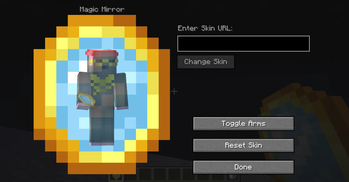
Local Looks is a simple mod that adds one item: The Magic Mirror. When used, this mirror opens up a GUI that allows the player to change their skin to any valid, uploaded skin. There are also additional appearance options. Included is support for transparent and high resolution player textures as well.
Asides from being able to rapidly update your skin in game, the unique aspect of Local Looks is how each skin is unique to the game save in question. For example, a skin you change in one world or server will stay that way, provided the mod is installed, until it is changed or reset through the use of the mirror again. This means every minecraft save can have a different look to it!
Local Looks works on the server side, meaning that servers must have the mod installed for it to work. The player's name and title will also not be changed by any update to the appearance, and any caching of the textures is done on the client side. Further more, each change of the player's appearance consumes the mirror, meaning more have to be crafted.
The Magic Mirror is given to all new players by default(configurable) but additional mirrors can be crafted like so: !(https://i.imgur.com/opE96Au.png)
One important limitation to note is that Local Looks only supports skins that are 1:1 height:width ratio. In other words, only skins that are in the new, square format will work properly. Also note that LocalLooks cannot "find" images on its own - if you don't link it directly to a file, it will not work! To solve this, make sure your entered URL ends with .png or other supported image extensions. If you use Mozilla Firefox or Google Chrome, an easy way to ensure this is to right-click an image and select "Copy Link". For best results, upload your skin to websites like imgur where they are secure, can be publicly accessed and are less likely to be removed.
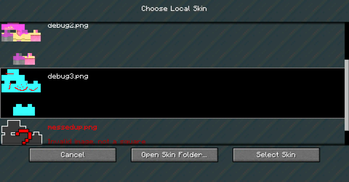
If uploading files is not your forte, you can also select a skin png or jpeg from a folder added to your minecraft directory.
!(https://i.imgur.com/bagXyaS.png)
Local Looks has several configs for both servers and clients, including whether to give players a mirror on startup, whether mirrors are single use, and whether transparency of skins is supported. Future updates may introduce saving recently used skins, upgraded mirrors and animated textures.
📊 Mod Details
- Game
- Minecraft Mods
- Author
- AlexModGuy
- Version
- 1.5.0
- Downloads
- 21,121
- Endorsements
- 35
- Category
- forge
- Created
- 11/7/2023
- Updated
- 11/4/2023
- Game Versions
- 1.20, 1.20.1
- Tags
- social, utility
🔧 How to Install Minecraft Mods Mods
Download from Modrinth. Use Prism Launcher or drop into your mods folder.
📖 Full step-by-step install guide for Minecraft Mods →
Visit the official mod page for specific installation instructions for this mod.
🎮 Need cheat codes or console commands? Check ur gaming wiki for Minecraft Mods commands, item IDs, and more.
❓ Frequently Asked Questions
Which Minecraft Mods versions does Local Looks support?
The author lists 1.20, 1.20.1. Other versions may work but are untested by the author.
What is the latest version of Local Looks?
Version 1.5.0, published 2023-11-04 with 21,121 downloads recorded at the source.
Keep browsing — more Minecraft Mods mods await