Loadstone - Chunk Loader
🟡 Updated this year⚠️ Install Order · 2 steps
Install in this order, then this mod last — most mods fail to load without their framework and dependencies in place.
🖼️ Gallery (7 images)


🔍 Analysis
- 👍 0.3% endorsement rate
- 🏆 #858 of 901 fabric mods in this game by downloads
📋 About This Mod
<!--suppress HtmlDeprecatedAttribute --> <p align="center"> <a href="https://ko-fi.com/ilyrac" target="_blank"> <img src="https://github.com/user-attachments/assets/fdc9037e-81d5-4b21-a380-277b84c61784" alt="Support Me" style="margin-bottom: 10px;"> </a> <a href="https://www.curseforge.com/members/ilyrac/projects" target="_blank"> <img src="https://i.imgur.com/rpoyjVG.png" alt="CurseForge" style="margin: 0 5px;"> </a> <a href="https://modrinth.com/user/ilyrac" target="_blank"> <img src="https://i.imgur.com/7fioiRx.png" alt="Modrinth" style="margin: 0 5px;"> </a> <a href="https://github.com/IlyRac/Loadstone" target="_blank"> <img src="https://i.imgur.com/EYNx6oL.png" alt="GitHub" style="margin: 0 5px;"> </a> </p> <hr> <h1>🧭 Loadstone – Chunk Loader (v3.0)</h1> <p>Tired of automation, machinery, or redstone contraptions stopping when you walk away?</p> <p><strong>Loadstone</strong> turns vanilla <strong>Lodestones</strong> into simple, reliable <strong>chunk loaders</strong>. By activating a Lodestone with a specific material,<strong> the targeted chunks </strong> remain continuously active so everything in range keeps running</p> <img src="https://github.com/user-attachments/assets/d2dc515d-fefd-4f9a-9175-3197e43da90f" alt="Interact" style="max-width:100%;"> <hr> <details> <summary>✨ Features</summary> <ul> <li><strong>Tiered Chunk Loading:</strong> Switch tiers anytime by using different materials. <ul> <li>⚒️ Iron → <strong>1×1</strong> chunk</li> <li>💎 Diamond → <strong>3×3</strong> chunks</li> <li>🔥 Netherite → <strong>5×5</strong> chunks</li> </ul> </li> <li><strong>Persistent Loader State:</strong> Loaders are saved securely to disk and manage chunk ticketing flawlessly across server restarts.</li> <li><strong>Smart Material System:</strong> Items are consumed on activation and safely returned on deactivation or tier swap.</li> <li><strong>Redstone Integration:</strong> Active loaders can be read by Comparators, making it easy to wire them into Redstone systems.</li> <li><strong>Visual Feedback:</strong> Unique particle effects and color tints per tier.</li> <li><strong>Real-Time HUD:</strong> Compact, configurable overlay showing loader status, tier, and chunk coverage.</li> <li><strong>Operator Commands:</strong> Powerful server administration tools to manage, audit, and force-toggle loaders instantly via commands.</li> </ul> </details> <details> <summary>🎮 How to Use & Commands</summary> <h3>Survival Activation</h3> <ol> <li>Place a <strong>Lodestone</strong> anywhere in your world.</li> <li>Hold the material for the tier: <ul> <li>⚒️ <strong>Iron Ingot</strong> → 1×1</li> <li>💎 <strong>Diamond</strong> → 3×3</li> <li>🔥 <strong>Netherite Ingot</strong> → 5×5</li> </ul> </li> <li><strong>Right-click</strong> the Lodestone to activate.</li> </ol> <h3>Deactivation / Change Tier</h3> <ul> <li>Right-click an active Lodestone with an empty hand to deactivate — the activation item is safely dropped.</li> <li>Right-click with a different valid material to change tier seamlessly (the old material is returned).</li> </ul> <h3>Redstone Output</h3> <ul> <li>Placing a <strong>Redstone Comparator</strong> facing away from a Lodestone will output a signal strength based on its running status and tier.</li> </ul> <h3>Admin / Operator Commands (Cheats On)</h3> <p>Server admins can manage active loaders globally using the following commands:</p> <ul> <li><code>/loadstone list</code> — View all active chunks globally with click-to-teleport shortcuts.</li> <li><code>/loadstone activate <x y z> <tier></code> — Remotely activate or upgrade/downgrade a vanilla Lodestone block.</li> <li><code>/loadstone deactivate <x y z></code> — Turn off a specific loader remotely.</li> <li><code>/loadstone deactivate all</code> — Clear every active loader ticket on the server instantly.</li> </ul> </details> <details> <summary>🖼️ Gallery</summary> <img style="max-width:100%; margin-bottom:10px;" alt="Hud" src="https://github.com/user-attachments/assets/2ca1e77a-19ee-4d2e-9241-10e0c641fd38" /> <img style="max-width:100%; margin-bottom:10px;" alt="Tiers" src="https://github.com/user-attachments/assets/e3c42e7c-2467-4e43-b379-2ecd425f30c0" /> <img style="max-width:100%; margin-bottom:10px;" alt="Tint" src="https://github.com/user-attachments/assets/cd9f50d5-37bf-433a-9775-d5d99bad9678" /> <img style="max-width:100%; margin-bottom:10px;" alt="Redstone" src="https://github.com/user-attachments/assets/33755e98-2a3e-486f-9c3f-2a4f766b434e" /> <img style="max-width:100%; margin-bottom:10px;" alt="ConfigScreen" src="https://github.com/user-attachments/assets/665289f5-30b1-4054-a3ac-2728291898c7" /> <img style="max-width:100%;" alt="Commands" src="https://github.com/user-attachments/assets/95


🧭 Loadstone – Chunk Loader (v3. 0)
Tired of automation, machinery, or redstone contraptions stopping when you walk away?
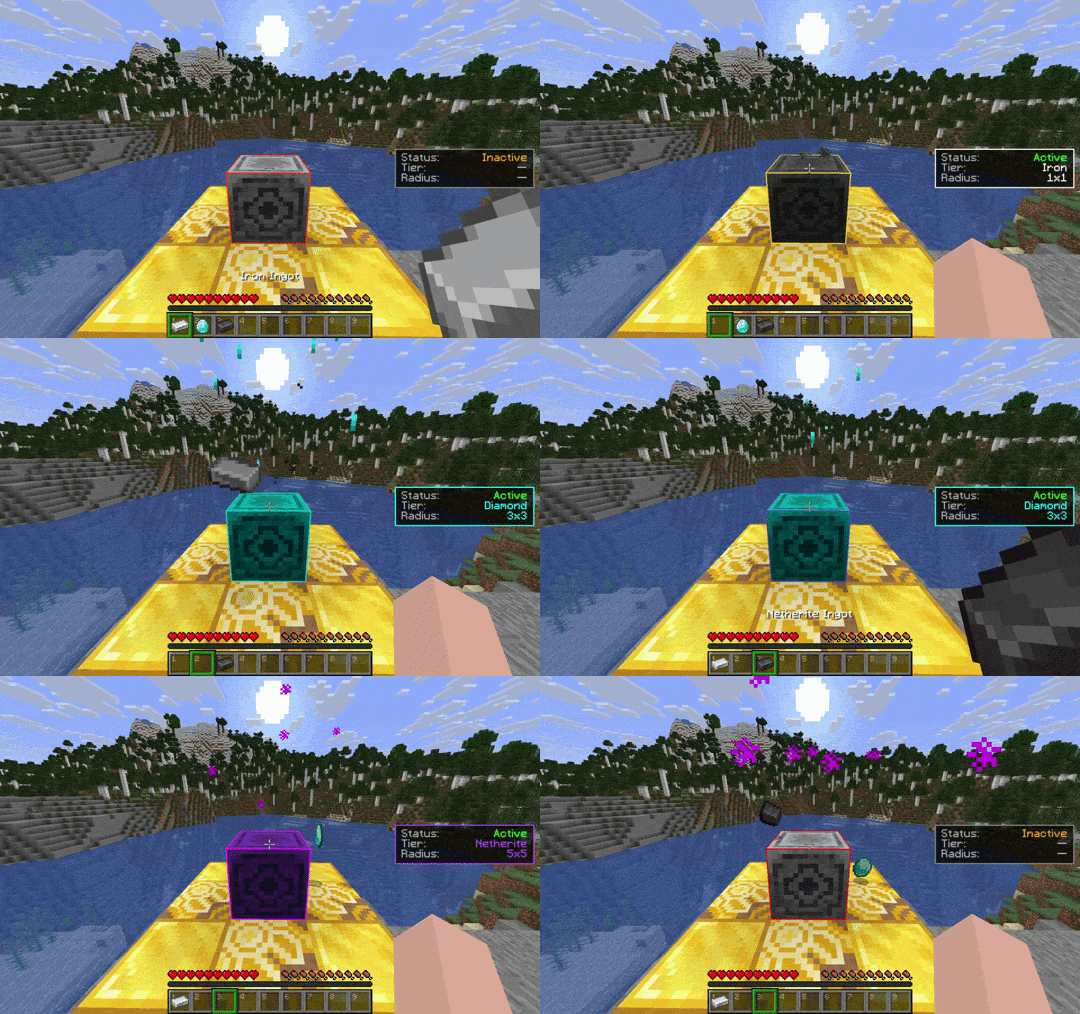
Loadstone turns vanilla Lodestones into simple, reliable chunk loaders. By activating a Lodestone with a specific material, the targeted chunks remain continuously active so everything in range keeps running
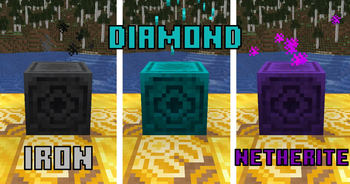
✨ Features
🎮 How to Use & Commands
Survival Activation
Deactivation / Change Tier
- Right-click an active Lodestone with an empty hand to deactivate — the activation item is safely dropped.
- Right-click with a different valid material to change tier seamlessly (the old material is returned).
Redstone Output
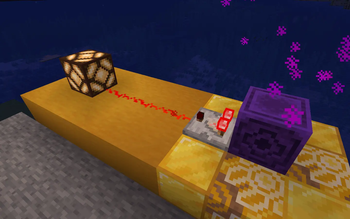
- Placing a Redstone Comparator facing away from a Lodestone will output a signal strength based on its running status and tier.
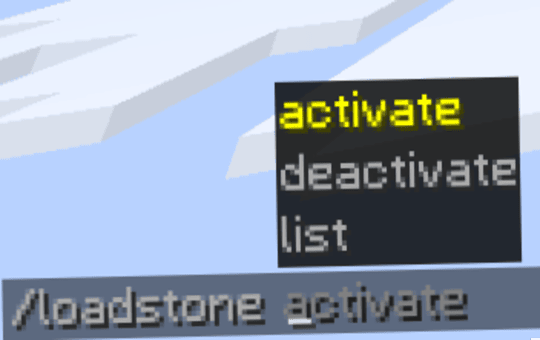
Admin / Operator Commands (Cheats On)
Server admins can manage active loaders globally using the following commands:
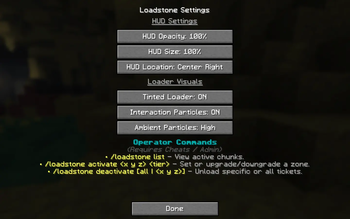
/loadstone list— View all active chunks globally with click-to-teleport shortcuts./loadstone activate <x y z> <tier>— Remotely activate or upgrade/downgrade a vanilla Lodestone block./loadstone deactivate <x y z>— Turn off a specific loader remotely./loadstone deactivate all— Clear every active loader ticket on the server instantly.
🖼️ Gallery
🤖 AI-enhanced — based on mod data
📊 Mod Details
- Game
- Minecraft Mods
- Author
- IlyRac
- Version
- 3.0
- Downloads
- 9,899
- Endorsements
- 26
- Category
- fabric
- Created
- 10/22/2025
- Updated
- 7/4/2026
- Game Versions
- 26.2
- Tags
- game-mechanics, technology, utility
🔧 How to Install Minecraft Mods Mods
Download from Modrinth. Use Prism Launcher or drop into your mods folder.
📖 Full step-by-step install guide for Minecraft Mods →
Visit the official mod page for specific installation instructions for this mod.
🎮 Need cheat codes or console commands? Check ur gaming wiki for Minecraft Mods commands, item IDs, and more.
❓ Frequently Asked Questions
Which Minecraft Mods versions does Loadstone - Chunk Loader support?
The author lists 26.2. Other versions may work but are untested by the author.
What is the latest version of Loadstone - Chunk Loader?
Version 3.0, published 2026-07-04 with 9,899 downloads recorded at the source.
Keep browsing — more Minecraft Mods mods await