LitematicaSync
🟡 Updated this year⚠️ Install Order · 2 steps
Install in this order, then this mod last — most mods fail to load without their framework and dependencies in place.
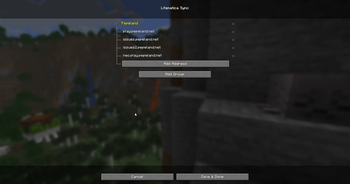
🖼️ Gallery (1 images)
🔍 Analysis
- 👍 0.9% endorsement rate
- 🏆 #540 of 894 fabric mods in this game by downloads
📋 About This Mod
<div align="center"> <h1>LitematicaSync | EN</h1> <p>A Fabric mod that synchronizes your Litematica placements and configurations across different server IPs!</p> <p><a href="https://github.com/FanyaOff/LitematicaSync/issues">If you see any bugs, please report here</a></p> </div> ## Features Do you play on servers with multiple proxy IPs (e.g., `play.pepeland.net`, `issues.pepeland.net`) and hate losing your Litematica placements when switching between them? **LitematicaSync** is here to fix that! - **IP Grouping**: Combine multiple server addresses into a single group. Litematica placements will automatically sync and show up across all IPs in that group! ## Screenshots <img width="1920" alt="image" src="https://github.com/user-attachments/assets/0c4d1434-7c0a-44de-bf3e-ed66d7e72884" /> ## How to Use 1. Install the mod along with its dependencies. 2. Launch the game and open the **ModMenu**. 3. Find **LitematicaSync** and open its settings. 4. Create a new group (e.g., "Pepeland"). 5. Add all the IP addresses used by that server (e.g., `play.pepeland.net`, `issues2.pepeland.net`). 6. Done! Placements made on one IP will now show up on the others. By default, the mod comes pre-configured with a group for **Pepeland**! # Updates --- ## 1.0.1 - Move I/O operations to another thread to prevent freeze spikes (ty solid_leader_ for the bug report) ## Dependencies To use this mod, you need the following installed: - (https://modrinth.com/mod/fabric-api) - (https://modrinth.com/mod/litematica) - (https://modrinth.com/mod/malilib) - (https://modrinth.com/mod/modmenu) _(Recommended for accessing the config)_ --- <div align="center"> <h1>LitematicaSync | RU</h1> <p>Мод, который синхронизирует ваши схемы и настройки лайтматики между разными айпишниками серверов!</p> <p><a href="https://github.com/FanyaOff/LitematicaSync/issues">При нахождении багов, просьба писать сюда</a></p> </div> ## Особенности Играете на серверах с несколькими айпи и устали терять свои схематы лайтматики при переключении между ними? **LitematicaSync** решит эту проблему! - **Группировка IP**: Объединяйте несколько адресов сервера в одну группу. Схематы лайтматики будут автоматически синхронизироваться и отображаться на всех айпишниках в этой группе! ## Скриншоты <img width="1920" alt="image" src="https://github.com/user-attachments/assets/0c4d1434-7c0a-44de-bf3e-ed66d7e72884" /> ## Как использовать 1. Установите мод и все его зависимости. 2. Запустите игру и откройте **ModMenu**. 3. Найдите **LitematicaSync** и откройте его настройки. 4. Создайте новую группу (например, "Pepeland"). 5. Добавьте все айпи адреса, которые используются на этом сервере (например, `play.pepeland.net`, `issues2.pepeland.net`). 6. Готово! Схемы, размещенные на одном айпи, теперь будут отображаться и на остальных. По умолчанию мод уже настроен для работы с серверами **Pepeland**! # Обновления --- ## 1.0.1 - Перенос операций с файлами в отдельный поток, воизбежании фриза в основном потоке игра, что давало неприятный фриз при перезаходах (спасибо solid_leader_ за репорт бага) ## Зависимости Для работы этого мода необходимо установить следующее: - (https://modrinth.com/mod/fabric-api) - (https://modrinth.com/mod/litematica) - (https://modrinth.com/mod/malilib) - (https://modrinth.com/mod/modmenu) _(Рекомендуется для быстрого доступа к настройкам)_
LitematicaSync | EN
A Fabric mod that synchronizes your Litematica placements and configurations across different server IPs!
## Features
Do you play on servers with multiple proxy IPs (e.g., `play.pepeland.net`, `issues.pepeland.net`) and hate losing your Litematica placements when switching between them? LitematicaSync is here to fix that!
- IP Grouping: Combine multiple server addresses into a single group. Litematica placements will automatically sync and show up across all IPs in that group!
## Screenshots
## How to Use
1. Install the mod along with its dependencies. 2. Launch the game and open the ModMenu. 3. Find LitematicaSync and open its settings. 4. Create a new group (e.g., "Pepeland"). 5. Add all the IP addresses used by that server (e.g., `play.pepeland.net`, `issues2.pepeland.net`). 6. Done! Placements made on one IP will now show up on the others.
By default, the mod comes pre-configured with a group for Pepeland!
# Updates --- ## 1. 0. 1 - Move I/O operations to another thread to prevent freeze spikes (ty solid_leader_ for the bug report)
## Dependencies
To use this mod, you need the following installed:
- (https://modrinth.com/mod/fabric-api)
- (https://modrinth.com/mod/litematica)
- (https://modrinth.com/mod/malilib)
- (https://modrinth.com/mod/modmenu) _(Recommended for accessing the config)_
LitematicaSync | RU
Мод, который синхронизирует ваши схемы и настройки лайтматики между разными айпишниками серверов!
## Особенности
Играете на серверах с несколькими айпи и устали терять свои схематы лайтматики при переключении между ними? LitematicaSync решит эту проблему!
- Группировка IP: Объединяйте несколько адресов сервера в одну группу. Схематы лайтматики будут автоматически синхронизироваться и отображаться на всех айпишниках в этой группе!
## Скриншоты
## Как использовать
1. Установите мод и все его зависимости. 2. Запустите игру и откройте ModMenu. 3. Найдите LitematicaSync и откройте его настройки. 4. Создайте новую группу (например, "Pepeland"). 5. Добавьте все айпи адреса, которые используются на этом сервере (например, `play.pepeland.net`, `issues2.pepeland.net`). 6. Готово! Схемы, размещенные на одном айпи, теперь будут отображаться и на остальных.
По умолчанию мод уже настроен для работы с серверами Pepeland!
# Обновления --- ## 1. 0. 1 - Перенос операций с файлами в отдельный поток, воизбежании фриза в основном потоке игра, что давало неприятный фриз при перезаходах (спасибо solid_leader_ за репорт бага)
## Зависимости
Для работы этого мода необходимо установить следующее:
- (https://modrinth.com/mod/fabric-api)
- (https://modrinth.com/mod/litematica)
- (https://modrinth.com/mod/malilib)
- (https://modrinth.com/mod/modmenu) _(Рекомендуется для быстрого доступа к настройкам)_
📊 Mod Details
- Game
- Minecraft Mods
- Author
- FanyaOff
- Version
- 1.0.1
- Downloads
- 642
- Endorsements
- 6
- Category
- fabric
- Created
- 7/16/2026
- Updated
- 7/24/2026
- Game Versions
- 26.2
- Tags
- management, utility
🔧 How to Install Minecraft Mods Mods
Download from Modrinth. Use Prism Launcher or drop into your mods folder.
📖 Full step-by-step install guide for Minecraft Mods →
Visit the official mod page for specific installation instructions for this mod.
🎮 Need cheat codes or console commands? Check ur gaming wiki for Minecraft Mods commands, item IDs, and more.
❓ Frequently Asked Questions
Which Minecraft Mods versions does LitematicaSync support?
The author lists 26.2. Other versions may work but are untested by the author.
What is the latest version of LitematicaSync?
Version 1.0.1, published 2026-07-24 with 642 downloads recorded at the source.
Keep browsing — more Minecraft Mods mods await