LitematicaMatReplace (LMR)
🟡 Updated this year⚠️ Install Order · 2 steps
Install in this order, then this mod last — most mods fail to load without their framework and dependencies in place.
🖼️ Gallery (3 images)

🔍 Analysis
- 🏆 #376 of 909 fabric mods in this game by downloads
📋 About This Mod
<div align="center"> <img src="https://cdn.modrinth.com/data/mtBqkJz8/images/a379aa0397fb2f0ac1128943c60eb3736c0812c3.png" alt="LMR Banner"> <p><strong>Replace one material everywhere in Litematica in a few clicks.</strong></p> <p> <a href="https://fabricmc.net/use/installer/"><img alt="Fabric" src="https://img.shields.io/badge/loader-Fabric-d8b57a"></a> <img alt="Minecraft 26.1 to 26.2" src="https://img.shields.io/badge/Minecraft-26.1%20%E2%86%92%2026.2-62b47a"> <a href="LICENSE"><img alt="GPL 3.0 only" src="https://img.shields.io/badge/license-GPL--3.0--only-blue"></a> </p> </div> | 🔁 Replace everywhere | 🔎 Find blocks fast | 💾 Save your way | | --- | --- | --- | | Changes the actual schematic block data. | Search by block name or ID. | Overwrite the original or export a copy. | ## See it in action ### 1. Choose a material Every material row gets a Litematica-styled **Replace** button. !(https://cdn.modrinth.com/data/cached_images/17106ff48b5aa74506d27c07693dbb89ed0a25bc_0.webp) ### 2. Find the replacement Type a name or namespaced ID and choose from rendered block previews. !(https://cdn.modrinth.com/data/cached_images/709b6b1aebb9829b2dadcbb6b251e920c3f16ef5_0.webp) ## Install 1. Install (https://fabricmc.net/use/installer/). 2. Download (https://modrinth.com/mod/litematica) and (https://modrinth.com/mod/malilib) for your exact Minecraft version. 3. Download the matching LMR jar and place all three mods in your `mods` folder. > **Supported:** Minecraft `26.1`, `26.1.1`, `26.1.2`, and `26.2` on Fabric. > LMR is client-side and does not bundle Litematica or MaLiLib. ## Use 1. Open a schematic or placement **Material List**. 2. Click **Replace** beside the material you want to change. 3. Search for and select the new block, then confirm the preview. 4. Choose **Overwrite Original** or **Export as New**. > **Tip:** Export as new if you want to keep the original schematic untouched. > Replacements use the target block's default state; NBT and orientation are > not preserved. --- GPL-3.0-only · © 2026 (https://github.com/NullKeeper-dev)

Replace one material everywhere in Litematica in a few clicks.



| 🔁 Replace everywhere | 🔎 Find blocks fast | 💾 Save your way | | --- | --- | --- | | Changes the actual schematic block data. | Search by block name or ID. | Overwrite the original or export a copy. |
## See it in action
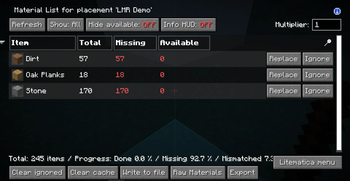
### 1. Choose a material
Every material row gets a Litematica-styled Replace button.
!(https://cdn.modrinth.com/data/cached_images/17106ff48b5aa74506d27c07693dbb89ed0a25bc_0.webp)
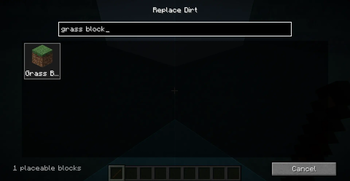
### 2. Find the replacement
Type a name or namespaced ID and choose from rendered block previews.
!(https://cdn.modrinth.com/data/cached_images/709b6b1aebb9829b2dadcbb6b251e920c3f16ef5_0.webp)
1. Install (https://fabricmc.net/use/installer/). 2. Download (https://modrinth.com/mod/litematica) and (https://modrinth.com/mod/malilib) for your exact Minecraft version. 3. Download the matching LMR jar and place all three mods in your `mods` folder.
> Supported: Minecraft `26. 1`, `26. 1. 1`, `26. 1. 2`, and `26. 2` on Fabric. > LMR is client-side and does not bundle Litematica or MaLiLib.
1. Open a schematic or placement Material List. 2. Click Replace beside the material you want to change. 3. Search for and select the new block, then confirm the preview. 4. Choose Overwrite Original or Export as New.
> Tip: Export as new if you want to keep the original schematic untouched. > Replacements use the target block's default state; NBT and orientation are > not preserved.
GPL-3. 0-only · © 2026 (https://github.com/NullKeeper-dev)
📊 Mod Details
- Game
- Minecraft Mods
- Author
- NullKeeper
- Version
- 0.1.0
- Downloads
- 274
- Endorsements
- 4
- Category
- fabric
- Created
- 8/10/2026
- Updated
- 7/28/2026
- Game Versions
- 26.2
- Tags
- utility
🔧 How to Install Minecraft Mods Mods
Download from Modrinth. Use Prism Launcher or drop into your mods folder.
📖 Full step-by-step install guide for Minecraft Mods →
Visit the official mod page for specific installation instructions for this mod.
🎮 Need cheat codes or console commands? Check ur gaming wiki for Minecraft Mods commands, item IDs, and more.
❓ Frequently Asked Questions
Which Minecraft Mods versions does LitematicaMatReplace (LMR) support?
The author lists 26.2. Other versions may work but are untested by the author.
What is the latest version of LitematicaMatReplace (LMR)?
Version 0.1.0, published 2026-07-28 with 274 downloads recorded at the source.
Keep browsing — more Minecraft Mods mods await