Litematica
🟢 Updated this month⚠️ Install Order · 2 steps
Install in this order, then this mod last — most mods fail to load without their framework and dependencies in place.
🖼️ Gallery (4 images)
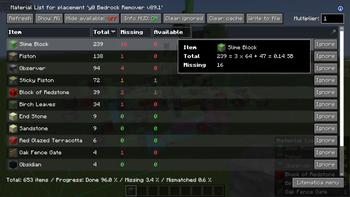
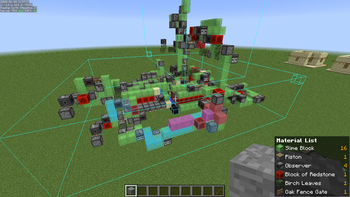
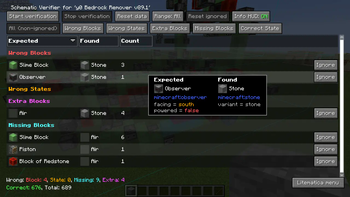
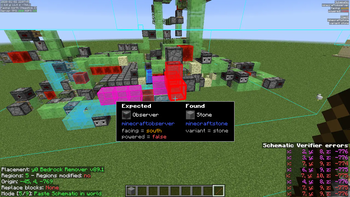
🔍 Analysis
- 👍 0.0% endorsement rate
- 🏆 #79 of 1284 fabric mods in this game by downloads
📋 About This Mod
A client-side schematic mod with extra features for creative mode work
## Description
Litematica is a modern schematic mod primarily targeting light mod loaders like LiteLoader on MC 1. 12.x, Rift on MC 1. 13.x and Fabric on MC 1. 14+.
There is also a Forge version, but currently only for MC 1. 12. 2. For later MC versions there are currently only third party ports such as (https://modrinth.com/mod/forgematica).
Litematica has all the main features (plus a bunch more) of the old (https://legacy.curseforge.com/minecraft/mc-mods/schematica) mod, except for the printer, which is not planned for Litematica itself, but instead is left to extension mods (see: (https://modrinth.com/mod/litematica-printer-easyplace-extension) or (https://modrinth.com/mod/litematica-printer)).
## Compatibility with shaders
Litematica's rendering doesn't currently work properly with shaders (even with Iris) in 1. 21. 3+. So when you need to use Litematica (schematic rendering), disable shaders.
In older MC versions the rendering works better with shaders, at least with Iris, but also depending on the shader pack. Some shader packs break the rendering pretty badly, but some used to work pretty nicely. Optifine in general is/was a lot more problematic, pretty much you can't use shaders at all with Optifine if you use Litematica. The general recommendation is to use Sodium (and Iris) instead of Optifine.
The default hotkey to open the Litematica main menu is `M`.
Other common default hotkeys:
- `M + C` - The direct hotkey to open the config menu
- `M + R` - Toggle ON/OFF ALL rendering from Litematica
- `M + G` - Toggle ON/OFF just schematic rendering ("ghost blocks" - all HUDs for example will still render)
- `M + T` - Toggle ON/OFF the "tool item" (which is by default a stick) functionality
- `M + P` - Directly open the Schematic Placements menu/list
- `M + V` - Open the Schematic Verifier menu
- `Numpad minus` - Open the placement configuration menu for the currently selected placement
- `Numpad multiply` - Open the Area Editor menu
- `Page Up/Down` - Change the selected layer in the render layers settings
- `M + Page Up/Down` - Change the render layers mode
- `Ctrl + scroll` (holding the tool) - Cycle the "tool mode" (there is also a button for this in the lower left corner of the main menu)
- `Alt + scroll` (holding the tool) - Nudge/move the selected placement or area selection box or corner (depending on the tool mode) in the direction the player is looking at
- `Ctrl + M` - Toggle or cycle the "sub-mode" or main setting of some of the "tool modes", such as `pasteReplaceBehavior` in Paste mode, the `Corners` vs. `Expand` behavior in Area Selection mode, or the `Area` vs. `Placement` behavior of the Delete mode
## Warning for multiplayer
The Easy Place mode feature may get you banned on some servers!
The Easy Place feature will always be clicking on the target position's air block, and this can easily be detected by anti-cheat systems. So this can result in at least two things: The block placement will just be rejected and you just get client-side ghost blocks, or some anti-cheat system flags that as cheating and auto-bans you from the server. So before using Easy Place, find out of it's allowed on the server!
## If you have Optifine...
In general I don't recommend using Optifine (with Litematica, or otherwise) due to the various rendering issues it causes. Instead I would recommend using Sodium and/or Iris if you want shaders.
If you have Optifine installed, then there are some options that you most likely will need to disable in Optifine, or otherwise it will break the schematic rendering:
- If you get glitchy weird triangles, then in 1. 16+ first try updating to the latest Litematica version. If that doesn't work, then set shaders to `OFF` (not `Internal`) and restart the game.
- `Render Regions` probably needs to be disabled to prevent weird rendering issues (the schematic partially rendering in weird places)
- `Fast Render` might also need to be disabled if there are still some weird HUD/GUI rendering issues
## Documentation
There is a (https://github.com/maruohon/litematica/wiki). The wiki is still being worked on, and it will probably have a new address at some point (or rather there will be a new wiki in a new location with a lot more coverage).
### Other/older documentation and explanations, some FAQ answers
Here is a Reddit post that explains the very basics of the mod: - https://old.reddit.com/r/Minecraft/comments/cqdmkk/anyone_can_help_me_how_do_i_make_schematics_with/exeug78/
Litematica - Easy Place support on servers - https://old.reddit.com/r/litematica/comments/1c7j79l/easy_place_on_server/l0hzmkt/
Misc explanations on Reddit or my Discord server
Schematic format conversion
📊 Mod Details
- Game
- Minecraft Mods
- Author
- masa
- Version
- 26.2
- Downloads
- 23,674,993
- Endorsements
- 8,172
- Category
- fabric
- Created
- 7/23/2024
- Updated
- 8/29/2026
- Game Versions
- 26.2
- Tags
- utility
🔗 Required By 2 Mods
These mods list this mod as a dependency.
🔧 How to Install Minecraft Mods Mods
Download from Modrinth. Use Prism Launcher or drop into your mods folder.
📖 Full step-by-step install guide for Minecraft Mods →
Visit the official mod page for specific installation instructions for this mod.
🎮 Need cheat codes or console commands? Check ur gaming wiki for Minecraft Mods commands, item IDs, and more.
❓ Frequently Asked Questions
Which Minecraft Mods versions does Litematica support?
The author lists 26.2. Other versions may work but are untested by the author.
What is the latest version of Litematica?
Version 26.2, published 2026-08-29 with 23.7M downloads recorded at the source.
Keep browsing — more Minecraft Mods mods await