LiquidSource
🟡 Updated this year⚠️ Install Order · 2 steps
Install in this order, then this mod last — most mods fail to load without their framework and dependencies in place.
🖼️ Gallery (2 images)
🔍 Analysis
- 🏆 #226 of 909 fabric mods in this game by downloads
📋 About This Mod
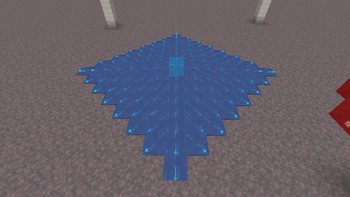
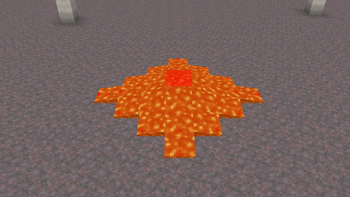
# LiquidSource A Minecraft (Fabric) client mod that highlights water and lava source blocks. ## Requirements - **Minecraft**: 26.1 - 26.2 - **Fabric Loader**: 0.19.2 or newer - **Fabric API**: 0.152.1+26.1.2 or newer - (https://modrinth.com/mod/modmenu) - (https://modrinth.com/mod/cloth-config) ## Features - **Water & Lava Source Highlighting**: Visualizes water and lava source blocks. Offers three rendering modes: *Fill*, *Outline*, or *Fill + Outline*, with configurable colors (via ARGB hex values). - **Liquid Flow Direction Arrows**: Renders 3D arrows indicating the flow direction of non-source liquids. Arrow color and scale (10% to 200%) are fully customizable. - **Bucket Pickup Indicator**: Shows a convenient green checkmark HUD indicator (`✔`) next to your crosshair when you are holding a bucket and targeting a liquid block that can be picked up. - **Quick Display Toggle Key**: Easily enable or disable the mod's overlay at any time using a customizable hotkey (unassigned by default). Toggling displays a temporary notification above the hotbar. ## Screenshots ### Water source blocks !(https://github.com/keeniGithub/LiquidSource/raw/master/image/water.png) ### Lava source blocks !(https://github.com/keeniGithub/LiquidSource/raw/master/image/lava.png) ## Configuration Install **Mod Menu**, open it from the pause or title screen, find **LiquidSource**, and click the config button. The color value is entered as an ARGB hex string: !(https://github.com/keeniGithub/LiquidSource/raw/master/image/color_input.png) - The first **2 characters** are the transparency (alpha channel). - The remaining **6 characters** are the hex color value.
# LiquidSource
A Minecraft (Fabric) client mod that highlights water and lava source blocks.
## Requirements
- Minecraft: 26. 1 - 26. 2
- Fabric Loader: 0. 19. 2 or newer
- Fabric API: 0. 152. 1+26. 1. 2 or newer
- [Mod Menu](https://modrinth.com/mod/modmenu)
- [Cloth Config API](https://modrinth.com/mod/cloth-config)
## Features
- Water & Lava Source Highlighting: Visualizes water and lava source blocks. Offers three rendering modes: Fill, Outline, or Fill + Outline, with configurable colors (via ARGB hex values).
- Liquid Flow Direction Arrows: Renders 3D arrows indicating the flow direction of non-source liquids. Arrow color and scale (10% to 200%) are fully customizable.
- Bucket Pickup Indicator: Shows a convenient green checkmark HUD indicator (`✔`) next to your crosshair when you are holding a bucket and targeting a liquid block that can be picked up.
- Quick Display Toggle Key: Easily enable or disable the mod's overlay at any time using a customizable hotkey (unassigned by default). Toggling displays a temporary notification above the hotbar.
## Screenshots
### Water source blocks
!(https://github.com/keeniGithub/LiquidSource/raw/master/image/water.png)
### Lava source blocks
!(https://github.com/keeniGithub/LiquidSource/raw/master/image/lava.png)
## Configuration
Install Mod Menu, open it from the pause or title screen, find LiquidSource, and click the config button.
The color value is entered as an ARGB hex string:
!(https://github.com/keeniGithub/LiquidSource/raw/master/image/color_input.png)
- The first 2 characters are the transparency (alpha channel).
- The remaining 6 characters are the hex color value.
📊 Mod Details
- Game
- Minecraft Mods
- Author
- kenyka
- Version
- 1.2.0
- Downloads
- 284
- Endorsements
- 1
- Category
- fabric
- Created
- 7/3/2026
- Updated
- 7/16/2026
- Game Versions
- 26.1, 26.1.1, 26.1.2, 26.2
- Tags
- utility
🔧 How to Install Minecraft Mods Mods
Download from Modrinth. Use Prism Launcher or drop into your mods folder.
📖 Full step-by-step install guide for Minecraft Mods →
Visit the official mod page for specific installation instructions for this mod.
🎮 Need cheat codes or console commands? Check ur gaming wiki for Minecraft Mods commands, item IDs, and more.
❓ Frequently Asked Questions
Which Minecraft Mods versions does LiquidSource support?
The author lists 26.1, 26.1.1, 26.1.2, 26.2. Other versions may work but are untested by the author.
What is the latest version of LiquidSource?
Version 1.2.0, published 2026-07-16 with 284 downloads recorded at the source.
Keep browsing — more Minecraft Mods mods await