Lidar
⚪ Last updated 2023⚠️ Install Order · 2 steps
Install in this order, then this mod last — most mods fail to load without their framework and dependencies in place.
🖼️ Gallery (1 images)
🔍 Analysis
- 👍 2.0% endorsement rate — high engagement, a strong quality signal
- 🏆 #99 of 162 cursed mods in this game by downloads
📋 About This Mod
!(https://gitlab.com/horrific-tweaks/lidar/-/raw/main/.images/2023-02-09_21. 09. 38.png)
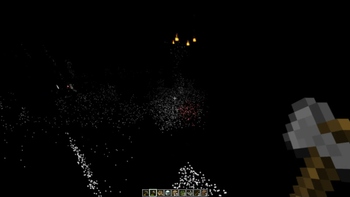
LIDAR is a mod that dramatically transforms Minecraft's visibility into an environment of dots and particles projected from the player onto surfaces around them. This makes the game super difficult to play! And also pretty spooky.
This mod is inspired from the game ["Lidar.exe" by KenForest](https://kenforest.itch.io/lidar-exe) - if you enjoy this mod, be sure to check out the original game!
This mod additionally customizes the in-game music - most of the included tracks can be found at (https://soundcloud.com/fennifith) or (https://fennifith.bandcamp.com) :)
## Configuration
For now, the mod's configuration can be edited manually in `config/lidar-lidarconfig.json`. Be aware that invalid values in this file can crash the game. An in-game config menu should be added to address this in a future update.
```json { // whether the mod rendering is enabled "isActive": true, // a mapping of block identifier -> particle color "blockColorMap": { "default": "#FFFFFF", "minecraft:water": "#0000FF", "minecraft:seagrass": "#0000FF" }, // a mapping of entity identifier -> particle color "entityColorMap": { "default": "#ff7e7e", "peaceful": "#61cf66", "hostile": "#ff7e7e", "minecraft:enderman": "#7e009e", "minecraft:creeper": "#008f07" }, // entities that are excluded from the particle system, and should be rendered normally "entityRender": [ "minecraft:item", "minecraft:item_frame", "minecraft:glow_item_frame", // if you remove the ender dragon from this list, it will actually crash the game when it renders - so don't do this :) "minecraft:ender_dragon" ], // whether particles should follow entities as they move (looks super cheesy, turned off by default) "entityParticleFollow": false, // if enabled, particles project onto entity models more accurately, at the cost of performance "entityParticleModel": true, // if enabled, particles from other entities will render on the current player (blocks the player's view, turned off by default) "entityParticlesOnSelf": false, // amount of lidar projections created by non-player entities, per tick "entityLidarCount": 20, // distance (blocks) that lidar particles should be cast "lidarDistance": 10. 0, // radius/spread of particles, in degrees "lidarSpread": 30. 0, // amount of lidar projections created for player entities, per tick "lidarCount": 100, // amount of ticks that particles cast onto blocks should remain "lidarDurationBlock": 100, // amount of ticks that particles cast onto entities should remain "lidarDurationEntity": 20, // whether a bloom effect should be rendered for the lidar particles "lidarBloom": true } ```
#### Keybinds
This mod has one keybind to toggle between particle/normal rendering modes, which is bound to `K` by default. You can change this in "options > controls > key binds".
### Mod Compatibility
This mod is likely incompatible with most other fabric mods due to how it modifies the rendering logic. It is known to be incompatible with Sodium/Iris/etc. Use at your own risk.
```plaintext Copyright (c) 2023 James Fenn
This Source Code Form is subject to the terms of the Mozilla Public License, v. 2. 0. If a copy of the MPL was not distributed with this file, You can obtain one at https://mozilla.org/MPL/2. 0/. ```
📊 Mod Details
- Game
- Minecraft Mods
- Author
- fennifith
- Version
- 1.0.1
- Downloads
- 2,370
- Endorsements
- 48
- Category
- cursed
- Created
- 2/12/2023
- Updated
- 2/17/2023
- Game Versions
- 1.19
- Tags
- cursed, decoration, utility
🔧 How to Install Minecraft Mods Mods
Download from Modrinth. Use Prism Launcher or drop into your mods folder.
📖 Full step-by-step install guide for Minecraft Mods →
Visit the official mod page for specific installation instructions for this mod.
🎮 Need cheat codes or console commands? Check ur gaming wiki for Minecraft Mods commands, item IDs, and more.
❓ Frequently Asked Questions
Which Minecraft Mods versions does Lidar support?
The author lists 1.19. Other versions may work but are untested by the author.
What is the latest version of Lidar?
Version 1.0.1, published 2023-02-17 with 2,370 downloads recorded at the source.
Keep browsing — more Minecraft Mods mods await