lazyboost-render
🟡 Updated this year⚠️ Install Order · 2 steps
Install in this order, then this mod last — most mods fail to load without their framework and dependencies in place.
🖼️ Gallery (2 images)

🔍 Analysis
- 👍 0.1% endorsement rate
- 🏆 #858 of 940 fabric mods in this game by downloads
📋 About This Mod
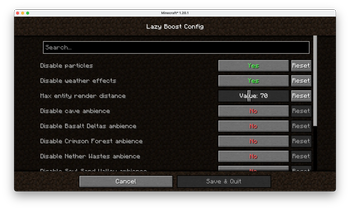
# LazyBoost LazyBoost is a Minecraft Fabric mod that boosts client rendering performance and provides many configurable visual and audio options for a smoother gameplay experience. # This mod requred modmenu, if not, you may not open the configure menu ## Features - **easier hand toggle** Use that toggle to easier toggle render hand. - **toggle gamma (brightness)** Easy to get more brightness, easy to take pictures. - **simple entity render** If the entity is out of config entity render distance and also in vanilla entity distance, the mod will use a red box to render it. - **Auto FPS Reduction** Automatically lowers FPS limit to 12 when Minecraft window is unfocused or minimized, saving system resources. - **ModMenu Integration** All options can be configured in-game via ModMenu or the config file. ## Installation 1. Download the latest release from (https://modrinth.com/mod/lazyboost-render). 2. Place the downloaded `.jar` file into your Minecraft `mods` folder. 3. Make sure you have installed Fabric Loader and Fabric API. 4. (Optional) Install ModMenu for in-game configuration. ## Configuration - Press the LazyBoost key (configurable in Controls) to open the configuration GUI. - You can also use ModMenu to access the config screen. - All options are saved in the config file and take effect immediately. !(https://cdn.modrinth.com/data/Ndcg0epd/images/1f6070b9e2f92872d72087d41bf71d58be4e5c1d_350.webp) ## License Licensed under the Apache License 2.0. See (https://www.apache.org/licenses/LICENSE-2.0) for details.
# LazyBoost
LazyBoost is a Minecraft Fabric mod that boosts client rendering performance and provides many configurable visual and audio options for a smoother gameplay experience.
# This mod requred modmenu, if not, you may not open the configure menu
## Features - easier hand toggle Use that toggle to easier toggle render hand.
- toggle gamma (brightness)
- Easy to get more brightness, easy to take pictures.
- simple entity render
- If the entity is out of config entity render distance and also in vanilla entity distance, the mod will use a red box to render it.
- Auto FPS Reduction
- Automatically lowers FPS limit to 12 when Minecraft window is unfocused or minimized, saving system resources.
- ModMenu Integration
- All options can be configured in-game via ModMenu or the config file.
## Installation
1. Download the latest release from (https://modrinth.com/mod/lazyboost-render). 2. Place the downloaded `.jar` file into your Minecraft `mods` folder. 3. Make sure you have installed Fabric Loader and Fabric API. 4. (Optional) Install ModMenu for in-game configuration.
## Configuration
- Press the LazyBoost key (configurable in Controls) to open the configuration GUI.
- You can also use ModMenu to access the config screen.
- All options are saved in the config file and take effect immediately.

Licensed under the Apache License 2. 0. See (https://www.apache.org/licenses/LICENSE-2. 0) for details.
📊 Mod Details
- Game
- Minecraft Mods
- Author
- zhengzhengyiyi
- Version
- 1.0.5-beta.1-1.21.11
- Downloads
- 17,939
- Endorsements
- 17
- Category
- fabric
- Created
- 8/21/2025
- Updated
- 4/19/2026
- Game Versions
- 1.21.11
- Tags
- game-mechanics, optimization, utility
🔧 How to Install Minecraft Mods Mods
Download from Modrinth. Use Prism Launcher or drop into your mods folder.
📖 Full step-by-step install guide for Minecraft Mods →
Visit the official mod page for specific installation instructions for this mod.
🎮 Need cheat codes or console commands? Check ur gaming wiki for Minecraft Mods commands, item IDs, and more.
❓ Frequently Asked Questions
Which Minecraft Mods versions does lazyboost-render support?
The author lists 1.21.11. Other versions may work but are untested by the author.
What is the latest version of lazyboost-render?
Version 1.0.5-beta.1-1.21.11, published 2026-04-19 with 17,939 downloads recorded at the source.
Keep browsing — more Minecraft Mods mods await