Lani Client
🟡 Updated this year⚠️ Install Order · 2 steps
Install in this order, then this mod last — most mods fail to load without their framework and dependencies in place.
🖼️ Gallery (5 images)
🔍 Analysis
- 👍 0.1% endorsement rate
- 🏆 #575 of 874 fabric mods in this game by downloads
📋 About This Mod
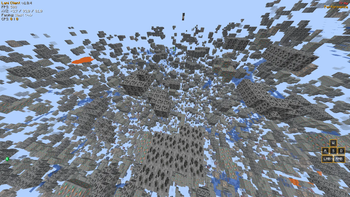
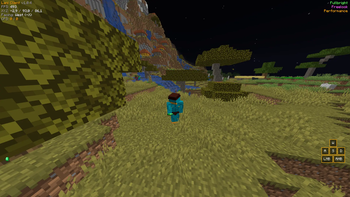
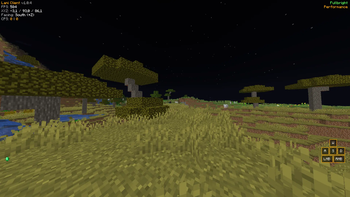
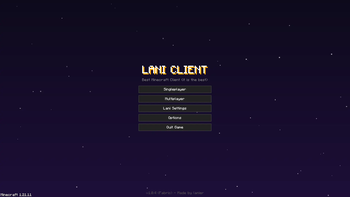
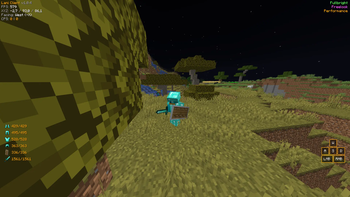
# Lani Client Lani Client is a lightweight, all-in-one utility mod built for Fabric. It aims to provide essential PvP features, visual enhancements, and quality-of-life improvements without the bloat of heavy modpacks. Whether you are playing survival or competitive multiplayer, Lani Client has everything you need. ## Features ### PvP & Utilities * **PvP Mode:** One-click optimization to disable camera shaking (distortion/FOV effects) for a stable combat experience. * **Keystrokes & Armor Status:** Fully customizable HUD to see your movement keys, mouse clicks, and armor durability at a glance. * **Toggle Sprint:** Never hold your sprint key again. * **CPS Counter:** Live Left-Click and Right-Click tracking. ### Visuals & Camera * **360° Freelook:** Look around your character smoothly without changing your movement direction (Orbit camera)(Doesn't work on servers without opt-in). * **Zoom:** Smooth, OptiFine-style zooming to see far distances. * **Fullbright:** See perfectly in the darkest caves without torches. * **Xray:** Find ores easily (Doesn't work on servers without opt-in). ### Customization & QoL * **HUD Editor:** A modern drag-and-drop system to position your HUD elements anywhere on the screen! * **Theme Colors:** Choose between 7 different UI colors (Aqua, Red, Green, Yellow, White, Gold, Light Purple) to match your style. * **Performance Mode:** Instantly applies optimized graphical settings for a quick FPS boost. Reverts back to your original settings when disabled. * **Clean Main Menu:** A redesigned, sleek main menu with easy access to all Lani Settings. ## How to Use Press **`Right Shift`** in-game to open the **ClickGUI**, where you can toggle all modules. You can also access the **Lani Settings** directly from the Main Menu to change HUD positions, theme colors, and zoom multipliers. ## Thanks for your supports.
# Lani Client Lani Client is a lightweight, all-in-one utility mod built for Fabric. It aims to provide essential PvP features, visual enhancements, and quality-of-life improvements without the bloat of heavy modpacks. Whether you are playing survival or competitive multiplayer, Lani Client has everything you need. ## Features ### PvP & Utilities PvP Mode: One-click optimization to disable camera shaking (distortion/FOV effects) for a stable combat experience. Keystrokes & Armor Status: Fully customizable HUD to see your movement keys, mouse clicks, and armor durability at a glance. Toggle Sprint: Never hold your sprint key again. CPS Counter: Live Left-Click and Right-Click tracking. ### Visuals & Camera 360° Freelook: Look around your character smoothly without changing your movement direction (Orbit camera)(Doesn't work on servers without opt-in). Zoom: Smooth, OptiFine-style zooming to see far distances. Fullbright: See perfectly in the darkest caves without torches. Xray: Find ores easily (Doesn't work on servers without opt-in). ### Customization & QoL HUD Editor: A modern drag-and-drop system to position your HUD elements anywhere on the screen! Theme Colors: Choose between 7 different UI colors (Aqua, Red, Green, Yellow, White, Gold, Light Purple) to match your style. Performance Mode: Instantly applies optimized graphical settings for a quick FPS boost. Reverts back to your original settings when disabled. Clean Main Menu: A redesigned, sleek main menu with easy access to all Lani Settings. ## How to Use Press `Right Shift` in-game to open the ClickGUI, where you can toggle all modules. You can also access the Lani Settings directly from the Main Menu to change HUD positions, theme colors, and zoom multipliers. ## Thanks for your supports.
📊 Mod Details
- Game
- Minecraft Mods
- Author
- lanier
- Version
- 1.0.0
- Downloads
- 1,749
- Endorsements
- 1
- Category
- fabric
- Created
- 7/30/2026
- Updated
- 7/11/2026
- Game Versions
- 1.21.11
- Tags
- utility
🔧 How to Install Minecraft Mods Mods
Download from Modrinth. Use Prism Launcher or drop into your mods folder.
📖 Full step-by-step install guide for Minecraft Mods →
Visit the official mod page for specific installation instructions for this mod.
🎮 Need cheat codes or console commands? Check ur gaming wiki for Minecraft Mods commands, item IDs, and more.
❓ Frequently Asked Questions
Which Minecraft Mods versions does Lani Client support?
The author lists 1.21.11. Other versions may work but are untested by the author.
What is the latest version of Lani Client?
Version 1.0.0, published 2026-07-11 with 1,749 downloads recorded at the source.
Keep browsing — more Minecraft Mods mods await