Labelling Containers
🟡 Updated this year⚠️ Install Order · 2 steps
Install in this order, then this mod last — most mods fail to load without their framework and dependencies in place.
🖼️ Gallery (5 images)

🔍 Analysis
- 👍 0.2% endorsement rate
- 🏆 #71 of 983 fabric mods in this game by downloads
📋 About This Mod
<br/><br/><img src="https://cdn.modrinth.com/data/b2T42hfY/images/cc27b05693aa6dae46db0000dd8506a6f09af542.png" /> <br/><br/><br/> > ### A mod that makes easy labelling *chests*, *shulker boxes*, *barrels* and other containers without the use of signs. <br/><br/> Check out my (https://discord.gg/34A6fRAgyM) to suggest features and add compatibility with other mods!<br/> # How to use This mod adds a **Label printer** which is an item that can set a label and an icon to a container. !(https://cdn.modrinth.com/data/b2T42hfY/images/b181c7a15b26931249f4b2e23eec84110416de0b.png) ## Printing labels: To use the **Label Printer**, _right-click_ while holding it, and it'll open a menu where you can set your icon and label. Finally, have **paper** in your inventory and _shift-right-click_ a chest or compatible container to set them. ## Copying labels from existing ones: When holding the **Label Printer**, _shift-right-click_ to switch to *Copy mode*. Then _shift-right-click_ on a container that has a label already set to copy its icon and text. <br/> # Commands ## `/labelposition` Sets the current player's HUD position. Available positions are: - `center-right` (default) - `center-left` - `left` - `top` - `top-left` Examples: - Set the current HUD position to `left`: ```minecraft /labelposition left ``` ## `/setlabel` Requires *admin* permissions. Sets the label / icon of the selected container. Examples: - Setting the label of a block at <x> <y> <z> coordinates: ```minecraft /setlabel <x> <y> <z> label I'm a dirt chest! ``` - Setting the icon of a block at <x> <y> <z> coordinates: ```minecraft /setlabel <x> <y> <z> icon minecraft:dirt ``` ## `/labelconfig` Requires *admin* permissions. Adds/removes blocks that can be labeled from the config. > NOTE: All blocks that have a Block Entity associated with them can be labeled. > <br/>To check if a block can be added to the config and used correctly try *shift-right-clicking* on it with the *Label Printer* item, > and if it displays something like "You can't tag this block", that block can be added to the config Examples: - Add the Bell block to the config: ```minecraft /labelconfig add-item minecraft:bell ``` - Add the Bell block to the config (while having the block in player's hand): ```minecraft /labelconfig add-hand ``` - Remove the Bell block from the config: ```minecraft /labelconfig remove-item minecraft:bell ``` - Remove the Bell block from the config (while having the block in player's hand): ```minecraft /labelconfig remove-hand ```

> ### A mod that makes easy labelling chests, shulker boxes, barrels and other containers without the use of signs.
Check out my (https://discord.gg/34A6fRAgyM) to suggest features and add compatibility with other mods!
# How to use
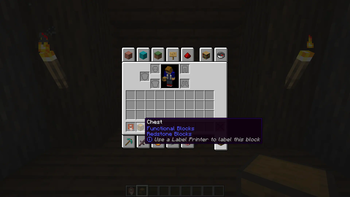
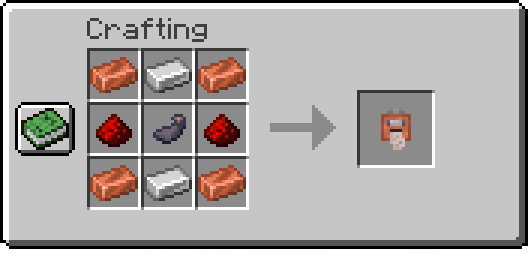
This mod adds a Label printer which is an item that can set a label and an icon to a container.

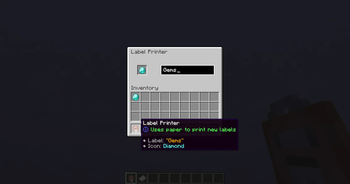
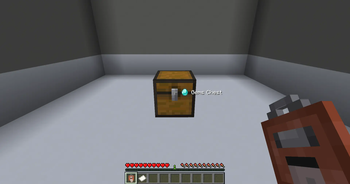
## Printing labels: To use the Label Printer, _right-click_ while holding it, and it'll open a menu where you can set your icon and label. Finally, have paper in your inventory and _shift-right-click_ a chest or compatible container to set them.
## Copying labels from existing ones:
When holding the Label Printer, _shift-right-click_ to switch to Copy mode. Then _shift-right-click_ on a container that has a label already set to copy its icon and text.
## `/labelposition`
Sets the current player's HUD position. Available positions are:
- `center-right` (default)
- `center-left`
- `left`
- `top`
- `top-left`
- Set the current HUD position to `left`:
- ```minecraft
- /labelposition left
- ```
## `/setlabel`
Requires admin permissions. Sets the label / icon of the selected container.
- Setting the label of a block at
coordinates: - ```minecraft
- /setlabel
label I'm a dirt chest! - ```
- Setting the icon of a block at
coordinates: - ```minecraft
- /setlabel
icon minecraft:dirt - ```
## `/labelconfig`
Requires admin permissions. Adds/removes blocks that can be labeled from the config.
> NOTE: All blocks that have a Block Entity associated with them can be labeled. > To check if a block can be added to the config and used correctly try shift-right-clicking on it with the Label Printer item, > and if it displays something like "You can't tag this block", that block can be added to the config
- Add the Bell block to the config:
- ```minecraft
- /labelconfig add-item minecraft:bell
- ```
- Add the Bell block to the config (while having the block in player's hand):
- ```minecraft
- /labelconfig add-hand
- ```
- Remove the Bell block from the config:
- ```minecraft
- /labelconfig remove-item minecraft:bell
- ```
- Remove the Bell block from the config (while having the block in player's hand):
- ```minecraft
- /labelconfig remove-hand
- ```
📊 Mod Details
- Game
- Minecraft Mods
- Author
- Infinituum17
- Version
- 1.9.3
- Downloads
- 83,660
- Endorsements
- 150
- Category
- fabric
- Created
- 3/31/2023
- Updated
- 7/26/2026
- Game Versions
- 1.21.1
- Tags
- management, storage, utility
🔧 How to Install Minecraft Mods Mods
Download from Modrinth. Use Prism Launcher or drop into your mods folder.
📖 Full step-by-step install guide for Minecraft Mods →
Visit the official mod page for specific installation instructions for this mod.
🎮 Need cheat codes or console commands? Check ur gaming wiki for Minecraft Mods commands, item IDs, and more.
❓ Frequently Asked Questions
Which Minecraft Mods versions does Labelling Containers support?
The author lists 1.21.1. Other versions may work but are untested by the author.
What is the latest version of Labelling Containers?
Version 1.9.3, published 2026-07-26 with 83,660 downloads recorded at the source.
Keep browsing — more Minecraft Mods mods await