KubeJS Studio
🟢 Updated this month⚠️ Install Order · 2 steps
Install in this order, then this mod last — most mods fail to load without their framework and dependencies in place.
🖼️ Gallery (12 images)
🔍 Analysis
- 🏆 #143 of 367 forge mods in this game by downloads
📋 About This Mod
# KubeJS Studio KubeJS Studio is an in-game front end for KubeJS. Press **K** and you get a workspace for recipes, tags, loot tables, item and block stats and new registry entries, plus a code editor that knows what is loaded in your pack. Studio writes plain files under `kubejs/`: scripts, datapack JSON, lang files and models. There is no project format to export, and the generated files keep working without Studio. > Needs (https://www.curseforge.com/minecraft/mc-mods/kubejs). On Forge 1.20.1 it also needs (https://www.curseforge.com/minecraft/mc-mods/kotlin-for-forge). LDLib2 is bundled inside the jar. Client side only, it never has to go on a server. !(https://media.forgecdn.net/attachments/1872/447/recipes-png.png) ## GUI or code, your call A GUI can be faster than writing a script by hand. Other times it's just better to edit the script. Studio does both, and you can switch whenever you like, or use both at once. If you have never written a KubeJS script, start with the five visual tabs. Pick a recipe, a tag, a loot table or an item, change it with real item slots and normal fields, hit Queue. Studio shows you exactly what it is going to write before it touches anything. If you already write KubeJS, the Files tab is a proper editor. Completion, hover docs and error checking are built from the running instance, not from a typings file that went stale two updates ago. Type `event.recipes.` and the list is the recipe types loaded in that pack, mods included. ## The workspace ### Recipes Every loaded recipe is in the browser, filterable by mod, type or item. Supported types open in a form with item slots filled from a picker (or a Held button that copies the stack in your hand into the result), count and category fields, and the generated output shown underneath as you edit. Override a recipe, disable it, duplicate it, or start a blank one. Vanilla crafting, cooking, stonecutting and smithing have hand-built forms. Create's processing recipes do too, including heated mixing and sequenced assembly. Farmer's Delight, Ars Nouveau and the common Mekanism machine types have their own layouts. For other types, Studio builds a flat form from the recipe schema KubeJS already has for it: item and fluid fields become slots, numbers and flags become fields. That covers a lot of mods with a KubeJS addon without me writing anything per mod. If a type has no schema, or the existing JSON is more complicated than that form can round-trip, it opens as raw JSON and you edit that. !(https://media.forgecdn.net/attachments/1872/448/recipes-create-png.png) Recipe JSON comes from the running world, so what you see is what the game loaded. JEI and EMI recipe pages get an Edit button that jumps into Studio with that recipe selected (singleplayer, creative mode). !(https://media.forgecdn.net/attachments/1872/449/recipes-farmersdelight-png.png) ### Tags Pick a registry (items, blocks, fluids, entities, and any dynamic registry the game exposes), find the tag, add or remove members. Additions and removals are shown inline against the live contents so you can see the diff before you queue it. This is the quick way to get modded items into `#minecraft:planks` or `#c:ingots/copper` so recipes and mechanics pick them up. !(https://media.forgecdn.net/attachments/1872/451/tags-png.png) ### Loot Real loot tables, edited in place as a tree of pools and entries. Rolls, count and weight stay inline. The `...` on a row opens the full editor for that entry, which is where conditions and functions live as typed forms: tool checks, random chance, Fortune style bonuses, explosion decay, names, lore, components or NBT, and nested `all_of` / `any_of` logic. Table-level settings (context type, random sequence, table-wide functions) are under **Table…**. The catalog follows the Minecraft version, and anything without a typed form stays editable as raw JSON. !(https://media.forgecdn.net/attachments/1872/444/loot-png.png) !(https://media.forgecdn.net/attachments/1872/445/loot-entry-png.png) ### Properties Base stats that no recipe or tag can touch. Items expose stack size, durability, food values, burn time and an enable-only fire resistance flag. Blocks expose hardness, blast resistance, light level, friction, whether a tool is required, mining tier and the tool it is mineable with. Studio writes the matching `ItemEvents.modification` or `BlockEvents.modification` startup script. The same tab renames and retextures anything already in the game, which lands as a lang entry and a model override under `kubejs/assets`. Stat changes need a game restart, mining tags apply on `/reload`, names and textures on F3+T. Each row is marked with which one it needs. !(https://media.forgecdn.net/attachments/1872/446/properties-png.png) ### Create New items, blocks and fluids without touching a s
# KubeJS Studio
KubeJS Studio is an in-game front end for KubeJS. Press K and you get a workspace for recipes, tags, loot tables, item and block stats and new registry entries, plus a code editor that knows what is loaded in your pack. Studio writes plain files under `kubejs/`: scripts, datapack JSON, lang files and models. There is no project format to export, and the generated files keep working without Studio.
> Needs (https://www.curseforge.com/minecraft/mc-mods/kubejs). On Forge 1. 20. 1 it also needs (https://www.curseforge.com/minecraft/mc-mods/kotlin-for-forge). LDLib2 is bundled inside the jar. Client side only, it never has to go on a server.
!(https://media.forgecdn.net/attachments/1872/447/recipes-png.png)
## GUI or code, your call
A GUI can be faster than writing a script by hand. Other times it's just better to edit the script. Studio does both, and you can switch whenever you like, or use both at once.
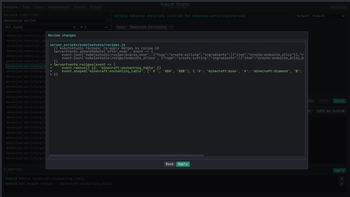
If you have never written a KubeJS script, start with the five visual tabs. Pick a recipe, a tag, a loot table or an item, change it with real item slots and normal fields, hit Queue. Studio shows you exactly what it is going to write before it touches anything.
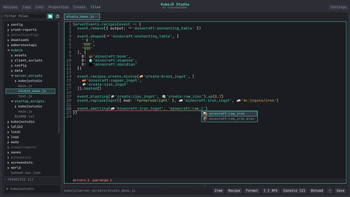
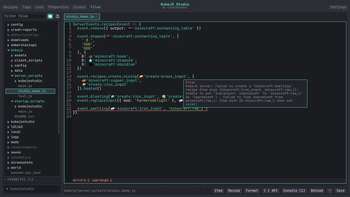
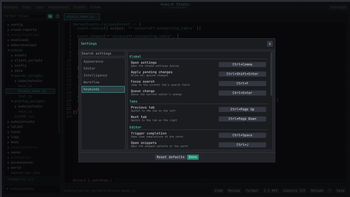
If you already write KubeJS, the Files tab is a proper editor. Completion, hover docs and error checking are built from the running instance, not from a typings file that went stale two updates ago. Type `event.recipes.` and the list is the recipe types loaded in that pack, mods included.
## The workspace
### Recipes
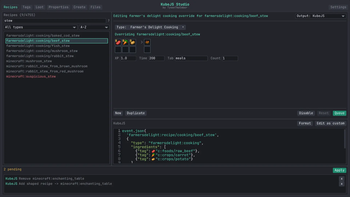
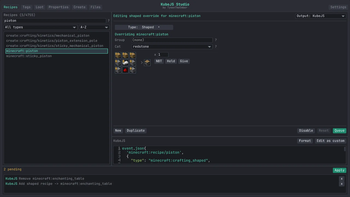
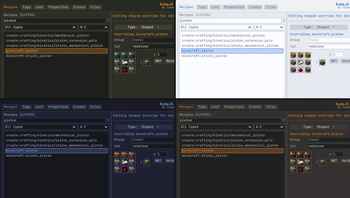
Every loaded recipe is in the browser, filterable by mod, type or item. Supported types open in a form with item slots filled from a picker (or a Held button that copies the stack in your hand into the result), count and category fields, and the generated output shown underneath as you edit. Override a recipe, disable it, duplicate it, or start a blank one.
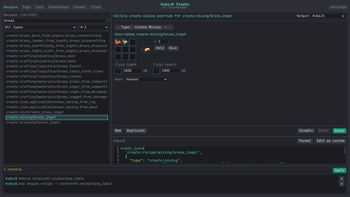
Vanilla crafting, cooking, stonecutting and smithing have hand-built forms. Create's processing recipes do too, including heated mixing and sequenced assembly. Farmer's Delight, Ars Nouveau and the common Mekanism machine types have their own layouts.
For other types, Studio builds a flat form from the recipe schema KubeJS already has for it: item and fluid fields become slots, numbers and flags become fields. That covers a lot of mods with a KubeJS addon without me writing anything per mod. If a type has no schema, or the existing JSON is more complicated than that form can round-trip, it opens as raw JSON and you edit that.
!(https://media.forgecdn.net/attachments/1872/448/recipes-create-png.png)
Recipe JSON comes from the running world, so what you see is what the game loaded. JEI and EMI recipe pages get an Edit button that jumps into Studio with that recipe selected (singleplayer, creative mode).
!(https://media.forgecdn.net/attachments/1872/449/recipes-farmersdelight-png.png)
Pick a registry (items, blocks, fluids, entities, and any dynamic registry the game exposes), find the tag, add or remove members. Additions and removals are shown inline against the live contents so you can see the diff before you queue it. This is the quick way to get modded items into `#minecraft:planks` or `#c:ingots/copper` so recipes and mechanics pick them up.
!(https://media.forgecdn.net/attachments/1872/451/tags-png.png)
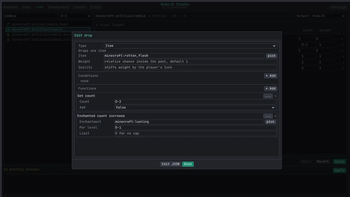
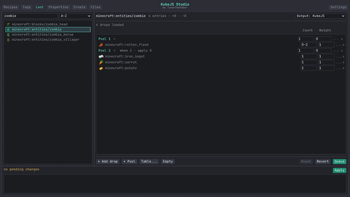
Real loot tables, edited in place as a tree of pools and entries. Rolls, count and weight stay inline. The `...` on a row opens the full editor for that entry, which is where conditions and functions live as typed forms: tool checks, random chance, Fortune style bonuses, explosion decay, names, lore, components or NBT, and nested `all_of` / `any_of` logic. Table-level settings (context type, random sequence, table-wide functions) are under Table…. The catalog follows the Minecraft version, and anything without a typed form stays editable as raw JSON.
!(https://media.forgecdn.net/attachments/1872/444/loot-png.png)
!(https://media.forgecdn.net/attachments/1872/445/loot-entry-png.png)
### Properties
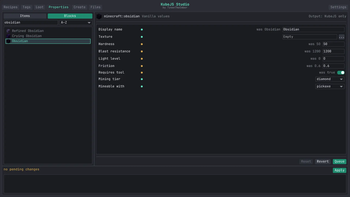
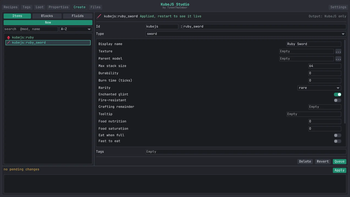
Base stats that no recipe or tag can touch. Items expose stack size, durability, food values, burn time and an enable-only fire resistance flag. Blocks expose hardness, blast resistance, light level, friction, whether a tool is required, mining tier and the tool it is mineable with. Studio writes the matching `ItemEvents.modification` or `BlockEvents.modification` startup script.
The same tab renames and retextures anything already in the game, which lands as a lang entry and a model override under `kubejs/assets`. Stat changes need a game restart, mining tags apply on `/reload`, names and textures on F3+T. Each row is marked with which one it needs.
!(https://media.forgecdn.net/attachments/1872/446/properties-png.png)
New items, blocks and fluids without touching a s
📊 Mod Details
- Game
- Minecraft Mods
- Author
- TysonTheEmber
- Version
- 1.0.1+neoforge-1.21.1
- Downloads
- 436
- Endorsements
- 11
- Category
- forge
- Created
- 8/17/2026
- Updated
- 8/19/2026
- Game Versions
- 1.21.1
- Tags
- game-mechanics, management, utility
🔧 How to Install Minecraft Mods Mods
Download from Modrinth. Use Prism Launcher or drop into your mods folder.
📖 Full step-by-step install guide for Minecraft Mods →
Visit the official mod page for specific installation instructions for this mod.
🎮 Need cheat codes or console commands? Check ur gaming wiki for Minecraft Mods commands, item IDs, and more.
❓ Frequently Asked Questions
Which Minecraft Mods versions does KubeJS Studio support?
The author lists 1.21.1. Other versions may work but are untested by the author.
What is the latest version of KubeJS Studio?
Version 1.0.1+neoforge-1.21.1, published 2026-08-19 with 436 downloads recorded at the source.
Keep browsing — more Minecraft Mods mods await