KantoStarters
🟡 Updated this year⚠️ Install Order · 2 steps
Install in this order, then this mod last — most mods fail to load without their framework and dependencies in place.
🖼️ Gallery (3 images)
🔍 Analysis
- 👍 0.0% endorsement rate
- 🏆 #230 of 581 adventure mods in this game by downloads
📋 About This Mod
# KantoStarters **KantoStarters** is a Fabric/Cobblemon utility mod that lets creators build configurable choice stations using normal Minecraft blocks. This mod was originally created for the **(https://modrinth.com/modpack/cobblekanto)** project, but it can also be used by other server owners and map creators who want a custom starter, reward, or one-time choice system for their own Cobblemon worlds. KantoStarters does not add physical blocks of its own. Instead, it lets you bind existing blocks from your map to configured choices. Those choices can be used for starter selection, dojo-style rewards, fossil choices, special creature gifts, custom item rewards, or any other map event where the player must choose one option from a configured set. --- (https://res.cloudinary.com/dd5ftzldn/image/upload/v1779248899/ksbg_qpzmus.png)](https://shockbyte.com/billing/aff.php?aff=10741) Get 25% off your Minecraft server with Shockbyte! Ready to start an epic adventure with your friends? Just click (https://shockbyte.com/billing/aff.php?aff=10741) or on the banner and use promo code “COBBLEKANTO”, plus you’ll be helping us keep improving the mod and developing future projects! --- ## Features - Custom starter and reward choice system - Configurable choice sessions through JSON files - Bind any normal Minecraft block to a configured choice - Custom dialogue screen with YES/NO confirmation - 3D Cobblemon preview support - Item preview support for item-based choices - One-time choice protection - Optional blocking if the player already has a Cobblemon - Optional control over the default Cobblemon starter screen - Language-based dialogue files for different player languages --- ## System Overview KantoStarters uses configurable **choice sessions**. Each session can contain multiple choices, but each physical block is linked to one specific option. For example, a classic starter table can be built with three blocks: - one block linked to `start / bulbasaur` - one block linked to `start / charmander` - one block linked to `start / squirtle` When the player right-clicks one of these bound blocks, a custom dialogue screen opens with a preview, dialogue text, and a YES/NO confirmation. If the player confirms the choice, the mod can run commands, give items, and mark that session as completed for that player. --- <details> <summary><strong>Show setup and configuration details</strong></summary> ## Setup Before binding a block in the world, you need to create or edit a choice session in the config file: `config/kantostarters/choice_sessions.json` A choice station is based on two IDs: - `sessionId` — the group of choices, such as `start`, `dojo`, or `mtmoon` - `choiceId` — the specific choice inside that session, such as `bulbasaur`, `charmander`, or `helix_fossil` Example: ```json { "sessionId": "start", "enabled": true, "oneTimeChoice": true, "blockIfAlreadyHasCobblemon": false, "textColour": "#3050c8", "secondConfirmLines": , "choices": , "itemRewards": , "previewScale": 1.0, "previewOffsetX": -1, "previewOffsetY": 4, "commands": } ] } ``` Recommended setup order: 1. Create or edit the session in `choice_sessions.json`. 2. Create the `sessionId` and the `choiceId`. 3. Run `/kantostarters reload`. 4. Look directly at the block you want to bind. 5. Run `/kantostarters set <sessionId> <choiceId>`. 6. Test the choice with `/kantostarters open <sessionId> <choiceId>` if needed. Example: `/kantostarters set start bulbasaur` After that, players can right-click the block to open that specific choice. To remove a binding from the block you are looking at: `/kantostarters unset` All setup commands require operator/admin permission. --- ## Config Files On first launch, KantoStarters creates its config files inside: `config/kantostarters/` Main files: - `choice_sessions.json` - `choice_dialog_arrays_en_us.json` - `choice_dialog_arrays_pt_br.json` By default, the mod includes example sessions for: - `start` — Bulbasaur, Charmander, and Squirtle - `dojo` — Hitmonlee and Hitmonchan - `celadoneevee` — Eevee - `mtmoon` — Helix Fossil and Dome Fossil These are only default examples. You can edit, remove, expand, or replace them with your own custom sessions. Always create the session and choice in `choice_sessions.json` before using `/kantostarters set`. --- ## Sessions Each session controls a group of related choices. Example: ```json { "sessionId": "start", "enabled": true, "oneTimeChoice": true, "blockIfAlreadyHasCobblemon": false, "textColour": "#3050c8", "secondConfirmLines": , "choices": } ``` **`sessionId`** The inte
# KantoStarters
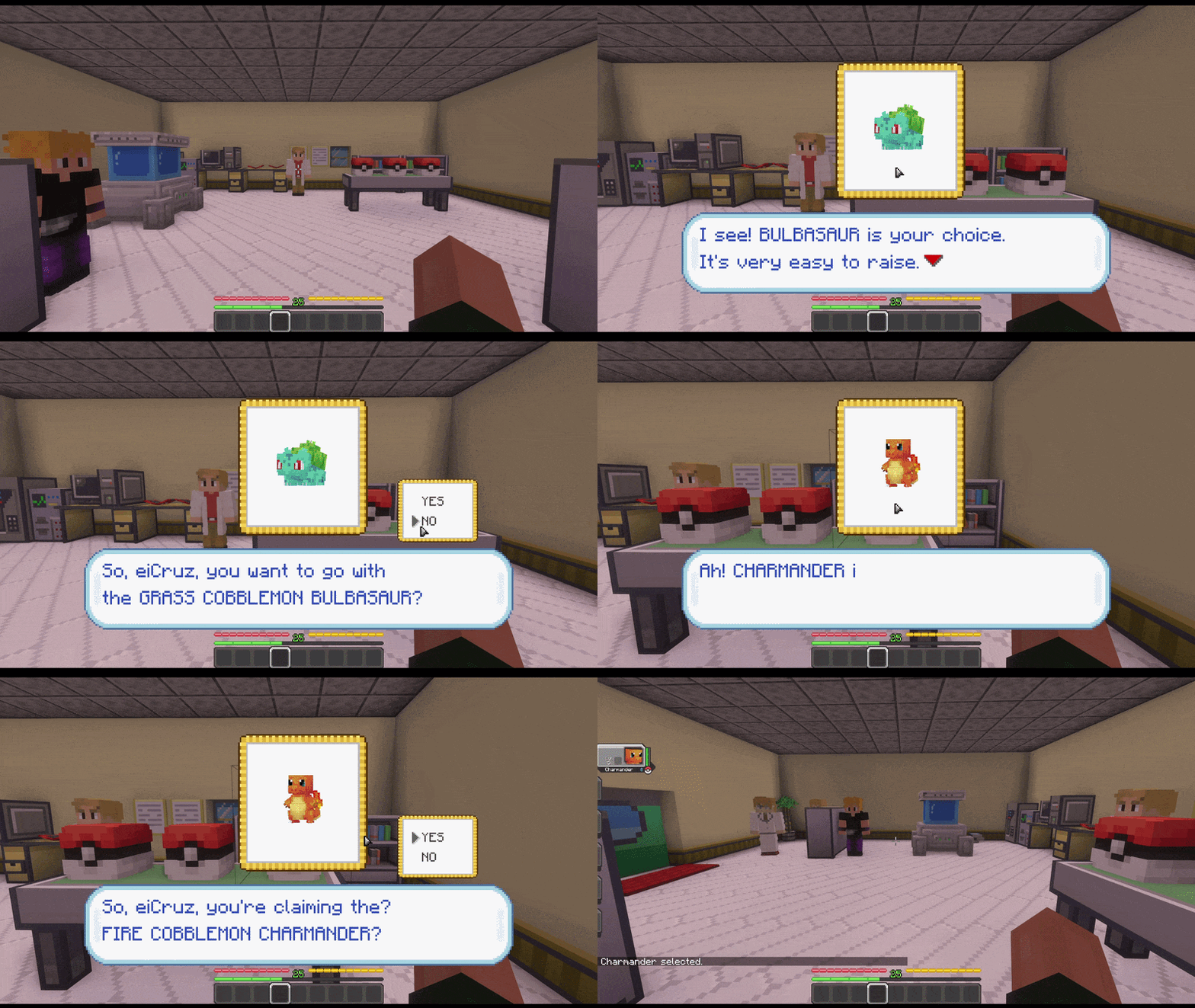
KantoStarters is a Fabric/Cobblemon utility mod that lets creators build configurable choice stations using normal Minecraft blocks.
This mod was originally created for the (https://modrinth.com/modpack/cobblekanto)** project, but it can also be used by other server owners and map creators who want a custom starter, reward, or one-time choice system for their own Cobblemon worlds.
KantoStarters does not add physical blocks of its own. Instead, it lets you bind existing blocks from your map to configured choices. Those choices can be used for starter selection, dojo-style rewards, fossil choices, special creature gifts, custom item rewards, or any other map event where the player must choose one option from a configured set.
[!(https://res.cloudinary.com/dd5ftzldn/image/upload/v1779248899/ksbg_qpzmus.png)](https://shockbyte.com/billing/aff.php?aff=10741)
Get 25% off your Minecraft server with Shockbyte! Ready to start an epic adventure with your friends? Just click (https://shockbyte.com/billing/aff.php?aff=10741) or on the banner and use promo code “COBBLEKANTO”, plus you’ll be helping us keep improving the mod and developing future projects!
## Features
- Custom starter and reward choice system
- Configurable choice sessions through JSON files
- Bind any normal Minecraft block to a configured choice
- Custom dialogue screen with YES/NO confirmation
- 3D Cobblemon preview support
- Item preview support for item-based choices
- One-time choice protection
- Optional blocking if the player already has a Cobblemon
- Optional control over the default Cobblemon starter screen
- Language-based dialogue files for different player languages
## System Overview
KantoStarters uses configurable choice sessions.
Each session can contain multiple choices, but each physical block is linked to one specific option.
For example, a classic starter table can be built with three blocks:
- one block linked to `start / bulbasaur`
- one block linked to `start / charmander`
- one block linked to `start / squirtle`
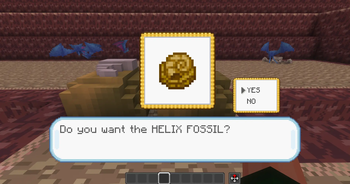
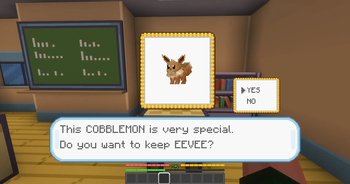
When the player right-clicks one of these bound blocks, a custom dialogue screen opens with a preview, dialogue text, and a YES/NO confirmation.
If the player confirms the choice, the mod can run commands, give items, and mark that session as completed for that player.
Show setup and configuration details
Before binding a block in the world, you need to create or edit a choice session in the config file:
`config/kantostarters/choice_sessions.json`
A choice station is based on two IDs:
- `sessionId` — the group of choices, such as `start`, `dojo`, or `mtmoon`
- `choiceId` — the specific choice inside that session, such as `bulbasaur`, `charmander`, or `helix_fossil`
```json { "sessionId": "start", "enabled": true, "oneTimeChoice": true, "blockIfAlreadyHasCobblemon": false, "textColour": "#3050c8", "secondConfirmLines": [], "choices": [ { "choiceId": "bulbasaur", "displayName": "Bulbasaur", "previewSpecies": "bulbasaur", "dialogId": "start_bulbasaur_dialog", "dialogLines": [], "itemRewards": [], "previewScale": 1. 0, "previewOffsetX": -1, "previewOffsetY": 4, "commands": [ "pokegive %player% bulbasaur level=5" ] } ] } ```
Recommended setup order:
1. Create or edit the session in `choice_sessions.json`.
2. Create the `sessionId` and the `choiceId`.
3. Run `/kantostarters reload`.
4. Look directly at the block you want to bind.
5. Run `/kantostarters set
`/kantostarters set start bulbasaur`
After that, players can right-click the block to open that specific choice.
To remove a binding from the block you are looking at:
`/kantostarters unset`
All setup commands require operator/admin permission.
## Config Files
On first launch, KantoStarters creates its config files inside:
`config/kantostarters/`
Main files:
- `choice_sessions.json`
- `choice_dialog_arrays_en_us.json`
- `choice_dialog_arrays_pt_br.json`
By default, the mod includes example sessions for:
- `start` — Bulbasaur, Charmander, and Squirtle
- `dojo` — Hitmonlee and Hitmonchan
- `celadoneevee` — Eevee
- `mtmoon` — Helix Fossil and Dome Fossil
These are only default examples. You can edit, remove, expand, or replace them with your own custom sessions.
Always create the session and choice in `choice_sessions.json` before using `/kantostarters set`.
## Sessions
Each session controls a group of related choices.
```json { "sessionId": "start", "enabled": true, "oneTimeChoice": true, "blockIfAlreadyHasCobblemon": false, "textColour": "#3050c8", "secondConfirmLines": [], "choices": [] } ```
`sessionId`**
📊 Mod Details
- Game
- Minecraft Mods
- Author
- CobbleKanto
- Version
- 0.0.4
- Downloads
- 5,174
- Endorsements
- 1
- Category
- adventure
- Created
- 5/22/2026
- Updated
- 6/9/2026
- Game Versions
- 1.21.1
- Tags
- adventure, game-mechanics, utility
🔧 How to Install Minecraft Mods Mods
Download from Modrinth. Use Prism Launcher or drop into your mods folder.
📖 Full step-by-step install guide for Minecraft Mods →
Visit the official mod page for specific installation instructions for this mod.
🎮 Need cheat codes or console commands? Check ur gaming wiki for Minecraft Mods commands, item IDs, and more.
❓ Frequently Asked Questions
Which Minecraft Mods versions does KantoStarters support?
The author lists 1.21.1. Other versions may work but are untested by the author.
What is the latest version of KantoStarters?
Version 0.0.4, published 2026-06-09 with 5,174 downloads recorded at the source.
Keep browsing — more Minecraft Mods mods await