Kairo's Totem Customizer
🟡 Updated this year⚠️ Install Order · 2 steps
Install in this order, then this mod last — most mods fail to load without their framework and dependencies in place.
🖼️ Gallery (4 images)
🔍 Analysis
- 🏆 #72 of 216 decoration mods in this game by downloads
📋 About This Mod
# Kairo's Totem Customizer Customize every visual aspect of the Totem of Undying. Move it, resize it, recolor it, or hide it entirely. Everything is 100% client-side and render only. !(https://imagedelivery.net/1cX-qFz6BMlgosL_p_OfCg/5b8f13fb-4d91-4ada-859f-e89a8f45b200/public) ## Features _**Pop Animation**_ * Move the pop animation anywhere on your screen with X/Y sliders. * Lock the position to remove the random wobble, so it pops in the exact same spot every time. * Resize it from 25%–300%. * Adjust animation duration. * Disable the spin animation. * Disable the zoom animation. * Hide the pop animation completely. !(https://imagedelivery.net/1cX-qFz6BMlgosL_p_OfCg/313dcf10-00ce-49fd-e12e-81256e2a3200/public) _**Held Totem**_ * Resize the totem in your main hand or offhand (first person) to keep it out of your view. * Disable the equip animation when you swap a totem in. * Optional size animation that makes the held totem smoothly pulse, with adjustable speed, minimum, and maximum size. _**Overlay**_ * Show your totem count under the crosshair. * Flash a color over the screen when your totem pops, with a custom color and opacity. !(https://imagedelivery.net/1cX-qFz6BMlgosL_p_OfCg/270d929b-e4e6-4de4-c369-22c39d16df00/public) _**Particles**_ * Adjust particle amount (0%–500%). * Change particle size, speed, and lifetime. * Control how long the pop keeps spawning particles, and move the spawn point up or down. * Customize two particle colors with a click-to-open color picker. * Optional fade color for smooth color transitions. * Disable your own totem particles while still seeing other players' particles. !(https://imagedelivery.net/1cX-qFz6BMlgosL_p_OfCg/eb1fadd7-bdee-4282-3946-95d57f682f00/public) ## Settings Open the configuration through Mod Menu, or bind the Open Totem Settings key in Options → Controls. Three organized tabs (General, Pop Animation, Particles) with grouped sections. Every setting includes a tooltip and can be reset individually, and every color setting has a pop-up color picker. ## Requirements * Fabric Loader * Fabric API * Cloth Config
# Kairo's Totem Customizer
Customize every visual aspect of the Totem of Undying.
Move it, resize it, recolor it, or hide it entirely. Everything is 100% client-side and render only.
!(https://imagedelivery.net/1cX-qFz6BMlgosL_p_OfCg/5b8f13fb-4d91-4ada-859f-e89a8f45b200/public)
## Features
_Pop Animation_
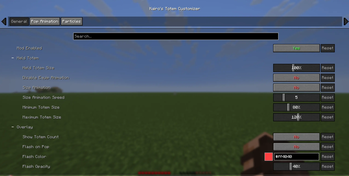
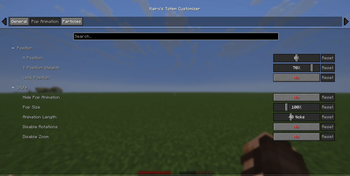
Move the pop animation anywhere on your screen with X/Y sliders. Lock the position to remove the random wobble, so it pops in the exact same spot every time. Resize it from 25%–300%. Adjust animation duration. Disable the spin animation. Disable the zoom animation. Hide the pop animation completely. !(https://imagedelivery.net/1cX-qFz6BMlgosL_p_OfCg/313dcf10-00ce-49fd-e12e-81256e2a3200/public) _Held Totem_
Resize the totem in your main hand or offhand (first person) to keep it out of your view. Disable the equip animation when you swap a totem in. Optional size animation that makes the held totem smoothly pulse, with adjustable speed, minimum, and maximum size.
_Overlay_
Show your totem count under the crosshair. Flash a color over the screen when your totem pops, with a custom color and opacity. !(https://imagedelivery.net/1cX-qFz6BMlgosL_p_OfCg/270d929b-e4e6-4de4-c369-22c39d16df00/public) _Particles_
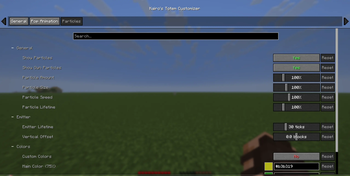
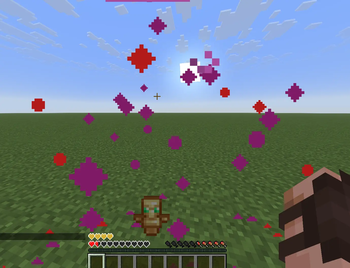
Adjust particle amount (0%–500%). Change particle size, speed, and lifetime. Control how long the pop keeps spawning particles, and move the spawn point up or down. Customize two particle colors with a click-to-open color picker. Optional fade color for smooth color transitions. Disable your own totem particles while still seeing other players' particles. !(https://imagedelivery.net/1cX-qFz6BMlgosL_p_OfCg/eb1fadd7-bdee-4282-3946-95d57f682f00/public)
## Settings
Open the configuration through Mod Menu, or bind the Open Totem Settings key in Options → Controls.
Three organized tabs (General, Pop Animation, Particles) with grouped sections. Every setting includes a tooltip and can be reset individually, and every color setting has a pop-up color picker.
## Requirements
Fabric Loader Fabric API * Cloth Config
📊 Mod Details
- Game
- Minecraft Mods
- Author
- DevKairo
- Version
- 2.11.0+26.1-26.1.2
- Downloads
- 225
- Endorsements
- 1
- Category
- decoration
- Created
- 7/21/2026
- Updated
- 7/18/2026
- Game Versions
- 26.1, 26.1.1, 26.1.2
- Tags
- decoration, equipment, utility
🔧 How to Install Minecraft Mods Mods
Download from Modrinth. Use Prism Launcher or drop into your mods folder.
📖 Full step-by-step install guide for Minecraft Mods →
Visit the official mod page for specific installation instructions for this mod.
🎮 Need cheat codes or console commands? Check ur gaming wiki for Minecraft Mods commands, item IDs, and more.
❓ Frequently Asked Questions
Which Minecraft Mods versions does Kairo's Totem Customizer support?
The author lists 26.1, 26.1.1, 26.1.2. Other versions may work but are untested by the author.
What is the latest version of Kairo's Totem Customizer?
Version 2.11.0+26.1-26.1.2, published 2026-07-18 with 225 downloads recorded at the source.
Keep browsing — more Minecraft Mods mods await