Just Enough Backups (JEB)
🟡 Updated this year⚠️ Install Order · 2 steps
Install in this order, then this mod last — most mods fail to load without their framework and dependencies in place.
🖼️ Gallery (4 images)
🔍 Analysis
- 👍 0.5% endorsement rate
- 🏆 #248 of 896 fabric mods in this game by downloads
📋 About This Mod
<p align="center"> <img src="https://cdn.modrinth.com/data/cached_images/62686d9bbfda8504a5e740e36bc664645f3294c7.png" alt="Just Enough Backups Banner"> </p> Just Enough Backups is a Fabric mod that adds server-side world backups with a usable in-game workflow. It supports: - full, partial, and differential backups - manual backups through commands and UI - automatic scheduled backups - configurable public backup/restore announcements - retention by backup count - retention by total backup size per world - restore preparation from the backup browser - a configurable client HUD popup with live preview - parallel (multi-threaded) scanning, compression, and restore extraction - optional Mod Menu integration The mod is designed to keep the actual backup logic on the server side while exposing management and configuration through a client UI. ## Features ### Backup types - **Full**: stores a complete snapshot of the world. - **Partial**: stores changes relative to a base backup. - **Differential**: stores changes relative to a base backup, while keeping a separate retention bucket from partial backups. Dependencies between backups are tracked. Retention and delete operations respect those dependencies, so required base backups are preserved when newer partial or differential backups still depend on them. ### Automatic backups Automatic backups are driven by per-type schedulers (`FULL`, `DIFFERENTIAL`, `PARTIAL`) and can be configured to: - run independently based on configured intervals for each backup type - send optional public warning before an automatic backup starts - pause when no players have been online since the last backup - run on server start - run on server stop Public announcements can be sent to chat, sent to the action bar, or disabled. ### Retention policy Retention can be configured in two ways at the same time: - **count-based retention** - keep the newest `X` full backups - keep the newest `X` partial backups - keep the newest `X` differential backups - **size cap per world** - optional hard cap for the total size of a world's backup folder - applied to the final published backup set - respects dependency chains If a new backup would exceed the configured space cap even after deleting every backup that is allowed to be removed, creation fails instead of publishing an invalid final state. ### Performance: parallel processing Backups and restores use multiple worker threads to speed up large worlds: - **scanning / hashing**: the world snapshot scan runs across `threadCount` threads (up to one per CPU core), reading and hashing files in parallel - **compression**: the ZIP archive is written with parallel compression - **restore extraction**: backup ZIP files are extracted across `threadCount` threads The number of threads is controlled by `threadCount` in the config and can be set between `1` and the maximum number of CPU threads (default: CPU cores minus two). Lower values reduce CPU usage; higher values speed up large worlds. ### Backup management UI The backup browser includes: - refresh - create backup - rename backup - delete backup - restore backup - dependency-aware inline details - search/filtering Manual backup creation supports a custom file name from both the command line and the UI. ### Config UI and popup preview The config screen exposes: - backup mode and scheduler options - retention rules - permission level - integrity mode - backup directory and temporary backup directory - excluded paths - popup text, colors, channels, and layout The popup preview screen lets you move and preview the HUD state before saving. On a dedicated server the config screen is client-side only: it shows the HUD and Preview tabs (which apply locally to the popup), and server settings are edited on the server's `config/justenoughbackups.json` file followed by `/jeb config reload`. In single-player the whole config is shared and editable from the screen. ## Commands The root command is: ```text /jeb ``` Available commands: ```text /jeb now /jeb now <name> /jeb create full /jeb create full <name> /jeb create partial /jeb create partial <name> /jeb create differential /jeb create differential <name> /jeb list /jeb next /jeb restore <backup> /jeb config reload ``` Notes: - `<name>` is optional and becomes the real `.zip` file name after sanitization. - `<backup>` is the visible backup name, with or without the `.zip` suffix. Tab completion suggests the visible name. - restore is prepared asynchronously and then the server shuts down so the restore can be applied safely on the next startup. - `/jeb next` displays a multi-schedule summary showing remaining times and exact execution timestamps for all configured backup types, sorted by proximity. - command access follows the configured permission level. ## Default keybindings Client-side keybindings: - `B`: open backup management - `N`: open config screen These are regular Minecraft keybindings and

Just Enough Backups is a Fabric mod that adds server-side world backups with a usable in-game workflow.
It supports:
- full, partial, and differential backups
- manual backups through commands and UI
- automatic scheduled backups
- configurable public backup/restore announcements
- retention by backup count
- retention by total backup size per world
- restore preparation from the backup browser
- a configurable client HUD popup with live preview
- parallel (multi-threaded) scanning, compression, and restore extraction
- optional Mod Menu integration
The mod is designed to keep the actual backup logic on the server side while exposing management and configuration through a client UI.
## Features
### Backup types
- Full: stores a complete snapshot of the world.
- Partial: stores changes relative to a base backup.
- Differential: stores changes relative to a base backup, while keeping a separate retention bucket from partial backups.
Dependencies between backups are tracked. Retention and delete operations respect those dependencies, so required base backups are preserved when newer partial or differential backups still depend on them.
### Automatic backups
Automatic backups are driven by per-type schedulers (`FULL`, `DIFFERENTIAL`, `PARTIAL`) and can be configured to:
- run independently based on configured intervals for each backup type
- send optional public warning before an automatic backup starts
- pause when no players have been online since the last backup
- run on server start
- run on server stop
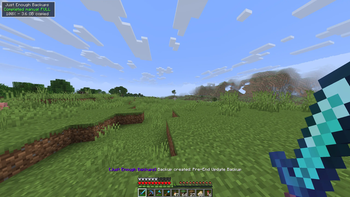
Public announcements can be sent to chat, sent to the action bar, or disabled.
### Retention policy
Retention can be configured in two ways at the same time:
- count-based retention
- - keep the newest `X` full backups
- - keep the newest `X` partial backups
- - keep the newest `X` differential backups
- size cap per world
- - optional hard cap for the total size of a world's backup folder
- - applied to the final published backup set
- - respects dependency chains
If a new backup would exceed the configured space cap even after deleting every backup that is allowed to be removed, creation fails instead of publishing an invalid final state.
### Performance: parallel processing
Backups and restores use multiple worker threads to speed up large worlds:
- scanning / hashing: the world snapshot scan runs across `threadCount` threads (up to one per CPU core), reading and hashing files in parallel
- compression: the ZIP archive is written with parallel compression
- restore extraction: backup ZIP files are extracted across `threadCount` threads
The number of threads is controlled by `threadCount` in the config and can be set between `1` and the maximum number of CPU threads (default: CPU cores minus two). Lower values reduce CPU usage; higher values speed up large worlds.
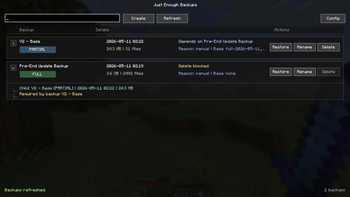
### Backup management UI
The backup browser includes:
- refresh
- create backup
- rename backup
- delete backup
- restore backup
- dependency-aware inline details
- search/filtering
Manual backup creation supports a custom file name from both the command line and the UI.
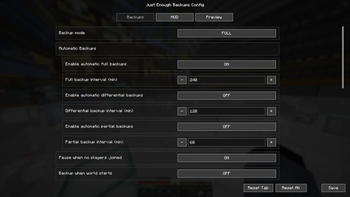
### Config UI and popup preview
The config screen exposes:
- backup mode and scheduler options
- retention rules
- permission level
- integrity mode
- backup directory and temporary backup directory
- excluded paths
- popup text, colors, channels, and layout
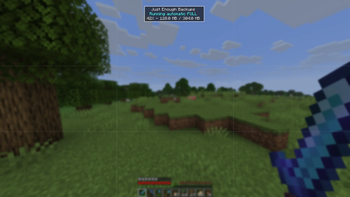
The popup preview screen lets you move and preview the HUD state before saving.
On a dedicated server the config screen is client-side only: it shows the HUD and Preview tabs (which apply locally to the popup), and server settings are edited on the server's `config/justenoughbackups.json` file followed by `/jeb config reload`. In single-player the whole config is shared and editable from the screen.
## Commands
The root command is:
```text /jeb ```
Available commands:
```text
/jeb now
/jeb now
/jeb create full
/jeb create full
/jeb list
/jeb next
/jeb restore
- `
` is optional and becomes the real `.zip` file name after sanitization. - `
` is the visible backup name, with or without the `.zip` suffix. Tab completion suggests the visible name. - restore is prepared asynchronously and then the server shuts down so the restore can be applied safely on the next startup.
- `/jeb next` displays a multi-schedule summary showing remaining times and exact execution timestamps for all configured backup types, sorted by proximity.
- command access follows the configured permission level.
## Default keybindings
Client-side keybindings:
- `B`: open backup management
- `N`: open config screen
These are regular Minecraft keybindings and
📊 Mod Details
- Game
- Minecraft Mods
- Author
- frandm16
- Version
- 1.2.0.3+26.2
- Downloads
- 3,678
- Endorsements
- 18
- Category
- fabric
- Created
- 5/13/2026
- Updated
- 8/12/2026
- Game Versions
- 26.2
- Tags
- management, storage, utility
🔧 How to Install Minecraft Mods Mods
Download from Modrinth. Use Prism Launcher or drop into your mods folder.
📖 Full step-by-step install guide for Minecraft Mods →
Visit the official mod page for specific installation instructions for this mod.
🎮 Need cheat codes or console commands? Check ur gaming wiki for Minecraft Mods commands, item IDs, and more.
❓ Frequently Asked Questions
Which Minecraft Mods versions does Just Enough Backups (JEB) support?
The author lists 26.2. Other versions may work but are untested by the author.
What is the latest version of Just Enough Backups (JEB)?
Version 1.2.0.3+26.2, published 2026-08-12 with 3,678 downloads recorded at the source.
Keep browsing — more Minecraft Mods mods await