JumpAndRun
🟠 Updated over a year ago⚠️ Install Order · 2 steps
Install in this order, then this mod last — most mods fail to load without their framework and dependencies in place.
🖼️ Gallery (2 images)
🔍 Analysis
- 🏆 #808 of 899 fabric mods in this game by downloads
📋 About This Mod
# Jump and Run **An exciting parkour minigame for Minecraft Fabric!** Transform your Minecraft server into an action-packed jump-and-run arena! This mod adds a fully functional parkour system where players must jump through randomly generated wool blocks to reach their goal. ## Features ### Core Gameplay - **30 Block Challenge**: Reach 30 randomly generated wool blocks floating in the air - **Smart Block Generation**: Blocks spawn automatically at manageable jumping distances - **Multi-colored Wool Blocks**: Each player gets assigned a random color - **Dynamic Gameplay**: Only 2 blocks are active at once - the next appears only when reached ### Timer & Statistics - **Live HUD**: Real-time display of time and progress - **Precise Time Tracking**: Accurate to the millisecond - **Persistent Leaderboards**: Best times are permanently saved - **Detailed Statistics**: Best time, completion count, and rank position ### Multiplayer Support - **Concurrent Players**: Multiple players can play simultaneously - **Individual Sessions**: Each player has their own blocks - **Collision Avoidance**: Blocks don't overlap between players ### Admin Features - **Zone System**: Define areas with `/startjumpandrun pos1/pos2` - **Custom Spawnpoints**: Set special respawn locations - **Debug Mode**: Extended logging options for server admins - **Automatic Configuration**: Settings are automatically saved ## Commands ### For Players - `/startjumpandrun` - Start your jump and run - `/startjumpandrun stop` - End your current game - `/leaderboard` - Show the leaderboard ### For Admins (OP Level 2) - `/startjumpandrun pos1 <position>` - Set first corner of the zone - `/startjumpandrun pos2 <position>` - Set second corner of the zone - `/startjumpandrun spawnpoint <position>` - Set respawn point - `/startjumpandrun info` - Show configuration status - `/startjumpandrun debug` - Toggle debug mode - `/startjumpandrun <playername>` - Start game for another player ## Installation & Setup ### Quick Start 1. **Installation**: Download the mod and place it in your `mods` folder 2. **Pressure Plate**: Place a **Heavy Weighted Pressure Plate** 3. **Play**: Step on the plate or use `/startjumpandrun` 4. **Setup Zone** (Optional): Use `/startjumpandrun pos1` and `pos2` for defined areas ### Technical Requirements - **Minecraft Version**: 1.20+ (Fabric) - **Dependencies**: Fabric API - **Configuration**: Automatically saved to `config/jumpandrun.properties` - **Leaderboard**: Stored in `config/jumpandrun_times.properties` - **Performance**: Optimized for multi-player servers ## Gameplay ### How It Works 1. **Start**: Step on a heavy weighted pressure plate or use the command 2. **Jump**: Navigate through randomly spawned wool blocks 3. **Progress**: Only 2 blocks exist at once - reach one to spawn the next 4. **Complete**: Reach all 30 blocks to finish and set your time 5. **Compete**: Check the leaderboard to see how you rank! ### Leaderboard System - **Top 5 Display**: Best times are prominently shown - **Personal Statistics**: Each player sees their own records - **Ranking Position**: Find out where you stand in comparison - **Persistent Data**: Times survive server restarts ### Wool Colors The system uses 10 different wool colors: - White, Red, Blue, Green, Yellow - Purple, Orange, Pink, Cyan, Lime ## Performance & Safety - **Automatic Cleanup**: Blocks are automatically removed - **Fall Protection**: Players are safely teleported when falling - **Resource Efficient**: Minimal server impact - **Collision Detection**: Prevents block conflicts between players ## Support This mod is actively developed and maintained. Bug reports and feature requests are welcome! --- **Ready for the ultimate parkour experience? Download Jump and Run and leap into adventure!**
# Jump and Run
An exciting parkour minigame for Minecraft Fabric!
Transform your Minecraft server into an action-packed jump-and-run arena! This mod adds a fully functional parkour system where players must jump through randomly generated wool blocks to reach their goal.
## Features
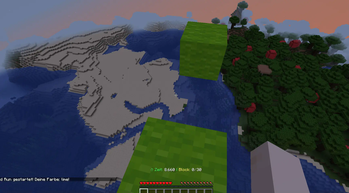
### Core Gameplay - 30 Block Challenge: Reach 30 randomly generated wool blocks floating in the air - Smart Block Generation: Blocks spawn automatically at manageable jumping distances - Multi-colored Wool Blocks: Each player gets assigned a random color - Dynamic Gameplay: Only 2 blocks are active at once - the next appears only when reached
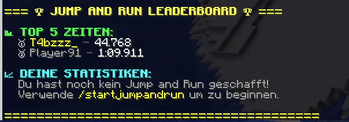
### Timer & Statistics - Live HUD: Real-time display of time and progress - Precise Time Tracking: Accurate to the millisecond - Persistent Leaderboards: Best times are permanently saved - Detailed Statistics: Best time, completion count, and rank position
### Multiplayer Support - Concurrent Players: Multiple players can play simultaneously - Individual Sessions: Each player has their own blocks - Collision Avoidance: Blocks don't overlap between players
### Admin Features - Zone System: Define areas with `/startjumpandrun pos1/pos2` - Custom Spawnpoints: Set special respawn locations - Debug Mode: Extended logging options for server admins - Automatic Configuration: Settings are automatically saved
## Commands
### For Players - `/startjumpandrun` - Start your jump and run - `/startjumpandrun stop` - End your current game - `/leaderboard` - Show the leaderboard
### For Admins (OP Level 2)
- `/startjumpandrun pos1
## Installation & Setup
### Quick Start 1. Installation: Download the mod and place it in your `mods` folder 2. Pressure Plate: Place a Heavy Weighted Pressure Plate 3. Play: Step on the plate or use `/startjumpandrun` 4. Setup Zone (Optional): Use `/startjumpandrun pos1` and `pos2` for defined areas
### Technical Requirements - Minecraft Version: 1. 20+ (Fabric) - Dependencies: Fabric API - Configuration: Automatically saved to `config/jumpandrun.properties` - Leaderboard: Stored in `config/jumpandrun_times.properties` - Performance: Optimized for multi-player servers
## Gameplay
### How It Works 1. Start: Step on a heavy weighted pressure plate or use the command 2. Jump: Navigate through randomly spawned wool blocks 3. Progress: Only 2 blocks exist at once - reach one to spawn the next 4. Complete: Reach all 30 blocks to finish and set your time 5. Compete: Check the leaderboard to see how you rank!
### Leaderboard System - Top 5 Display: Best times are prominently shown - Personal Statistics: Each player sees their own records - Ranking Position: Find out where you stand in comparison - Persistent Data: Times survive server restarts
### Wool Colors The system uses 10 different wool colors: - White, Red, Blue, Green, Yellow - Purple, Orange, Pink, Cyan, Lime
## Performance & Safety
- Automatic Cleanup: Blocks are automatically removed
- Fall Protection: Players are safely teleported when falling
- Resource Efficient: Minimal server impact
- Collision Detection: Prevents block conflicts between players
This mod is actively developed and maintained. Bug reports and feature requests are welcome!
Ready for the ultimate parkour experience? Download Jump and Run and leap into adventure!
📊 Mod Details
- Game
- Minecraft Mods
- Author
- .t4bzzz
- Version
- 1.0
- Downloads
- 154
- Endorsements
- 2
- Category
- fabric
- Created
- 5/31/2025
- Updated
- 5/25/2025
- Game Versions
- 1.21.1
- Tags
- minigame
🔧 How to Install Minecraft Mods Mods
Download from Modrinth. Use Prism Launcher or drop into your mods folder.
📖 Full step-by-step install guide for Minecraft Mods →
Visit the official mod page for specific installation instructions for this mod.
🎮 Need cheat codes or console commands? Check ur gaming wiki for Minecraft Mods commands, item IDs, and more.
❓ Frequently Asked Questions
Which Minecraft Mods versions does JumpAndRun support?
The author lists 1.21.1. Other versions may work but are untested by the author.
What is the latest version of JumpAndRun?
Version 1.0, published 2025-05-25 with 154 downloads recorded at the source.
Keep browsing — more Minecraft Mods mods await