Just Enough Items (JEI)
🟡 Updated this year⚠️ Install Order · 2 steps
Install in this order, then this mod last — most mods fail to load without their framework and dependencies in place.
🖼️ Gallery (6 images)
🔍 Analysis
- 👍 0.0% endorsement rate
- 🏆 #15 of 1284 fabric mods in this game by downloads
📋 About This Mod
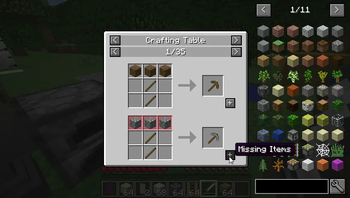
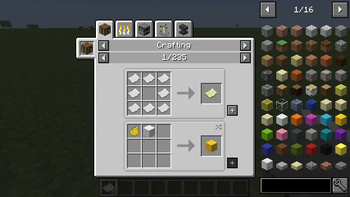
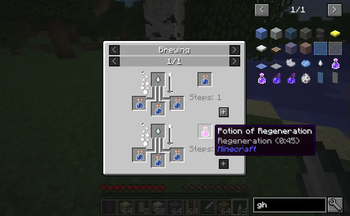
# Just Enough Items JEI is an item and recipe viewing mod for Minecraft, built from the ground up for stability and performance.
!(https://cdn.modrinth.com/data/u6dRKJwZ/images/ee0ea4051573264d2b4edb53f9d4e634faa11f21.png)
## Controls
### Inventory: (Minecraft Options -> Controls)
Show Recipes: Hover over item + R Show Uses: Hover over item + U Toggle Item List Overlay: Control + O
### Item List: Show Recipes: Click Item or type R Show Uses: Right-Click Item or type U Next/Previous page: Scroll Wheel
### Search: Select Search Bar: Click or Control + F Clear Search: Right Click Previous Search: Up Arrow Search by Mod Name: Type @ in front of a word (@thaum) Multiple terms work together (wand @thaum)
Exclude search terms: Type - in front of a word (@thaum -wand)
Search terms that have spaces in them: Type "" around the words ("two words")
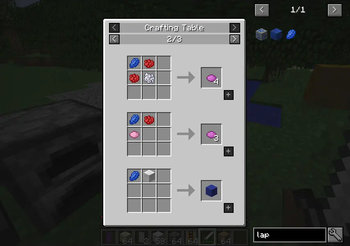
### Recipe View: Next/Previous page: Scroll Wheel Show all Recipes: Click the recipe category's name Move items into crafting area: Click the [+] button. Shift-Click to move multiple sets of items.
View advanced controls
### Advanced Search: Search by Tooltip Only: Type # in front of a word Search by OreDict name: Type $ in front of a word Search by Creative Tab: Type % in front of a word Multiple Searches: Separate terms with | characters, like "wrench|hammer"
### With Cheat Mode Active: Get a full stack of Items: Click Item Get one Item: Right-Click Item Delete Item: Drop an Item into the Item List
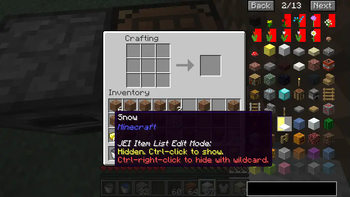
### With Item List Edit Mode Active: (These controls are shown in-game on the item tooltip)
Hide Item: Control-Click Item Hide Items and Sub-Items: Control-Right-Click Item Hide all Items from a mod: Control-Shift-Click Item
## FAQ ### Can I include JEI in my mod pack? Of course!
### Can JEI run client-only, or with a vanilla server? Yes, with some features disabled: - The "Move items into crafting area" [+] buttons. - Cheating in items that have lots of NBT data. - Deleting items.
Since Minecraft 1. 21. 2, recipes are stored on the server and not the client. Please install JEI and NeoForge/Fabric on the server to sync recipes to the client.
### Where can I find the ___ feature from NEI?
(https://docs.google.com/spreadsheets/d/1NEWZjKvWB-SibY1BXc1zoYkK7AhjMMBZess9wMy--6w/edit#gid=0)
### I have an issue / bug / crash / report / request, where can I send it? (https://github.com/mezz/JustEnoughItems/issues)
## Support (https://www.patreon.com/mezz)
JEI is a highly popular item and recipe viewing mod for Minecraft, rebuilt for stability and performance. It offers intuitive controls for viewing recipes, uses, and searching items, with advanced search options and cheat mode. With over 72.9M downloads and 10,830 endorsements, it's a staple for modded Minecraft players.
✨ Key Features
📊 Pros & Cons
✅ Pros
- Massive community trust with 72.9M downloads and 10,830 endorsements
- Built for stability and performance, a core mod for modpacks
- Advanced search and cheat features give power users fine control
⚠️ Cons
- Requires Fabric, so not for Forge users without an alternative
- Cheat mode and some features are disabled on vanilla servers, limiting functionality
This is for any Minecraft player who uses mods and wants to easily look up recipes and item uses. It's essential for modpack creators and players who need quick access to crafting information. If you play on a vanilla server, you'll still get basic recipe viewing but lose cheat features.
💡 Beginner Tips
- Use @ to search by mod name, like '@thaum' to find Thaumcraft items
- Hover over an item and press R to see its recipe, U to see where it's used
- In cheat mode, click an item to get a full stack, right-click for one
📊 Mod Details
- Game
- Minecraft Mods
- Author
- mezz
- Version
- 29.29.0.85
- Downloads
- 72,888,390
- Endorsements
- 10,830
- Category
- fabric
- Created
- 1/29/2023
- Updated
- 8/27/2026
- Game Versions
- 26.1, 26.1.1, 26.1.2
- Tags
- library, utility
🔧 How to Install Minecraft Mods Mods
Download from Modrinth. Use Prism Launcher or drop into your mods folder.
📖 Full step-by-step install guide for Minecraft Mods →
Visit the official mod page for specific installation instructions for this mod.
🎮 Need cheat codes or console commands? Check ur gaming wiki for Minecraft Mods commands, item IDs, and more.
❓ Frequently Asked Questions
Which Minecraft Mods versions does Just Enough Items (JEI) support?
The author lists 26.1, 26.1.1, 26.1.2. Other versions may work but are untested by the author.
What is the latest version of Just Enough Items (JEI)?
Version 29.29.0.85, published 2026-08-27 with 72.9M downloads recorded at the source.
Keep browsing — more Minecraft Mods mods await