JAW Lab
🟡 Updated this year⚠️ Install Order · 2 steps
Install in this order, then this mod last — most mods fail to load without their framework and dependencies in place.
🖼️ Gallery (4 images)
🔍 Analysis
- 👍 0.8% endorsement rate
- 🏆 #67 of 257 decoration mods in this game by downloads
📋 About This Mod
<img src="https://i.imgur.com/ZOo3zcf.png" alt="Jaw"> This mod adds a key door system with a keycards system verificated via networks with security systems that gives ability to create multiple facilities with different networks in single world. Also mod adds many functional and decorative blocks ## Networks Networks gives ability to create many autonomic facilities with diffirent keycards. ### Features: - Roles - Access levels - UUID verification Roles allows to do specific actions: adding users, configurate keydoors, manage keycards level e.t.c ### Roles: - Founder - Admin - Moderator - User ## Keycards <img src="https://i.imgur.com/sU8hLme.png" alt="Keycards"> Keycards activates different mechanisms: key doors or keycard interfaces. Keycard level is not binded to it's actual texture. You can set any level Features: - Individual name - UUID verification (coming in 0.8) - Access level - Network ## Doors <img src="https://i.imgur.com/3pvOvdL.png" alt="Doors"> Mod adds key doors and code doors. Key doors can be opened via keycards, code doors can be only open by providing password. All the doors closes after a small delay but <strong>this can be disabled in door settings</strong> To the key doors you can set any level: from 0 to billiards Code doors password cannot be longer than 9 symbols ## Barrier Gates <img src="https://i.imgur.com/l4BtYGc.png" alt="Block-Barrier"> Mod adds a gates system - multiblock structure 16xinfinite blocks maximum. Currently there is only on type of gate: blocker-gate; If turned on - solid. Planned to add: laser-gate (kills you) and check-gate (fizzlers blacklisted items) Also improving visualisation is planned. | Blocker-Gate | Laser-Gate | Fizzler-Gate 3 | |---------------------|:---------------------:|---------------------:| | Currently creative only | In developmet | In developmet | | Blocks player from passing threw | Kills player | Fizzlers blacklisted items | ## Decorations <img src="https://i.imgur.com/YPdZWnE.png" alt="Decorations"> Currently there aren't many decoration block, more will be added in future updates Want to suggest an idea? Leave it in (https://discord.gg/yMAXVDabCs)! P.S if you are a designer - dm me in (https://discord.gg/yMAXVDabCs) to improve visual. I'm bad at this... ## Usage To set up door you first need to create network. Use keycard programmator. !(https://cdn.modrinth.com/data/cached_images/56987e17d6f95214d39d113c420065b409a369d1.png) First you see a network name !(https://cdn.modrinth.com/data/cached_images/bcd969ab30971b06e42dc8fcabeec3a71235201e.png) Currently selected user !(https://cdn.modrinth.com/data/cached_images/229548d29e8ac91d530698540840c05b9f2b1805.png) But how to add Network and User? Type Network Name at the bottom box to set a name !(https://cdn.modrinth.com/data/cached_images/87d7d5a65d0ed92ebbd5aabb4309f9194aaa2b42.png) Then click add button at the left Minus button deletes network !(https://cdn.modrinth.com/data/cached_images/85f8650e0ac8f23d249863932f28650bc6f4036a.png) Now your menu changed and you will see something like this !(https://cdn.modrinth.com/data/cached_images/d2a248da9d3fff1fc0eb1af01ea0502f2caf6329.png) To add user you need to type a username at box below (replace your network name) and then click one of these buttons as like network management above !(https://cdn.modrinth.com/data/cached_images/ab4e406087eb81428e7d09d658e562e256eabdba.png) Now you can view this user settings: his role and access level. But how do you manage it? !(https://cdn.modrinth.com/data/cached_images/134f14fca0bb05c1cae78efda82a28df46af8b45.png) There are a few buttons on the right !(https://cdn.modrinth.com/data/cached_images/1c1f3950a823480957a6a407856684eeb8b272e2.png) Arrows changes user role: member / moderator / admin / founder Plus and minus buttons manages user level Magnifying glass button used to find players. For example if you want to chage someones properties you can type his name at box below and click this button. System will found this user in selected network But why do we need user level and roles? Now let's move to Keycard menu !(https://cdn.modrinth.com/data/cached_images/fb2bcf5b5258144c02d9e3adb9b66ecdddf05bb7.png) Here you can view keycard's properties. First of all you need to bind your keycard to network. To do this you need a role at least moderator. Adding networks is similar to the network creation we did before !(https://cdn.modrinth.com/data/cached_images/d63ee32e150abcadb80691c43141106968107324.png) Now you can change keycard properties. To set level you have a buttons on the right. Level can be changed only by moderators and higher. But moderators can modify level in case their user level we changed in network configuration is higher. For ex

This mod adds a key door system with a keycards system verificated via networks with security systems that gives ability to create multiple facilities with different networks in single world. Also mod adds many functional and decorative blocks
## Networks Networks gives ability to create many autonomic facilities with diffirent keycards. ### Features: - Roles - Access levels - UUID verification
Roles allows to do specific actions: adding users, configurate keydoors, manage keycards level e.t.c ### Roles: - Founder - Admin - Moderator - User
## Keycards

Keycards activates different mechanisms: key doors or keycard interfaces. Keycard level is not binded to it's actual texture. You can set any level Features: - Individual name - UUID verification (coming in 0. 8) - Access level - Network
## Doors

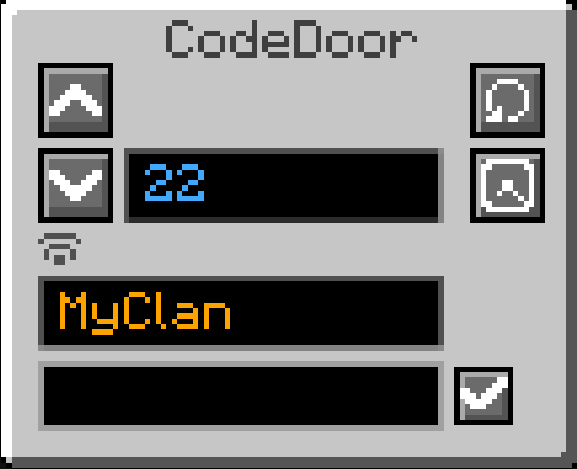
Mod adds key doors and code doors. Key doors can be opened via keycards, code doors can be only open by providing password. All the doors closes after a small delay but this can be disabled in door settings
To the key doors you can set any level: from 0 to billiards Code doors password cannot be longer than 9 symbols
## Barrier Gates

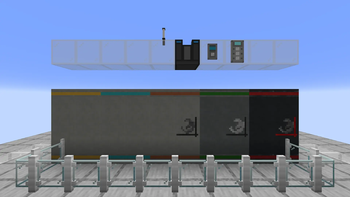
Mod adds a gates system - multiblock structure 16xinfinite blocks maximum. Currently there is only on type of gate: blocker-gate; If turned on - solid. Planned to add: laser-gate (kills you) and check-gate (fizzlers blacklisted items) Also improving visualisation is planned. | Blocker-Gate | Laser-Gate | Fizzler-Gate 3 | |---------------------|:---------------------:|---------------------:| | Currently creative only | In developmet | In developmet | | Blocks player from passing threw | Kills player | Fizzlers blacklisted items |
## Decorations

Currently there aren't many decoration block, more will be added in future updates Want to suggest an idea? Leave it in (https://discord.gg/yMAXVDabCs)!
P. S if you are a designer - dm me in (https://discord.gg/yMAXVDabCs) to improve visual. I'm bad at this...
## Usage To set up door you first need to create network. Use keycard programmator.
!(https://cdn.modrinth.com/data/cached_images/56987e17d6f95214d39d113c420065b409a369d1.png)
First you see a network name
!(https://cdn.modrinth.com/data/cached_images/bcd969ab30971b06e42dc8fcabeec3a71235201e.png)
Currently selected user
!(https://cdn.modrinth.com/data/cached_images/229548d29e8ac91d530698540840c05b9f2b1805.png)
But how to add Network and User? Type Network Name at the bottom box to set a name
!(https://cdn.modrinth.com/data/cached_images/87d7d5a65d0ed92ebbd5aabb4309f9194aaa2b42.png)
Then click add button at the left Minus button deletes network
!(https://cdn.modrinth.com/data/cached_images/85f8650e0ac8f23d249863932f28650bc6f4036a.png)
Now your menu changed and you will see something like this
!(https://cdn.modrinth.com/data/cached_images/d2a248da9d3fff1fc0eb1af01ea0502f2caf6329.png)
To add user you need to type a username at box below (replace your network name) and then click one of these buttons as like network management above
!(https://cdn.modrinth.com/data/cached_images/ab4e406087eb81428e7d09d658e562e256eabdba.png)
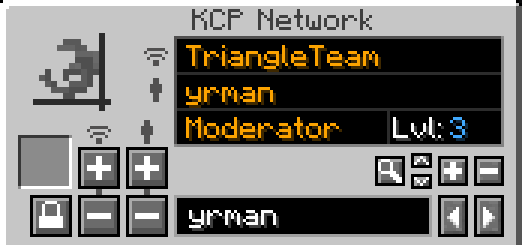
Now you can view this user settings: his role and access level. But how do you manage it?
!(https://cdn.modrinth.com/data/cached_images/134f14fca0bb05c1cae78efda82a28df46af8b45.png)
There are a few buttons on the right
!(https://cdn.modrinth.com/data/cached_images/1c1f3950a823480957a6a407856684eeb8b272e2.png)
Arrows changes user role: member / moderator / admin / founder Plus and minus buttons manages user level
Magnifying glass button used to find players. For example if you want to chage someones properties you can type his name at box below and click this button. System will found this user in selected network
But why do we need user level and roles? Now let's move to Keycard menu
!(https://cdn.modrinth.com/data/cached_images/fb2bcf5b5258144c02d9e3adb9b66ecdddf05bb7.png)
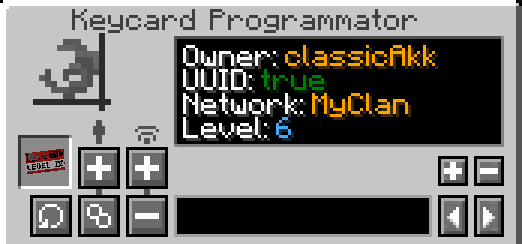
Here you can view keycard's properties. First of all you need to bind your keycard to network. To do this you need a role at least moderator. Adding networks is similar to the network creation we did before
!(https://cdn.modrinth.com/data/cached_images/d63ee32e150abcadb80691c43141106968107324.png)
Now you can change keycard properties. To set level you have a buttons on the right. Level can be changed only by moderators and higher. But moderators can modify level in case their user level we changed in network configuration is higher. For ex
📊 Mod Details
- Game
- Minecraft Mods
- Author
- Awyvrix
- Version
- 0.8-1.21.1
- Downloads
- 1,142
- Endorsements
- 9
- Category
- decoration
- Created
- 3/29/2026
- Updated
- 5/25/2026
- Game Versions
- 1.21.1
- Tags
- decoration, game-mechanics, technology
🔧 How to Install Minecraft Mods Mods
Download from Modrinth. Use Prism Launcher or drop into your mods folder.
📖 Full step-by-step install guide for Minecraft Mods →
Visit the official mod page for specific installation instructions for this mod.
🎮 Need cheat codes or console commands? Check ur gaming wiki for Minecraft Mods commands, item IDs, and more.
❓ Frequently Asked Questions
Which Minecraft Mods versions does JAW Lab support?
The author lists 1.21.1. Other versions may work but are untested by the author.
What is the latest version of JAW Lab?
Version 0.8-1.21.1, published 2026-05-25 with 1,142 downloads recorded at the source.
Keep browsing — more Minecraft Mods mods await