JackItToMe (JEI/REI/EMI)
🟡 Updated this year⚠️ Install Order · 2 steps
Install in this order, then this mod last — most mods fail to load without their framework and dependencies in place.
🖼️ Gallery (1 images)
🔍 Analysis
- 🏆 #12 of 84 neoforge mods in this game by downloads
📋 About This Mod
# JackItToMe A NeoForge 1.21.x mod that pulls items from whatever inventory you have open into your own — either one item at a time with a keybind, or a whole recipe's worth with a button on your recipe viewer's recipe screen. Works with **JEI**, **EMI**, or **REI** — install whichever you already use. ## Two ways to grab items ### 1. Hover-and-press: pull items Hover the cursor over **any item** in any open screen and press **G**. One of that item moves into your inventory, sourced from whatever container is open behind the cursor. Three keybinds control how much you pull — each one shows up in **Options → Controls → JackItToMe** and can be rebound independently: | Keybind (default) | Effect | | ----------------- | --------------------------------------- | | **G** | One item | | **Shift+G** | One full stack (up to 64) | | **Ctrl+G** | As much as fits in your inventory | Ctrl beats Shift if you hold both. **Autocraft escalation:** if the hovered item isn't in stock but your open storage network can craft it (AE2, Refined Storage, or Integrated Dynamics), pressing G opens that system's native autocraft popup pre-filled with the amount your modifier asked for (1 / 64 / a lot). Works on: - Vanilla container slots (chest, barrel, shulker, etc.) - Items in your recipe viewer's item list and favorites/bookmarks - Slots inside a recipe view — including the cycling "any planks" tag slots, where all variants are considered and whichever you actually have is what gets pulled ### 2. Per-recipe button: start crafting (and optionally pull what's ready) While viewing any recipe, a chest-icon **J** button appears on the recipe. Hover it to preview the state of each slot, then click to act on the recipe. - **Hover** the button: each input slot is checked against your open storage, refreshing every ¾ second while you stay on the button. - **Red** = missing, and no connected storage system can produce it. - **Green** = missing, but your network can autocraft it. - **Clear** = in stock. - The tooltip also shows **"Current stock can make: N"** — how many of the result your stock covers right now (autocraft potential not counted). - **Click** the button: - If every ingredient is in stock: pulls them all (at recipe amounts) into your inventory. - If any ingredient is missing: triggers autocraft popups (one after the next) for the missing-but-craftable ones. **Does not pull anything** — in-stock items stay in storage so you can review the popups without committing. - **Alt+Click**: pulls every in-stock ingredient at recipe amounts **and** triggers autocraft popups for the missing-but-craftable ones. (Alt is the default — it's a rebindable keybind, see Configuring.) - **Shift+Click**: pulls the materials for **a full stack of the output** — a book prints one per craft, so Shift grabs 64 crafts' worth: 192 paper + 64 leather. Always whole crafts, ratios preserved: with 64 paper but only 3 leather in stock you get 9 paper + 3 leather (three crafts' worth), never a useless pile of paper. - **Ctrl+Click**: as many complete crafts as your storage (and inventory space) supports. Ctrl beats Shift if you hold both. - **Add Alt to Shift/Ctrl**: same targets, but drop the whole-crafts rule — every ingredient fills toward the target from whatever stock exists, even when another ingredient is completely missing. "Grab what you can, I'll sort out the rest." Missing-but-craftable ingredients never limit Shift/Ctrl — their popups open pre-filled with exactly the gap toward the requested amount. The modifiers mean the same thing everywhere: **Shift = a stack's worth, Ctrl = as much as fits** — on the hover keybind and on the recipe button alike. Alt is the button's "pull what's in stock anyway" override for when something is missing. ### The full matrix | Input | Hovering an item (keybind) | On the recipe button | | ----- | -------------------------- | -------------------- | | **G** / plain click | Pull 1 of that item | Pull the recipe's amounts — but if anything is missing, only open autocraft popups (nothing pulled) | | **Shift** | Pull one stack of it | Pull materials for a **stack of the output** — whole crafts only | | **Ctrl** | Pull as much as fits | Pull as many **whole crafts** as stock allows | | **Alt** | — | Pull in-stock recipe amounts even though something is missing | | **Alt+Shift** | — | Stack-of-output target, but fill each ingredient from whatever stock exists (no whole-crafts rule) | | **Alt+Ctrl** | — | Same, with the "as much as fits" target | Everywhere: Ctrl beats Shift; anything missing-but-autocraftable opens its native craft popup pre-filled with exactly the gap. ## Recipe viewers Install any **one** of these (or none). The mod adapts to whichever it finds: | Viewer | Pull button | Hover tooltip | Red/green slot overlays | | -----
# JackItToMe
A NeoForge 1. 21.x mod that pulls items from whatever inventory you have open into your own — either one item at a time with a keybind, or a whole recipe's worth with a button on your recipe viewer's recipe screen.
Works with JEI, EMI, or REI — install whichever you already use.
## Two ways to grab items
### 1. Hover-and-press: pull items
Hover the cursor over any item in any open screen and press G. One of that item moves into your inventory, sourced from whatever container is open behind the cursor.
Three keybinds control how much you pull — each one shows up in Options → Controls → JackItToMe and can be rebound independently:
| Keybind (default) | Effect | | ----------------- | --------------------------------------- | | G | One item | | Shift+G | One full stack (up to 64) | | Ctrl+G | As much as fits in your inventory |
Ctrl beats Shift if you hold both.
Autocraft escalation: if the hovered item isn't in stock but your open storage network can craft it (AE2, Refined Storage, or Integrated Dynamics), pressing G opens that system's native autocraft popup pre-filled with the amount your modifier asked for (1 / 64 / a lot).
- Vanilla container slots (chest, barrel, shulker, etc.)
- Items in your recipe viewer's item list and favorites/bookmarks
- Slots inside a recipe view — including the cycling "any planks" tag slots,
- where all variants are considered and whichever you actually have is what
- gets pulled
### 2. Per-recipe button: start crafting (and optionally pull what's ready)
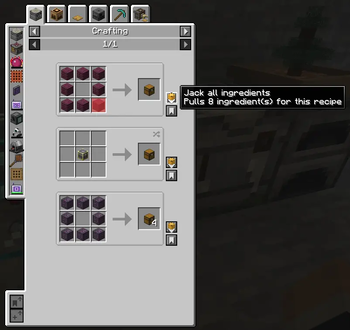
While viewing any recipe, a chest-icon J button appears on the recipe. Hover it to preview the state of each slot, then click to act on the recipe.
- Hover the button: each input slot is checked against your open storage,
- refreshing every ¾ second while you stay on the button.
- - Red = missing, and no connected storage system can produce it.
- - Green = missing, but your network can autocraft it.
- - Clear = in stock.
- - The tooltip also shows "Current stock can make: N" — how many of
- the result your stock covers right now (autocraft potential not
- counted).
- Click the button:
- - If every ingredient is in stock: pulls them all (at recipe amounts)
- into your inventory.
- - If any ingredient is missing: triggers autocraft popups (one after the
- next) for the missing-but-craftable ones. Does not pull anything —
- in-stock items stay in storage so you can review the popups without
- committing.
- Alt+Click: pulls every in-stock ingredient at recipe amounts and
- triggers autocraft popups for the missing-but-craftable ones. (Alt is
- the default — it's a rebindable keybind, see Configuring.)
- Shift+Click: pulls the materials for a full stack of the output
- — a book prints one per craft, so Shift grabs 64 crafts' worth: 192
- paper + 64 leather. Always whole crafts, ratios preserved: with 64
- paper but only 3 leather in stock you get 9 paper + 3 leather (three
- crafts' worth), never a useless pile of paper.
- Ctrl+Click: as many complete crafts as your storage (and inventory
- space) supports. Ctrl beats Shift if you hold both.
- Add Alt to Shift/Ctrl: same targets, but drop the whole-crafts
- rule — every ingredient fills toward the target from whatever stock
- exists, even when another ingredient is completely missing. "Grab
- what you can, I'll sort out the rest."
Missing-but-craftable ingredients never limit Shift/Ctrl — their popups open pre-filled with exactly the gap toward the requested amount.
The modifiers mean the same thing everywhere: Shift = a stack's worth, Ctrl = as much as fits — on the hover keybind and on the recipe button alike. Alt is the button's "pull what's in stock anyway" override for when something is missing.
### The full matrix
| Input | Hovering an item (keybind) | On the recipe button | | ----- | -------------------------- | -------------------- | | G / plain click | Pull 1 of that item | Pull the recipe's amounts — but if anything is missing, only open autocraft popups (nothing pulled) | | Shift | Pull one stack of it | Pull materials for a stack of the output — whole crafts only | | Ctrl | Pull as much as fits | Pull as many whole crafts as stock allows | | Alt | — | Pull in-stock recipe amounts even though something is missing | | Alt+Shift | — | Stack-of-output target, but fill each ingredient from whatever stock exists (no whole-crafts rule) | | Alt+Ctrl | — | Same, with the "as much as fits" target |
Everywhere: Ctrl beats Shift; anything missing-but-autocraftable opens its native craft popup pre-filled with exactly the gap.
## Recipe viewers
Install any one of these (or none). The mod adapts to whichever it finds:
| Viewer | Pull button | Hover tooltip | Red/green slot overlays | | -----
📊 Mod Details
- Game
- Minecraft Mods
- Author
- ljack2k
- Version
- 1.0.0+1.21.1
- Downloads
- 285
- Endorsements
- 1
- Category
- neoforge
- Created
- 5/28/2026
- Updated
- 8/25/2026
- Game Versions
- 1.21.1
- Tags
- storage, utility
🔧 How to Install Minecraft Mods Mods
Download from Modrinth. Use Prism Launcher or drop into your mods folder.
📖 Full step-by-step install guide for Minecraft Mods →
Visit the official mod page for specific installation instructions for this mod.
🎮 Need cheat codes or console commands? Check ur gaming wiki for Minecraft Mods commands, item IDs, and more.
❓ Frequently Asked Questions
Which Minecraft Mods versions does JackItToMe (JEI/REI/EMI) support?
The author lists 1.21.1. Other versions may work but are untested by the author.
What is the latest version of JackItToMe (JEI/REI/EMI)?
Version 1.0.0+1.21.1, published 2026-08-25 with 285 downloads recorded at the source.
Keep browsing — more Minecraft Mods mods await