Island++
🟡 Updated this year⚠️ Install Order · 2 steps
Install in this order, then this mod last — most mods fail to load without their framework and dependencies in place.
🖼️ Gallery (12 images)


🔍 Analysis
- 👍 0.3% endorsement rate
- 🏆 #163 of 874 fabric mods in this game by downloads
📋 About This Mod
Island++ --- Client-side utility mod for (https://mcchampionship.com/island/). Fork of (https://github.com/pe3ep/Trident) adding a lot of extra features and additions, especially to fishing Join the discord! (https://discord.gg/EyvNtSKbT6) ## Requirements - Minecraft 1.21.8 - Fabric - (https://modrinth.com/mod/yacl) - (https://modrinth.com/mod/fabric-language-kotlin) - (https://modrinth.com/mod/noxesium) ## Island++ Features ### Hook, Magnet, Rod Chances & Chance perks modules Each row shows the Base view (left) and the Expanded view (right) of a module. All the modules calculations are affected by your current spot, tides, upgrades, augments, supplies, and anything else that should affect them. <table> <thead> <tr> <th align="center">Base</th> <th align="center">Expanded</th> </tr> </thead> <tbody> <tr> <td align="center"><img alt="Module base view 1" src="https://cdn.modrinth.com/data/cached_images/c15fca8900dfd4db72c61e6285d4caf0380e3f5e.png" width="100%" /><br/><sub>Base view — compact overview</sub></td> <td align="center"><img alt="Module expanded view 1" src="https://cdn.modrinth.com/data/cached_images/7c9ca6da29ce5dc089cead72a19b235c1f5e456c.png" width="100%" /><br/><sub>Expanded view — Shows calculations.</sub></td> </tr> <tr> <td align="center"><img alt="Module base view 2" src="https://cdn.modrinth.com/data/cached_images/f8ccc42f1c4e824891a77df35520fadd83a44431.png" width="100%" /><br/><sub>Base view — compact overview</sub></td> <td align="center"><img alt="Module expanded view 2" src="https://cdn.modrinth.com/data/cached_images/08cbd9b9a1b59cf43c58835eb2263f33ca399d6f.png" width="100%" /><br/><sub>Expanded view — Shows calculations, and the % chance to get 1 more</sub></td> </tr> <tr> <td align="center"><img alt="Module base view 3" src="https://cdn.modrinth.com/data/cached_images/5c7281d21117ba2dc29f2bebcc6b47b677ff2c58.png" width="100%" /><br/><sub>Base view — compact overview</sub></td> <td align="center"><img alt="Module expanded view 3" src="https://cdn.modrinth.com/data/cached_images/faf78e2fb485c519337589b9976a1838b2277a75.png" width="100%" /><br/><sub>Expanded view — Shows calculations. Also works in grotto spots!</sub></td> </tr> </tbody> <tfoot> <tr> <td colspan="2" align="center"><sub>Use the dropdowns to view detailed breakdowns, and use the compact view to see useful info at a glance.</sub></td> </tr> </tfoot> </table> <p align="center"> <img alt="Additional module view" src="https://cdn.modrinth.com/data/cached_images/65fa05371248a72a3553d5b0b634713e34565d75.png" width="70%" /> <br/> <sub>Rod chances also included</sub> </p> ### Upgraded Supplies module <table> <caption><strong>Upgraded Supplies module</strong></caption> <tbody> <tr> <td align="center" width="60%"> <img alt="Upgraded Supplies module" src="https://cdn.modrinth.com/data/cached_images/ba1af87e1b89d2dc63e256f45e103996e93a674e.png" width="100%" /> </td> <td width="40%"> <ul> <li>Colorcoded bait and line!</li> <li>Shows supplies, augments, and overclocks</li> <li>Displays OC levels</li> <li>Augment uses: max and remaining</li> </ul> </td> </tr> </tbody> </table> ### Upgrades module <table> <caption><strong>Upgrades module</strong></caption> <tbody> <tr> <td align="center" width="60%"> <img alt="Upgrades module" src="https://cdn.modrinth.com/data/cached_images/3bb577c9429b591aaf9f2b5b644629e0b37e0db7.png" width="100%" /> </td> <td width="40%"> <ul> <li>Summarizes your current upgrade status</li> <li>Quick at-a-glance progress</li> </ul> </td> </tr> </tbody> </table> ### Spot module <table> <caption><strong>Spot module</strong></caption> <tbody> <tr> <td align="center" width="60%"> <img alt="Spot module" src="https://cdn.modrinth.com/data/cached_images/7844f31e0b5cea3b7d8aa4ef2ad83a8b7b20072a.png" width="100%" /> </td> <td width="40%"> <ul> <li>Displays all buffs from the current spot</li> <li>Understand context-specific bonuses quickly</li> </ul> </td> </tr> </tbody> </table> ## Base Trident Features <table> <caption><strong>Base Trident Features</strong></caption> <thead> <tr> <th align="left">Feature</th> <th align="center">Preview</th> <th align="left">Description</th> </tr> </thead> <tbody> <tr> <td><strong>Rarity overlay</strong></td> <td align="center">—</td> <td>Displays an outline behind the item in the color of its rarity</td> </tr> <tr> <td><strong>Blueprint indicators</strong></td> <td align="center"><img alt="Blueprint indicators" s
Island++ --- Client-side utility mod for (https://mcchampionship.com/island/). Fork of (https://github.com/pe3ep/Trident) adding a lot of extra features and additions, especially to fishing
Join the discord! (https://discord.gg/EyvNtSKbT6)
## Requirements - Minecraft 1. 21. 8 - Fabric - (https://modrinth.com/mod/yacl) - (https://modrinth.com/mod/fabric-language-kotlin) - (https://modrinth.com/mod/noxesium)
## Island++ Features
### Hook, Magnet, Rod Chances & Chance perks modules
Each row shows the Base view (left) and the Expanded view (right) of a module.
All the modules calculations are affected by your current spot, tides, upgrades, augments, supplies, and anything else that should affect them.
| Base | Expanded |
|---|---|
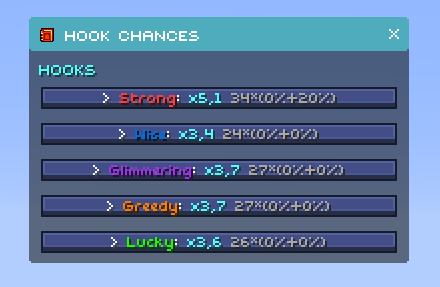 Base view — compact overview
 |
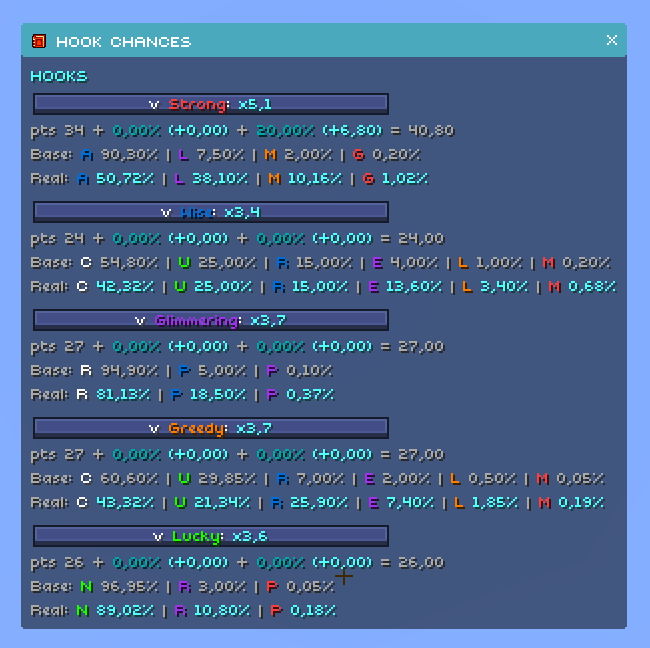 Expanded view — Shows calculations.
 |
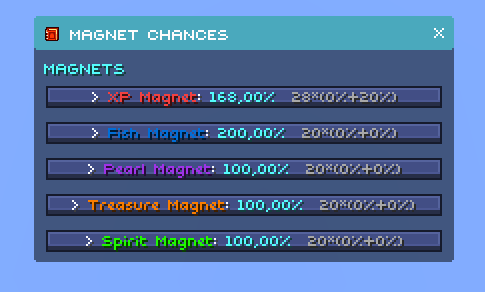 Base view — compact overview
 |
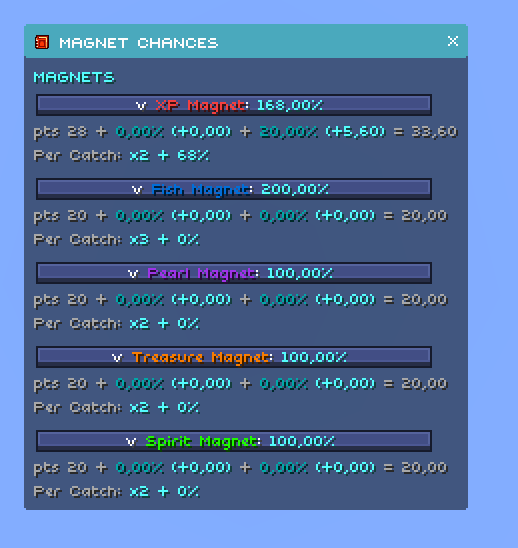 Expanded view — Shows calculations, and the % chance to get 1 more
 |
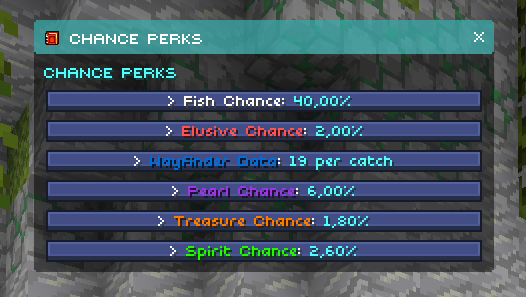 Base view — compact overview
 |
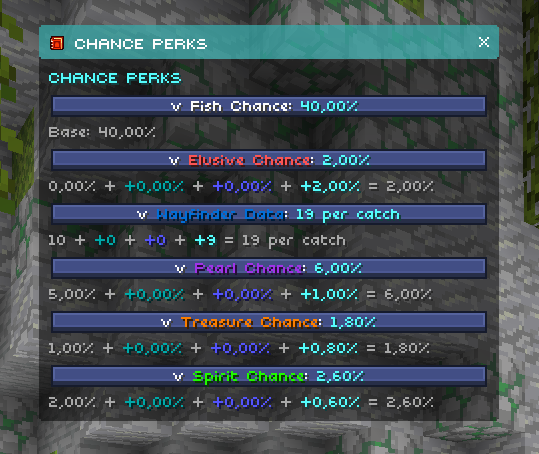 Expanded view — Shows calculations. Also works in grotto spots!
 |
| Use the dropdowns to view detailed breakdowns, and use the compact view to see useful info at a glance. | |
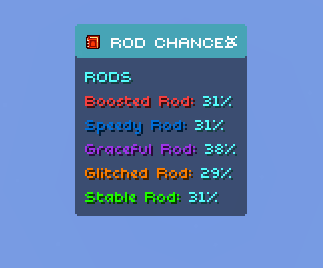
Rod chances also included
### Upgraded Supplies module
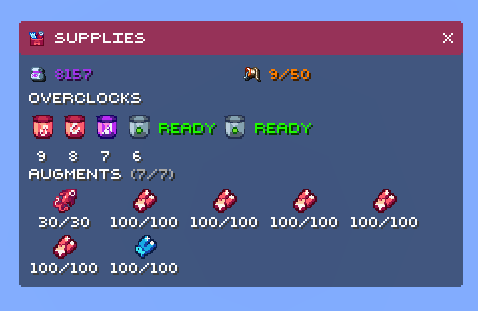
|
|
### Upgrades module
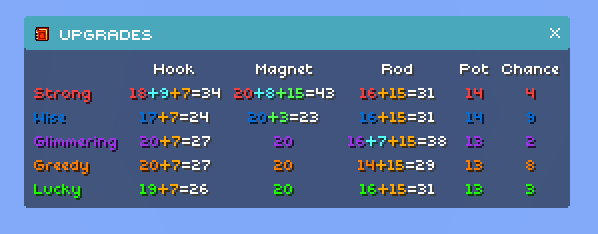
|
|
### Spot module
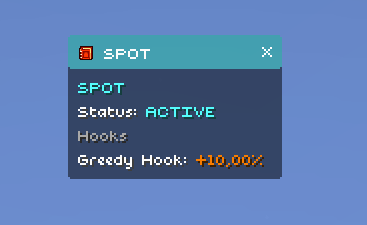
|
|
## Base Trident Features
| Feature | Preview | Description |
|---|---|---|
| Rarity overlay | — | Displays an outline behind the item in the color of its rarity |
| Blueprint indicators | 🤖 AI-enhanced — based on mod data
📊 Mod Details
🔧 How to Install Minecraft Mods ModsDownload from Modrinth. Use Prism Launcher or drop into your mods folder. 📖 Full step-by-step install guide for Minecraft Mods → Visit the official mod page for specific installation instructions for this mod. 🎮 Need cheat codes or console commands? Check ur gaming wiki for Minecraft Mods commands, item IDs, and more. ❓ Frequently Asked QuestionsWhich Minecraft Mods versions does Island++ support?The author lists 1.21.8. Other versions may work but are untested by the author. What is the latest version of Island++?Version 1.4.1, published 2025-10-08 with 1,999 downloads recorded at the source. Keep browsing — more Minecraft Mods mods await |