InventorySaves+
🟡 Updated this year⚠️ Install Order · 2 steps
Install in this order, then this mod last — most mods fail to load without their framework and dependencies in place.
🖼️ Gallery (5 images)


🔍 Analysis
- 🏆 #265 of 329 equipment mods in this game by downloads
📋 About This Mod
# Inventory Saves+ 🎒✨ !(https://cdn.modrinth.com/data/cached_images/e7b202cbced9eb3f9101e4607a766815dab8e5cb.png) A full inventory management system for PvP players that goes far beyond vanilla hotbar saves — store, load, and switch complete loadouts in seconds. ## Loadout System 🧠 Save and restore your entire inventory with a single keypress. How It Works Save your full inventory to any of 18 available slots Load any slot to instantly restore your hotbar, armor, offhand, and main inventory Works exclusively in Creative Mode to keep things server-safe Async save system means zero lag when writing to disk ## Loadout Manager 🖥️ A clean in-game UI for managing all your saved loadouts. Features Scrollable list of all 18 slots with names and status Inline name editor — rename slots without extra menus Save, Load, and Delete from one screen Real-time slot preview with empty/filled state indicators Scrollbar for navigating large slot lists Accessible via keybind or ModMenu ## Preset Kits ⚔️ Jump straight into combat with one click using built-in preset loadouts. PresetDescriptionPot PvPClassic potion PvP kitAxe KitAxe-based combat setupSMP KitGeneral survival multiplayer loadoutMace KitMace-focused combat buildSword KitSword PvP standard kitUHC (Old)Classic UHC-style setupUHC (New)Modern UHC buildNethPotNether potion kitVanilla (Drain)Drain-focused vanilla kitVanilla (Eval)Evaluation vanilla kit All presets are available directly inside the Loadout Manager. ## HUD Display 🔰 A lightweight, non-intrusive HUD that keeps you informed without cluttering your screen. Features Shows active profile name and currently selected slot Fades in on change, fades out after inactivity — never in your way Smooth opacity animation with gold accent bar Text is only generated when something changes, keeping frame impact near zero ## Keybinds ⌨️ Everything is a single keypress away. ActionDefault KeySave LoadoutKLoad LoadoutLNext Slot]Previous Slot[Open Loadout MenuM All keybinds are fully remappable in the vanilla Controls menu. ## Save System 💾 Built for speed and reliability. Batched async I/O — saves never block the main thread Debounced writes — rapid changes queue into a single disk write Sparse JSON format — empty slots are skipped entirely, keeping save files small and fast to parse Saves automatically on every change; loads automatically on world join ## Commands ⚙️ (Coming in a future update — config GUI and command support are on the roadmap) Why Use Inventory Saves+? 💡 🎒 Save your full inventory — not just your hotbar ⚔️ Switch between PvP kits instantly 🏗️ Keep building, mining, and combat setups ready to go 🎨 Name and organise your slots your way 🔥 Built for competitive Creative Mode PvP and kit testing Compatibility Minecraft: 1.21.11 Loader: Fabric Environment: Client-side only Optional: ModMenu for settings screen integration
# Inventory Saves+ 🎒✨ !(https://cdn.modrinth.com/data/cached_images/e7b202cbced9eb3f9101e4607a766815dab8e5cb.png) A full inventory management system for PvP players that goes far beyond vanilla hotbar saves — store, load, and switch complete loadouts in seconds.
## Loadout System 🧠 Save and restore your entire inventory with a single keypress. How It Works
Save your full inventory to any of 18 available slots Load any slot to instantly restore your hotbar, armor, offhand, and main inventory Works exclusively in Creative Mode to keep things server-safe Async save system means zero lag when writing to disk
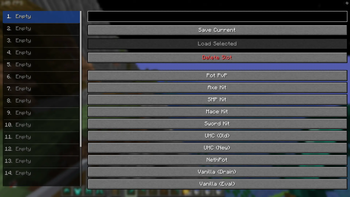
## Loadout Manager 🖥️ A clean in-game UI for managing all your saved loadouts. Features
Scrollable list of all 18 slots with names and status Inline name editor — rename slots without extra menus Save, Load, and Delete from one screen Real-time slot preview with empty/filled state indicators Scrollbar for navigating large slot lists Accessible via keybind or ModMenu
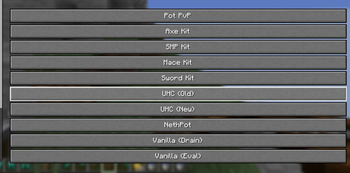
## Preset Kits ⚔️ Jump straight into combat with one click using built-in preset loadouts. PresetDescriptionPot PvPClassic potion PvP kitAxe KitAxe-based combat setupSMP KitGeneral survival multiplayer loadoutMace KitMace-focused combat buildSword KitSword PvP standard kitUHC (Old)Classic UHC-style setupUHC (New)Modern UHC buildNethPotNether potion kitVanilla (Drain)Drain-focused vanilla kitVanilla (Eval)Evaluation vanilla kit All presets are available directly inside the Loadout Manager.
## HUD Display 🔰 A lightweight, non-intrusive HUD that keeps you informed without cluttering your screen. Features
Shows active profile name and currently selected slot Fades in on change, fades out after inactivity — never in your way Smooth opacity animation with gold accent bar Text is only generated when something changes, keeping frame impact near zero
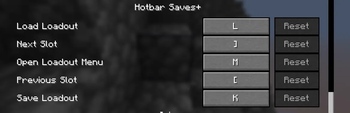
## Keybinds ⌨️ Everything is a single keypress away. ActionDefault KeySave LoadoutKLoad LoadoutLNext Slot]Previous Slot[Open Loadout MenuM All keybinds are fully remappable in the vanilla Controls menu.
## Save System 💾 Built for speed and reliability.
Batched async I/O — saves never block the main thread Debounced writes — rapid changes queue into a single disk write Sparse JSON format — empty slots are skipped entirely, keeping save files small and fast to parse Saves automatically on every change; loads automatically on world join
## Commands ⚙️ (Coming in a future update — config GUI and command support are on the roadmap)
Why Use Inventory Saves+? 💡 🎒 Save your full inventory — not just your hotbar ⚔️ Switch between PvP kits instantly 🏗️ Keep building, mining, and combat setups ready to go 🎨 Name and organise your slots your way 🔥 Built for competitive Creative Mode PvP and kit testing
Compatibility
Minecraft: 1. 21. 11 Loader: Fabric Environment: Client-side only Optional: ModMenu for settings screen integration
📊 Mod Details
- Game
- Minecraft Mods
- Author
- monobao
- Version
- 1.0-Beta
- Downloads
- 200
- Endorsements
- 0
- Category
- equipment
- Created
- 5/18/2026
- Updated
- 5/15/2026
- Game Versions
- 1.21.11
- Tags
- equipment, game-mechanics, utility
🔧 How to Install Minecraft Mods Mods
Download from Modrinth. Use Prism Launcher or drop into your mods folder.
📖 Full step-by-step install guide for Minecraft Mods →
Visit the official mod page for specific installation instructions for this mod.
🎮 Need cheat codes or console commands? Check ur gaming wiki for Minecraft Mods commands, item IDs, and more.
❓ Frequently Asked Questions
Which Minecraft Mods versions does InventorySaves+ support?
The author lists 1.21.11. Other versions may work but are untested by the author.
What is the latest version of InventorySaves+?
Version 1.0-Beta, published 2026-05-15 with 200 downloads recorded at the source.
Keep browsing — more Minecraft Mods mods await