Inventory Sorting
🟡 Updated this year⚠️ Install Order · 2 steps
Install in this order, then this mod last — most mods fail to load without their framework and dependencies in place.
Preview

🔍 Analysis
- 👍 0.0% endorsement rate
- 🏆 #435 of 1284 fabric mods in this game by downloads
📋 About This Mod
# Inventory Sorter (https://badges.crowdin.net/inventory-sorter/localized.svg)](https://crowdin.com/project/inventory-sorter) Inventory Sorter is a lightweight mod that keeps your inventory clean with minimal effort. It’s used by millions of players across Modrinth and CurseForge. Designed to run server-side, it works out of the box, even with **vanilla clients**, making it perfect for modpacks, multiplayer servers, and anyone who wants frictionless sorting without needing client-side mods. It also works perfectly in **single-player**, since Minecraft runs an integrated server behind the scenes. ## Features Inventory Sorter supports several ways to trigger a sort: - Click the sort button (client mod required) - Use the keybind (client mod required) - Double-click an empty slot (works with vanilla client) - Use `/invsort sort` or `/invsort sortme` in chat (works with vanilla client) The mod is designed to run server-side. Sorting actions like middle-click, double-click, and commands work even if the client has no mods installed. If you're using the optional client mod, you'll also get visual buttons, keybind support, and in-game configuration menus. ## Compatibility and Configuration Inventory Sorter supports **all inventories**, including those from other mods. You can control where sorting is enabled, customize how it behaves, and hide UI elements for specific containers. All configuration options are documented at: (https://inventorysorter.meza.gg) ## Before and After Before <img src="https://raw.githubusercontent.com/KyrptonaughtMC/Inventory-Sorter/main/before.png" alt="Before" width="450" height="253" /> After <img src="https://raw.githubusercontent.com/KyrptonaughtMC/Inventory-Sorter/main/after.png" alt="After" width="450" height="253" /> ## Dependencies For client-side configuration and UI features, you’ll need: - (https://modrinth.com/mod/cloth-config) (required) - (https://modrinth.com/mod/modmenu) (optional, for easier access to config) The mod functions server-side without any client dependencies. ## Translations Inventory Sorter is available in multiple languages. If you want to help translate the mod into your language, please check out the (https://inventorysorter.meza.gg/translate). ## Project Status Inventory Sorter is actively maintained and safe to use in modpacks and multiplayer environments. Compatibility issues with certain modded inventories can be resolved using the built-in configuration system, described in the documentation.
# Inventory Sorter [!(https://badges.crowdin.net/inventory-sorter/localized.svg)](https://crowdin.com/project/inventory-sorter)
Inventory Sorter is a lightweight mod that keeps your inventory clean with minimal effort. It’s used by millions of players across Modrinth and CurseForge.
Designed to run server-side, it works out of the box, even with vanilla clients, making it perfect for modpacks, multiplayer servers, and anyone who wants frictionless sorting without needing client-side mods.
It also works perfectly in single-player, since Minecraft runs an integrated server behind the scenes.
## Features
Inventory Sorter supports several ways to trigger a sort:
- Click the sort button (client mod required)
- Use the keybind (client mod required)
- Double-click an empty slot (works with vanilla client)
- Use `/invsort sort` or `/invsort sortme` in chat (works with vanilla client)
The mod is designed to run server-side. Sorting actions like middle-click, double-click, and commands work even if the client has no mods installed. If you're using the optional client mod, you'll also get visual buttons, keybind support, and in-game configuration menus.
## Compatibility and Configuration
Inventory Sorter supports all inventories, including those from other mods. You can control where sorting is enabled, customize how it behaves, and hide UI elements for specific containers.
All configuration options are documented at:
(https://inventorysorter.meza.gg)
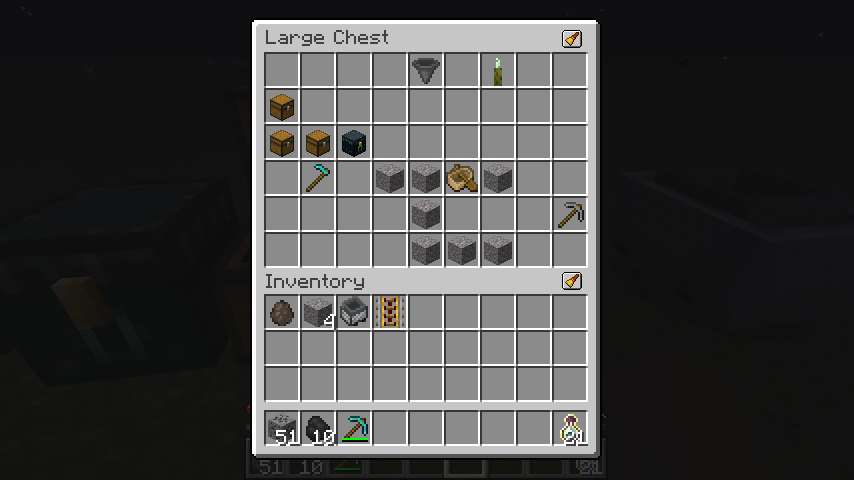
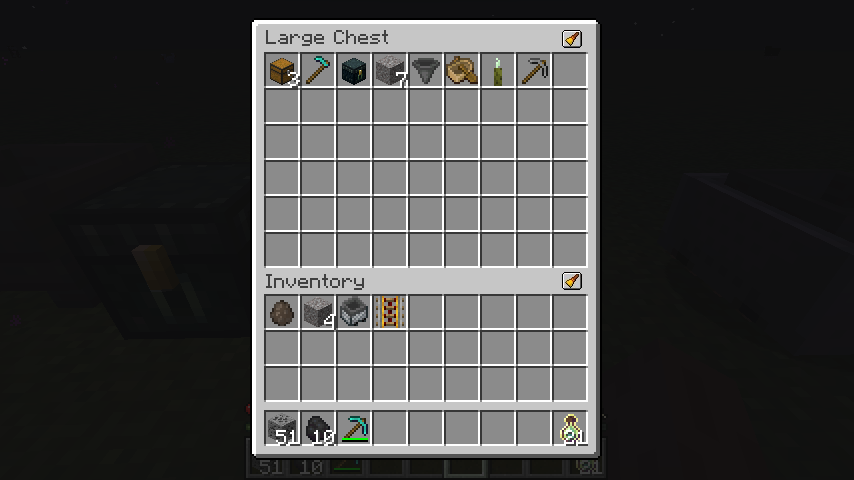
## Before and After
Before
After
## Dependencies
For client-side configuration and UI features, you’ll need:
- (https://modrinth.com/mod/cloth-config) (required)
- (https://modrinth.com/mod/modmenu) (optional, for easier access to config)
The mod functions server-side without any client dependencies.
## Translations
Inventory Sorter is available in multiple languages.
If you want to help translate the mod into your language, please check out the (https://inventorysorter.meza.gg/translate).
## Project Status
Inventory Sorter is actively maintained and safe to use in modpacks and multiplayer environments. Compatibility issues with certain modded inventories can be resolved using the built-in configuration system, described in the documentation.
📊 Mod Details
- Game
- Minecraft Mods
- Author
- kyrptonaught
- Version
- 3.0.0+neoforge-26.2
- Downloads
- 3,302,557
- Endorsements
- 1,145
- Category
- fabric
- Created
- 12/12/2022
- Updated
- 6/24/2026
- Game Versions
- 26.2
- Tags
- storage, utility
🔧 How to Install Minecraft Mods Mods
Download from Modrinth. Use Prism Launcher or drop into your mods folder.
📖 Full step-by-step install guide for Minecraft Mods →
Visit the official mod page for specific installation instructions for this mod.
🎮 Need cheat codes or console commands? Check ur gaming wiki for Minecraft Mods commands, item IDs, and more.
❓ Frequently Asked Questions
Which Minecraft Mods versions does Inventory Sorting support?
The author lists 26.2. Other versions may work but are untested by the author.
What is the latest version of Inventory Sorting?
Version 3.0.0+neoforge-26.2, published 2026-06-24 with 3.3M downloads recorded at the source.
Keep browsing — more Minecraft Mods mods await