interactEntity
🟡 Updated this year⚠️ Install Order · 2 steps
Install in this order, then this mod last — most mods fail to load without their framework and dependencies in place.
🖼️ Gallery (12 images)
🔍 Analysis
- 🏆 #461 of 536 adventure mods in this game by downloads
📋 About This Mod
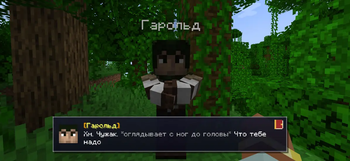
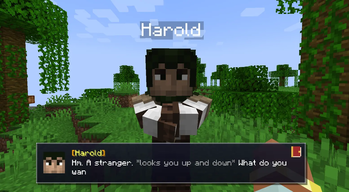
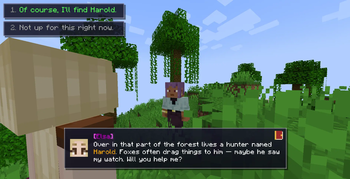
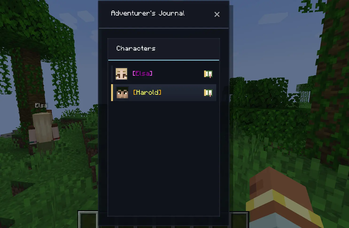
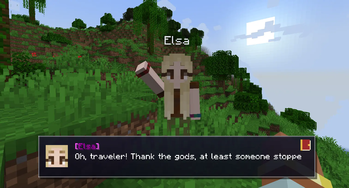
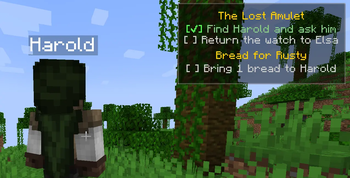
# InteractEntity Turn any mob into a fully scripted NPC. Branching dialogues, quests, conditional choices and story chains — all through simple JSON files. No Java required. ## ✨ Features - 💬 **Branching dialogues** with options and visibility conditions - 📜 **Quest system** with HUD tracker and journal (`J` to open) - 🔗 **Multi-NPC story chains** — one NPC's actions trigger another - 🎭 **19 conditions**: items (incl. NBT/modded), health, hunger, time, weather, biome, dimension, kills, variables, reputation, advancements, visited nodes… - ⚡ **28 actions**: give/remove items, run commands, teleport, particles, sounds, camera shake, effects, quests, reputation, variables, emotes… - 🧙 **Auto-spawn** — NPCs appear on world join, after a dialogue, or when a player enters an area - 🎨 **Dynamic skin loader** — drop custom `.png` skins (or player skins) straight into `config/interactentity/skins/`, no rebuilds. Custom avatars, backgrounds and color codes (`&a`, hex `&#FF6600`) - 🌐 **Multiplayer-ready** — shared progress across the server (global scope) ## 📦 Quick start 1. Drop the `.jar` into `mods/` 2. Launch — the folder `config/interactentity/dialogues/` is created 3. Add a JSON file describing the dialogue: ```json { "target": { "name": "Old Zombie", "tag": "old_zombie" }, "entry": "start", "nodes": { "start": { "text": "&fHello, traveler...", "next": "end" }, "end": { "text": "&7*The zombie falls silent*" } } } ``` 4. `/dialogue reload`, then spawn the mob and right-click it: ``` /summon zombie ~ ~ ~ {CustomName:'"Old Zombie"',CustomNameVisible:1b,Tags:} ``` > Tip: add a `summon` block to the JSON and you can use `/npc spawn old_zombie` instead. ## 📚 Full documentation All 28 actions, 19 conditions, examples, GUI customization, multi-NPC story chains — in the full README on GitHub (English + Русский). ## 🛠️ Requirements - Minecraft **1.20.1** + Forge - **GeckoLib** (mandatory dependency!) - Client + Server (mod must be on both sides) --- # 🇷🇺 Русский Превратите любого моба в полноценного NPC. Ветвящиеся диалоги, квесты, условия и цепочки сюжетов — всё через простые JSON-файлы. Без Java и плагинов. ## ✨ Возможности - 💬 **Ветвящиеся диалоги** с вариантами ответа и условиями видимости кнопок - 📜 **Система квестов** — HUD-трекер и журнал (`J` чтобы открыть) - 🔗 **Цепочки NPC** — действия одного запускают другого - 🎭 **19 условий**: предметы (в т.ч. NBT/модовые), здоровье, голод, время, погода, биом, измерение, убийства, переменные, репутация, достижения, посещённые узлы… - ⚡ **28 действий**: выдать/забрать предмет, команда, телепорт, частицы, звук, тряска камеры, эффекты, квесты, репутация, переменные, эмоции… - 🧙 **Автоспавн** — NPC появляется при заходе в мир, после диалога или при входе в зону - 🎨 **Загрузчик динамических скинов** — кидайте `.png` (или скины игроков) прямо в `config/interactentity/skins/`, без пересборки. Кастомные аватары, фоны и цветовые коды (`&a`, hex `&#FF6600`) - 🌐 **Мультиплеер** — общий прогресс на сервере (scope global) ## 📦 Быстрый старт 1. Кинь `.jar` в `mods/` 2. Запусти — создастся папка `config/interactentity/dialogues/` 3. Добавь JSON-файл с диалогом: ```json { "target": { "name": "Старый Зомби", "tag": "old_zombie" }, "entry": "start", "nodes": { "start": { "text": "&fПривет, путник...", "next": "end" }, "end": { "text": "&7*Зомби замолкает*" } } } ``` 4. `/dialogue reload`, заспавни моба и кликни ПКМ: ``` /summon zombie ~ ~ ~ {CustomName:'"Старый Зомби"',CustomNameVisible:1b,Tags:} ``` > Совет: добавь блок `summon` в JSON — тогда можно `/npc spawn old_zombie`. ## 📚 Полная документация Все 28 действий, 19 условий, примеры, кастомизация GUI, сюжетные цепочки NPC — в полном README на GitHub (English + Русский). ## 🛠️ Требования - Minecraft **1.20.1** + Forge - **GeckoLib** (обязательная зависимость!) - Клиент + Сервер (мод нужен с обеих сторон)
# InteractEntity
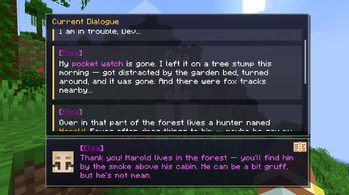
Turn any mob into a fully scripted NPC. Branching dialogues, quests, conditional choices and story chains — all through simple JSON files. No Java required.
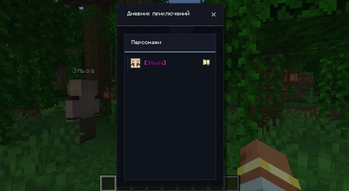
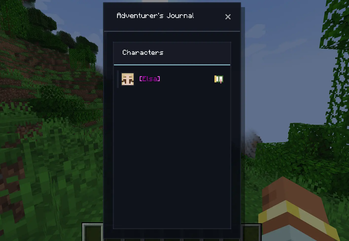
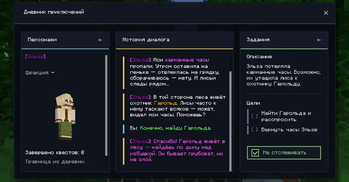
## ✨ Features - 💬 Branching dialogues with options and visibility conditions - 📜 Quest system with HUD tracker and journal (`J` to open) - 🔗 Multi-NPC story chains — one NPC's actions trigger another - 🎭 19 conditions: items (incl. NBT/modded), health, hunger, time, weather, biome, dimension, kills, variables, reputation, advancements, visited nodes… - ⚡ 28 actions: give/remove items, run commands, teleport, particles, sounds, camera shake, effects, quests, reputation, variables, emotes… - 🧙 Auto-spawn — NPCs appear on world join, after a dialogue, or when a player enters an area - 🎨 Dynamic skin loader — drop custom `.png` skins (or player skins) straight into `config/interactentity/skins/`, no rebuilds. Custom avatars, backgrounds and color codes (`&a`, hex `&#FF6600`) - 🌐 Multiplayer-ready — shared progress across the server (global scope)
## 📦 Quick start 1. Drop the `.jar` into `mods/` 2. Launch — the folder `config/interactentity/dialogues/` is created 3. Add a JSON file describing the dialogue: ```json { "target": { "name": "Old Zombie", "tag": "old_zombie" }, "entry": "start", "nodes": { "start": { "text": "&fHello, traveler...", "next": "end" }, "end": { "text": "&7The zombie falls silent" } } } ``` 4. `/dialogue reload`, then spawn the mob and right-click it: ``` /summon zombie ~ ~ ~ {CustomName:'"Old Zombie"',CustomNameVisible:1b,Tags:["old_zombie"]} ``` > Tip: add a `summon` block to the JSON and you can use `/npc spawn old_zombie` instead.
## 📚 Full documentation All 28 actions, 19 conditions, examples, GUI customization, multi-NPC story chains — in the full README on GitHub (English + Русский).
## 🛠️ Requirements - Minecraft 1. 20. 1 + Forge - GeckoLib (mandatory dependency!) - Client + Server (mod must be on both sides)
# 🇷🇺 Русский
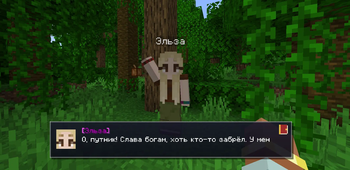
Превратите любого моба в полноценного NPC. Ветвящиеся диалоги, квесты, условия и цепочки сюжетов — всё через простые JSON-файлы. Без Java и плагинов.
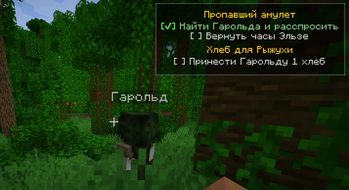
## ✨ Возможности - 💬 Ветвящиеся диалоги с вариантами ответа и условиями видимости кнопок - 📜 Система квестов — HUD-трекер и журнал (`J` чтобы открыть) - 🔗 Цепочки NPC — действия одного запускают другого - 🎭 19 условий: предметы (в т.ч. NBT/модовые), здоровье, голод, время, погода, биом, измерение, убийства, переменные, репутация, достижения, посещённые узлы… - ⚡ 28 действий: выдать/забрать предмет, команда, телепорт, частицы, звук, тряска камеры, эффекты, квесты, репутация, переменные, эмоции… - 🧙 Автоспавн — NPC появляется при заходе в мир, после диалога или при входе в зону - 🎨 Загрузчик динамических скинов — кидайте `.png` (или скины игроков) прямо в `config/interactentity/skins/`, без пересборки. Кастомные аватары, фоны и цветовые коды (`&a`, hex `&#FF6600`) - 🌐 Мультиплеер — общий прогресс на сервере (scope global)
## 📦 Быстрый старт 1. Кинь `.jar` в `mods/` 2. Запусти — создастся папка `config/interactentity/dialogues/` 3. Добавь JSON-файл с диалогом: ```json { "target": { "name": "Старый Зомби", "tag": "old_zombie" }, "entry": "start", "nodes": { "start": { "text": "&fПривет, путник...", "next": "end" }, "end": { "text": "&7Зомби замолкает" } } } ``` 4. `/dialogue reload`, заспавни моба и кликни ПКМ: ``` /summon zombie ~ ~ ~ {CustomName:'"Старый Зомби"',CustomNameVisible:1b,Tags:["old_zombie"]} ``` > Совет: добавь блок `summon` в JSON — тогда можно `/npc spawn old_zombie`.
## 📚 Полная документация Все 28 действий, 19 условий, примеры, кастомизация GUI, сюжетные цепочки NPC — в полном README на GitHub (English + Русский).
## 🛠️ Требования - Minecraft 1. 20. 1 + Forge - GeckoLib (обязательная зависимость!) - Клиент + Сервер (мод нужен с обеих сторон)
📊 Mod Details
- Game
- Minecraft Mods
- Author
- AshPapi
- Version
- 2.2.2-1.20.1
- Downloads
- 199
- Endorsements
- 4
- Category
- adventure
- Created
- 4/28/2026
- Updated
- 7/5/2026
- Game Versions
- 1.20.1
- Tags
- adventure, game-mechanics, mobs
🔧 How to Install Minecraft Mods Mods
Download from Modrinth. Use Prism Launcher or drop into your mods folder.
📖 Full step-by-step install guide for Minecraft Mods →
Visit the official mod page for specific installation instructions for this mod.
🎮 Need cheat codes or console commands? Check ur gaming wiki for Minecraft Mods commands, item IDs, and more.
❓ Frequently Asked Questions
Which Minecraft Mods versions does interactEntity support?
The author lists 1.20.1. Other versions may work but are untested by the author.
What is the latest version of interactEntity?
Version 2.2.2-1.20.1, published 2026-07-05 with 199 downloads recorded at the source.
Keep browsing — more Minecraft Mods mods await