Re: Pack
🟠 Updated over a year ago⚠️ Install Order · 2 steps
Install in this order, then this mod last — most mods fail to load without their framework and dependencies in place.
🖼️ Gallery (3 images)
🔍 Analysis
- 🏆 #118 of 371 forge mods in this game by downloads
📋 About This Mod
**Re: Pack** is a modular client-side mod for Minecraft 1.20.1, designed to enhance your experience with toggleable features. <details> <summary>Death Module</summary> Replaces the default death sound with voice lines from _Re:Zero_, and occasionally triggers a special event. _Most for fun._ 1. Enable/disable; 2. “Instant Resurrection” option, which disables the standard “Screen of Death”; 3. Regular “The Witch Whispers” event, which plays a custom sound after death; 4. Rare event “The Witch Calls”, which plays screen effects after death: particles, shaking; 5. Chance setting (default - 1/10) for a rare event, as well as switching the screen effect: particles, shaking. </details> <details> <summary>Guide Module</summary> Adds a brewing stand tutorial overlay > Subcategory “Brewing Guide, Part 1”: 1. Enable/disable; 2. Image position (left, right, top, or bottom); 3. Position settings (Y and X coordinates); 4. Image size settings (width and height). > Subcategory “Brewing Guide, Part 2”: 1. Enable/disable; 2. Image position (left, right, top, or bottom); 3. Position settings (Y and X coordinates); 4. Image size settings (width and height). </details> _P.S. You can change the images by creating a resource pack that contains your images at /assets/repack/textures/gui/brewing_guide/_
Re: Pack is a modular client-side mod for Minecraft 1. 20. 1, designed to enhance your experience with toggleable features.
Death Module
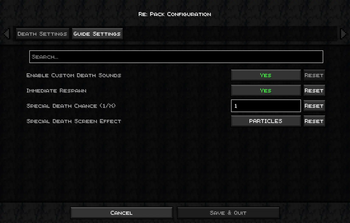
Replaces the default death sound with voice lines from _Re:Zero_, and occasionally triggers a special event.
_Most for fun._
1. Enable/disable; 2. “Instant Resurrection” option, which disables the standard “Screen of Death”; 3. Regular “The Witch Whispers” event, which plays a custom sound after death; 4. Rare event “The Witch Calls”, which plays screen effects after death: particles, shaking; 5. Chance setting (default - 1/10) for a rare event, as well as switching the screen effect: particles, shaking.
Guide Module
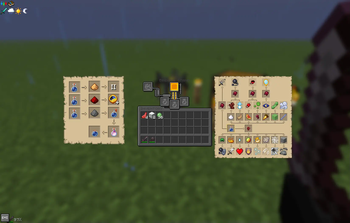
Adds a brewing stand tutorial overlay
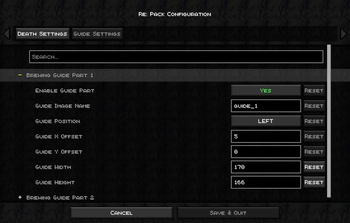
> Subcategory “Brewing Guide, Part 1”: 1. Enable/disable; 2. Image position (left, right, top, or bottom); 3. Position settings (Y and X coordinates); 4. Image size settings (width and height).
> Subcategory “Brewing Guide, Part 2”: 1. Enable/disable; 2. Image position (left, right, top, or bottom); 3. Position settings (Y and X coordinates); 4. Image size settings (width and height).
_P. S. You can change the images by creating a resource pack that contains your images at /assets/repack/textures/gui/brewing_guide/_
📊 Mod Details
- Game
- Minecraft Mods
- Author
- Inasai
- Version
- 2.4
- Downloads
- 348
- Endorsements
- 0
- Category
- forge
- Created
- 7/31/2025
- Updated
- 7/31/2025
- Game Versions
- 1.20.1
- Tags
- utility
🔧 How to Install Minecraft Mods Mods
Download from Modrinth. Use Prism Launcher or drop into your mods folder.
📖 Full step-by-step install guide for Minecraft Mods →
Visit the official mod page for specific installation instructions for this mod.
🎮 Need cheat codes or console commands? Check ur gaming wiki for Minecraft Mods commands, item IDs, and more.
❓ Frequently Asked Questions
Which Minecraft Mods versions does Re: Pack support?
The author lists 1.20.1. Other versions may work but are untested by the author.
What is the latest version of Re: Pack?
Version 2.4, published 2025-07-31 with 348 downloads recorded at the source.
Keep browsing — more Minecraft Mods mods await