ImproperUI
🟡 Updated this year⚠️ Install Order · 2 steps
Install in this order, then this mod last — most mods fail to load without their framework and dependencies in place.
🖼️ Gallery (5 images)
🔍 Analysis
- 👍 0.0% endorsement rate
- 🏆 #76 of 1032 fabric mods in this game by downloads
📋 About This Mod
# ImproperUI The ultimate solution to Minecraft Rendering being too hard to learn. --- !(https://img.shields.io/modrinth/dt/improperui?label=Modrinth&color=04b54b) !(https://img.shields.io/curseforge/dt/1418749?label=CurseForge&color=orange) !(https://img.shields.io/github/downloads/itzispyder/improperui/total?label=GitHub&color=blue) ### Introduction Unlike my other project, ClickCrystals Script, ImproperUI Script requires you to have prior knowledge of - Basic CSS properties and how they work - Basic HTML structures - Java ImproperUI's syntax is highly inspired by CSS (Cascading Style Sheets), thought it is not entirely identical. Below is a screenshot of an interactive screen with draggable and scrollable elements as the home page of the mod. This screen is scripted using ImproperUI Script: !(https://github.com/ItziSpyder/ImproperUI/raw/main/assets/demo.png) ### Recent Changes ```yml Version: 0.0.6-BETA Added: - added ConfigReader - added ImproperUIAPI.getConfigReader() Patches: - fixed config integer args not parsing properly ``` ### Adding ImproperUI to your Project To add ImproperUI, you download it as a jar and then add it to gradle manually. I didn't want to create an online repository and I didn't want to make it a separate mod. Womp Womp. (https://github.com/ItziSpyder/CrosshairTarget) is an example of how ImproperUI can be used in a mod! #### Step 1 (https://github.com/ItziSpyder/ImproperUI/releases/latest) and add it to your project files, as well as build.gradle as a dependency. ```gradle dependencies { compileOnly files("libs/ImproperUI-theVersionYouWant.jar") } ``` #### Step 2 Add the downloaded jar, as a mod, to your mods folder! You have to this use this a library! #### Step 3 (Final Step) Initialize the API. In this section, you call the init() function on ImproperUIAPI, then provide: - the `modId` your YOUR mod - the `main class mod initializer` of YOUR mod - then finally a list of script paths inside the `src/main/resources/` folder of YOUR mod. - by convention, you should create your scripts inside of `src/main/resources/assets/YOURMODID/improperui/` folder ```java public class ImproperUI implements ModInitializer { @Override public void onInitialize() { ImproperUIAPI.init("improperui", ImproperUI.class, "assets/improperui/improperui/what.ui", "assets/improperui/improperui/screen.ui" ); } } ``` ```java public class YourModInitializer implements ModInitializer { @Override public void onInitialize() { ImproperUIAPI.init("yourModId", YourModInitializer.class, "assets/yourModId/improperui/yourscreen1.ui", "assets/yourModId/improperui/yourscreen2.ui" ); } } ``` **DO NOTE THAT WHEN YOU ACTUALY TRY TO PARSE OR RUN THE SCRIPTS, YOU REFERENCE THE SCRIPT FILE'S NAME NOT THE PATH DECLARED HERE!** <br> ### Events To listen to events declared from your script, create a new class that implements `CallbackListener`. Create a method that 1. Has annotation `CallbackHandler` 2. Has parameter that contains the type of event you want to listen for 3. The name of the method should match the declared event from your script ```java public class CustomCallbacks implements CallbackListener { @CallbackHandler public void sendHelloWorld(MouseEvent e) { if (e.input.isDown()) ChatUtils.sendMessage("Hello World"); } } ``` In your script, the event should look like this: ``` element { on-click: sendHelloWorld } ``` Finally, when you declare a `ImproperUIPanel` screen, register the callback to your panel: ```java public void openScreen() { ImproperUIPanel panel = new ImproperUIPanel(); panel.registerCallback(new CustomCallback()); // parse script and add children elements here // panel.addChild() MinecraftClient.getInstance().setScreen(panel); } ``` If you are running a script, provide your custom callback in the creation arguments: ```java public void openScreen() { ImproperUIAPI.parseAndRunFile("yourModId", "testing.ui", new CustomCallback() /* and more... */); } ``` <br> ### Helper Methods ```yml Helper Methods: - ImproperUIPanel.collect() // a list of all elements and widgets, even their children - ImproperUIPanel.collectOrdered() // a sorted list based on z-index, of all elements and widgets including their children - ImproperUIPanel.collectById() // a list of elements with specified ID - ImproperUIPanel.collectByClassAttribute() // a list of elements with specified class attribute - ImproperUIPanel.collectById() // first element with specified ID - ImproperUIPanel.collectByClassAttribute() // first element with specified class attribute API: - ImproperUIAPI.parse() // parses a script then returns
# ImproperUI The ultimate solution to Minecraft Rendering being too hard to learn.
!(https://img.shields.io/modrinth/dt/improperui?label=Modrinth&color=04b54b) !(https://img.shields.io/curseforge/dt/1418749?label=CurseForge&color=orange) !(https://img.shields.io/github/downloads/itzispyder/improperui/total?label=GitHub&color=blue)
### Introduction Unlike my other project, ClickCrystals Script, ImproperUI Script requires you to have prior knowledge of
- Basic CSS properties and how they work
- Basic HTML structures
- Java
ImproperUI's syntax is highly inspired by CSS (Cascading Style Sheets), thought it is not entirely identical.
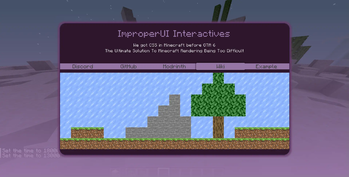
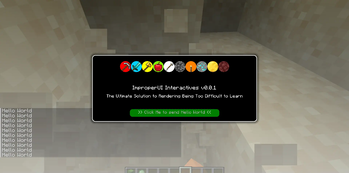
Below is a screenshot of an interactive screen with draggable and scrollable elements as the home page of the mod. This screen is scripted using ImproperUI Script:
!(https://github.com/ItziSpyder/ImproperUI/raw/main/assets/demo.png)
### Recent Changes ```yml Version: 0. 0. 6-BETA
Added: - added ConfigReader - added ImproperUIAPI.getConfigReader()
Patches: - fixed config integer args not parsing properly ```
### Adding ImproperUI to your Project To add ImproperUI, you download it as a jar and then add it to gradle manually. I didn't want to create an online repository and I didn't want to make it a separate mod. Womp Womp.
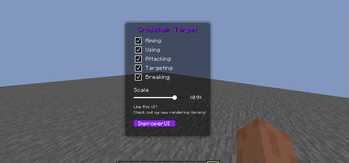
(https://github.com/ItziSpyder/CrosshairTarget) is an example of how ImproperUI can be used in a mod!
#### Step 1 (https://github.com/ItziSpyder/ImproperUI/releases/latest) and add it to your project files, as well as build.gradle as a dependency. ```gradle dependencies { compileOnly files("libs/ImproperUI-theVersionYouWant.jar") } ```
#### Step 2 Add the downloaded jar, as a mod, to your mods folder! You have to this use this a library!
#### Step 3 (Final Step) Initialize the API. In this section, you call the init() function on ImproperUIAPI, then provide: - the `modId` your YOUR mod - the `main class mod initializer` of YOUR mod - then finally a list of script paths inside the `src/main/resources/` folder of YOUR mod. - by convention, you should create your scripts inside of `src/main/resources/assets/YOURMODID/improperui/` folder
```java public class ImproperUI implements ModInitializer {
@Override public void onInitialize() { ImproperUIAPI.init("improperui", ImproperUI.class, "assets/improperui/improperui/what.ui", "assets/improperui/improperui/screen.ui" ); } } ``` ```java public class YourModInitializer implements ModInitializer {
@Override public void onInitialize() { ImproperUIAPI.init("yourModId", YourModInitializer.class, "assets/yourModId/improperui/yourscreen1.ui", "assets/yourModId/improperui/yourscreen2.ui" ); } } ``` DO NOTE THAT WHEN YOU ACTUALY TRY TO PARSE OR RUN THE SCRIPTS, YOU REFERENCE THE SCRIPT FILE'S NAME NOT THE PATH DECLARED HERE!
### Events To listen to events declared from your script, create a new class that implements `CallbackListener`.
Create a method that
1. Has annotation `CallbackHandler` 2. Has parameter that contains the type of event you want to listen for 3. The name of the method should match the declared event from your script
```java public class CustomCallbacks implements CallbackListener { @CallbackHandler public void sendHelloWorld(MouseEvent e) { if (e.input.isDown()) ChatUtils.sendMessage("Hello World"); } } ```
In your script, the event should look like this:
``` element { on-click: sendHelloWorld } ```
Finally, when you declare a `ImproperUIPanel` screen, register the callback to your panel:
```java public void openScreen() { ImproperUIPanel panel = new ImproperUIPanel(); panel.registerCallback(new CustomCallback()); // parse script and add children elements here // panel.addChild() MinecraftClient.getInstance().setScreen(panel); } ```
If you are running a script, provide your custom callback in the creation arguments:
```java public void openScreen() { ImproperUIAPI.parseAndRunFile("yourModId", "testing.ui", new CustomCallback() / and more... /); } ```
### Helper Methods ```yml Helper Methods: - ImproperUIPanel.collect() // a list of all elements and widgets, even their children - ImproperUIPanel.collectOrdered() // a sorted list based on z-index, of all elements and widgets including their children - ImproperUIPanel.collectById() // a list of elements with specified ID - ImproperUIPanel.collectByClassAttribute() // a list of elements with specified class attribute - ImproperUIPanel.collectById() // first element with specified ID - ImproperUIPanel.collectByClassAttribute() // first element with specified class attribute
API: - ImproperUIAPI.parse() // parses a script then returns
📊 Mod Details
- Game
- Minecraft Mods
- Author
- ItziSpyder
- Version
- 26.2-0.0.8-BETA
- Downloads
- 350,988
- Endorsements
- 64
- Category
- fabric
- Created
- 5/9/2024
- Updated
- 8/14/2026
- Game Versions
- 26.2
- Tags
- game-mechanics, library, utility
🔧 How to Install Minecraft Mods Mods
Download from Modrinth. Use Prism Launcher or drop into your mods folder.
📖 Full step-by-step install guide for Minecraft Mods →
Visit the official mod page for specific installation instructions for this mod.
🎮 Need cheat codes or console commands? Check ur gaming wiki for Minecraft Mods commands, item IDs, and more.
❓ Frequently Asked Questions
Which Minecraft Mods versions does ImproperUI support?
The author lists 26.2. Other versions may work but are untested by the author.
What is the latest version of ImproperUI?
Version 26.2-0.0.8-BETA, published 2026-08-14 with 350,988 downloads recorded at the source.
Keep browsing — more Minecraft Mods mods await