Image Overlay
🟡 Updated this year⚠️ Install Order · 2 steps
Install in this order, then this mod last — most mods fail to load without their framework and dependencies in place.
🖼️ Gallery (8 images)
🔍 Analysis
- 👍 0.4% endorsement rate
- 🏆 #199 of 296 decoration mods in this game by downloads
📋 About This Mod
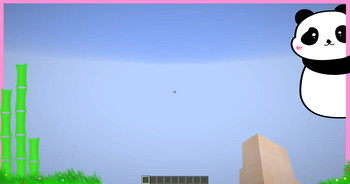
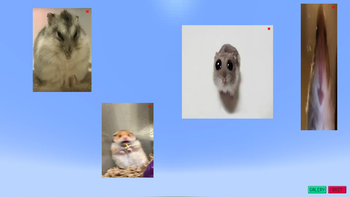
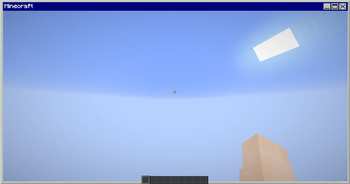
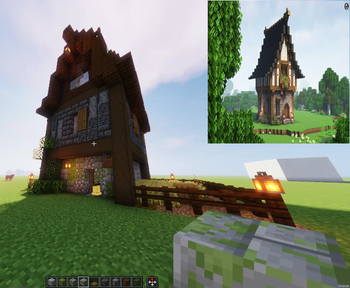
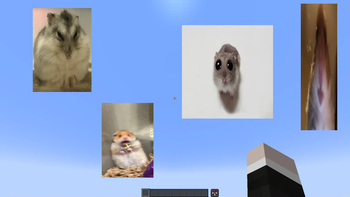
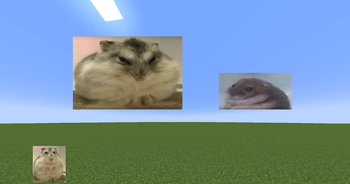
# Image Overlay Mod **Render images and GIFs directly on your screen!** ## Features - Render static images and animated GIFs - Dynamic positioning and resizing - Transparency and rotation controls - GUI - Slideshows - Overlays: render images at fullscren that automatically adapt to your resolution - Image rendering via URL (Imgur) - Rendering layers: Lets you render images/GIFs behind or in front of GUI elements (Hotbar, scoreboard...) Using the GUI, hold "Alt + right click" on an image/GIF to open a context menu and select the preferred option **ONLY WORKS IN 1.21.4 ONWARDS**. *Other features are also in the menu - Presets - Twitch integration -> Go to https://imageoverlay.gitbook.io/imageoverlay-docs for the tutorial on how to connect your Twitch account to the ImageOverlay Mod ## Commands | Command | Description | |---------|-------------| | `/image help` | List all available commands | | `/image list` | Show all images/GIFs in your `imageoverlay` folder | | `/image render <name> <x> <y>` | Display an image/GIF at specified coordinates | | `/image move <name> <x> <y>` | Move said image/GIF | | `/image resize <name> <x> <y>` | Modify image/GIF | | `/image url <name> <width> <size>` | Render image/GIF using an IMGUR URL | | `/image stop <name>` | Stop rendering an image/GIF | | `/image preset save <name>` | Saves every image/GIF data as one preset | | `/image preset list` | Lists all the presets | | `/image preset load <name>` | Loads saved presets | | `/image preset delete <name>` | Deletes said preset | **IN ORDER TO RENDER IMAGES/GIFs USING URLS YOU NEED TO PUT THEM BETWEEN "" E.g: /image url "https://i.imgur.com/funnymeme.jpeg" 100 100** ## GUI - **Drag & drop** images/GIFs around your screen - **Resize** by using the border and corner indicators - **Right-click** an image/GIF to toggle the transparency slider - **Hold Alt + corner** to rotate images - **Slideshows** (SLIDES button): - Set display duration per image - Cycle manually with J/K keys (toggle auto-mode) – keys can be changed in settings - **Overlays** (OVERLAY button): - Render images/GIFs in full-screen - Automatically scale to your resolution - Create overlay slides to have multiples overlays and cycle through them - **URL** lets you render images directly using an **IMGUR URL**. E.g: https://i.imgur.com/funnymeme.jpeg !(https://cdn.modrinth.com/data/cached_images/528a23c80e4b346b9964337808a7748a6c6cfe4a.png) ## Folder Location - All images/GIFs are located in the `imageoverlay` folder in the .minecraft directory - Overlays are located in the `imageoverlay/overlays` folder - Twitch images are located in the `imageoverlay/twitch` folder ## ❤️ Support & Feedback - **Join my Discord** (https://discord.gg/c8aagxeNty) - **Report issues or leave suggestions on** (https://github.com/martigonzalez/ImageOverlayIssues/issues) - **Support me on** (https://ko-fi.com/martigc)
# Image Overlay Mod
Render images and GIFs directly on your screen!
## Features - Render static images and animated GIFs - Dynamic positioning and resizing - Transparency and rotation controls - GUI - Slideshows - Overlays: render images at fullscren that automatically adapt to your resolution - Image rendering via URL (Imgur) - Rendering layers: Lets you render images/GIFs behind or in front of GUI elements (Hotbar, scoreboard...) Using the GUI, hold "Alt + right click" on an image/GIF to open a context menu and select the preferred option ONLY WORKS IN 1. 21. 4 ONWARDS. *Other features are also in the menu - Presets - Twitch integration -> Go to https://imageoverlay.gitbook.io/imageoverlay-docs for the tutorial on how to connect your Twitch account to the ImageOverlay Mod
## Commands
| Command | Description |
|---------|-------------|
| `/image help` | List all available commands |
| `/image list` | Show all images/GIFs in your `imageoverlay` folder |
| `/image render
IN ORDER TO RENDER IMAGES/GIFs USING URLS YOU NEED TO PUT THEM BETWEEN "" E.g: /image url "https://i.imgur.com/funnymeme.jpeg" 100 100
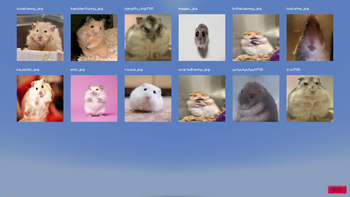
## GUI - Drag & drop images/GIFs around your screen - Resize by using the border and corner indicators - Right-click an image/GIF to toggle the transparency slider - Hold Alt + corner to rotate images - Slideshows (SLIDES button): - Set display duration per image - Cycle manually with J/K keys (toggle auto-mode) – keys can be changed in settings - Overlays (OVERLAY button): - Render images/GIFs in full-screen - Automatically scale to your resolution - Create overlay slides to have multiples overlays and cycle through them - URL lets you render images directly using an IMGUR URL. E.g: https://i.imgur.com/funnymeme.jpeg
!(https://cdn.modrinth.com/data/cached_images/528a23c80e4b346b9964337808a7748a6c6cfe4a.png)
## Folder Location - All images/GIFs are located in the `imageoverlay` folder in the .minecraft directory - Overlays are located in the `imageoverlay/overlays` folder - Twitch images are located in the `imageoverlay/twitch` folder
## ❤️ Support & Feedback - Join my Discord (https://discord.gg/c8aagxeNty) - Report issues or leave suggestions on (https://github.com/martigonzalez/ImageOverlayIssues/issues) - Support me on (https://ko-fi.com/martigc)
📊 Mod Details
- Game
- Minecraft Mods
- Author
- BoreasFury
- Version
- 26.2-1.1.3
- Downloads
- 6,977
- Endorsements
- 30
- Category
- decoration
- Created
- 1/13/2025
- Updated
- 6/16/2026
- Game Versions
- 26.2
- Tags
- decoration, game-mechanics, utility
🔧 How to Install Minecraft Mods Mods
Download from Modrinth. Use Prism Launcher or drop into your mods folder.
📖 Full step-by-step install guide for Minecraft Mods →
Visit the official mod page for specific installation instructions for this mod.
🎮 Need cheat codes or console commands? Check ur gaming wiki for Minecraft Mods commands, item IDs, and more.
❓ Frequently Asked Questions
Which Minecraft Mods versions does Image Overlay support?
The author lists 26.2. Other versions may work but are untested by the author.
What is the latest version of Image Overlay?
Version 26.2-1.1.3, published 2026-06-16 with 6,977 downloads recorded at the source.
Keep browsing — more Minecraft Mods mods await