Idwtialsimmoedm
🟠 Updated over a year ago⚠️ Install Order · 2 steps
Install in this order, then this mod last — most mods fail to load without their framework and dependencies in place.
Preview

🔍 Analysis
- 👍 0.0% endorsement rate
- 🏆 #20 of 64 cursed mods in this game by downloads
📋 About This Mod
<center><img src="https://cdn.modrinth.com/data/cached_images/e476a4ec8b6195ea1dd538f318ca0bd2c824b598.png" alt="tooltip example" width=600></center> # idwtialsimmoedm idwtialsimmoedm adds descriptions to tooltips that contain enchantments or status effects. It uses the same language-key format as (https://www.curseforge.com/minecraft/mc-mods/enchantment-descriptions), so all mods that already have descriptions available will be compatible out of the box. idwtialsimmoedm however is completely standalone and very lightweight, yet still comes with a few config options. If you have (https://modrinth.com/mod/cloth-config) and (https://modrinth.com/mod/modmenu) installed, you will be able to open the config screen otherwise you can edit the file in `config/idwtialsimmoedm.json`. ## Config Options - **Description Prefix and Indent:** These options determine what kind of bullet-point style to use for displaying the descriptions. If you want to just display the text, leave both of these blank. The indent is used on the second line onwards, if the description is too long and wraps, to align with the first line which uses the prefix - **Display only when Shift is held:** If this option is enabled, the description tooltip will never show on any item unless the Shift key is held on your keyboard - **Display only on Enchanted Books:** If this option is enabled, the description tooltip will never be shown on items that aren't Enchanted Books
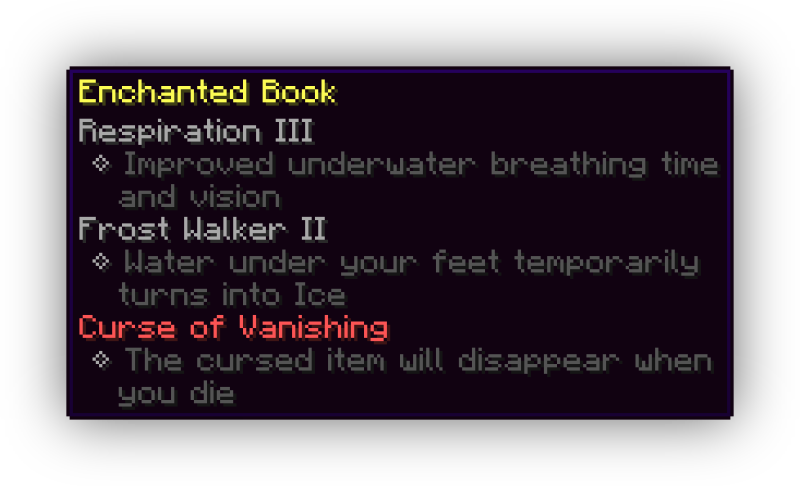
# idwtialsimmoedm
idwtialsimmoedm adds descriptions to tooltips that contain enchantments or status effects. It uses the same language-key format as (https://www.curseforge.com/minecraft/mc-mods/enchantment-descriptions), so all mods that already have descriptions available will be compatible out of the box. idwtialsimmoedm however is completely standalone and very lightweight, yet still comes with a few config options. If you have (https://modrinth.com/mod/cloth-config) and (https://modrinth.com/mod/modmenu) installed, you will be able to open the config screen otherwise you can edit the file in `config/idwtialsimmoedm.json`.
## Config Options - Description Prefix and Indent: These options determine what kind of bullet-point style to use for displaying the descriptions. If you want to just display the text, leave both of these blank. The indent is used on the second line onwards, if the description is too long and wraps, to align with the first line which uses the prefix - Display only when Shift is held: If this option is enabled, the description tooltip will never show on any item unless the Shift key is held on your keyboard - Display only on Enchanted Books: If this option is enabled, the description tooltip will never be shown on items that aren't Enchanted Books
📊 Mod Details
- Game
- Minecraft Mods
- Author
- glisco
- Version
- 0.3.3+1.21.6
- Downloads
- 1,503,596
- Endorsements
- 304
- Category
- cursed
- Created
- 5/30/2022
- Updated
- 8/8/2025
- Game Versions
- 1.21.6, 1.21.7, 1.21.8
- Tags
- cursed, magic, utility
🔧 How to Install Minecraft Mods Mods
Download from Modrinth. Use Prism Launcher or drop into your mods folder.
📖 Full step-by-step install guide for Minecraft Mods →
Visit the official mod page for specific installation instructions for this mod.
🎮 Need cheat codes or console commands? Check ur gaming wiki for Minecraft Mods commands, item IDs, and more.
❓ Frequently Asked Questions
Which Minecraft Mods versions does Idwtialsimmoedm support?
The author lists 1.21.6, 1.21.7, 1.21.8. Other versions may work but are untested by the author.
What is the latest version of Idwtialsimmoedm?
Version 0.3.3+1.21.6, published 2025-08-08 with 1.5M downloads recorded at the source.
Keep browsing — more Minecraft Mods mods await