Iconographic
🟡 Updated this year⚠️ Install Order · 2 steps
Install in this order, then this mod last — most mods fail to load without their framework and dependencies in place.
Preview
🔍 Analysis
- 👍 0.0% endorsement rate
- 🏆 #123 of 225 equipment mods in this game by downloads
📋 About This Mod
# Iconographic <img align="right" width="350" src="https://raw.githubusercontent.com/meowdding/tooltipthingy/refs/heads/master/.github/images/pet.png" alt="Pet Tooltip Preview"> <div align="left"> Remodel your Hypixel SkyBlock item tooltips completely to look much more fancy and organized. Tired of walls of plain text? Instead, look at beautiful icons, progress bars, perfectly aligned stats, and custom categorized tags in your tooltips. <br clear="all"> ## Features - Aligned Stat Lines: Aligns item stats (Pristine, Strength, Wisdom, etc.) and adds icons to them. - Progress Bars: Replaces boring text with progress bars for Pet Levels and Drill Fuel. - Clean Tags: Converts standard text into clean tags for an item's Category, Rarity, Dungeon Stars, and more! - Pet Enhancements: Centers pet abilities, adds separators, and renders your favourite pet star. - Spinny Items: Enable an optional 3D spinning item render in the top left corner of the tooltip. - Fancy Gemstones: Gemstones now get displayed with their texture to be easily identifiable. - ...and more, checkout the config ingame. ## Customizing You can configure all features to how you like it using the config at `/iconographic` or `/ttt` for short. </div>
# Iconographic
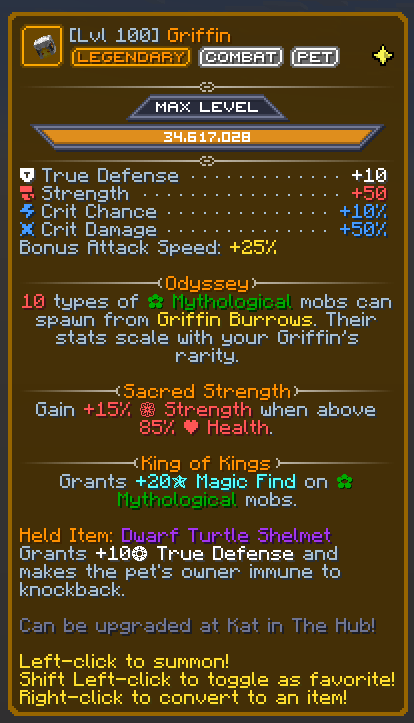
Tired of walls of plain text? Instead, look at beautiful icons, progress bars, perfectly aligned stats, and custom categorized tags in your tooltips.
## Features
- Aligned Stat Lines: Aligns item stats (Pristine, Strength, Wisdom, etc.) and adds icons to them.
- Progress Bars: Replaces boring text with progress bars for Pet Levels and Drill Fuel.
- Clean Tags: Converts standard text into clean tags for an item's Category, Rarity, Dungeon Stars, and more!
- Pet Enhancements: Centers pet abilities, adds separators, and renders your favourite pet star.
- Spinny Items: Enable an optional 3D spinning item render in the top left corner of the tooltip.
- Fancy Gemstones: Gemstones now get displayed with their texture to be easily identifiable.
- ...and more, checkout the config ingame.
## Customizing
You can configure all features to how you like it using the config at `/iconographic` or `/ttt` for short.
📊 Mod Details
- Game
- Minecraft Mods
- Author
- j10a1n15
- Version
- 1.0.0-beta.5+d76258ce
- Downloads
- 23,087
- Endorsements
- 10
- Category
- equipment
- Created
- 6/11/2026
- Updated
- 8/27/2026
- Game Versions
- 26.2
- Tags
- equipment, utility
🔧 How to Install Minecraft Mods Mods
Download from Modrinth. Use Prism Launcher or drop into your mods folder.
📖 Full step-by-step install guide for Minecraft Mods →
Visit the official mod page for specific installation instructions for this mod.
🎮 Need cheat codes or console commands? Check ur gaming wiki for Minecraft Mods commands, item IDs, and more.
❓ Frequently Asked Questions
Which Minecraft Mods versions does Iconographic support?
The author lists 26.2. Other versions may work but are untested by the author.
What is the latest version of Iconographic?
Version 1.0.0-beta.5+d76258ce, published 2026-08-27 with 23,087 downloads recorded at the source.
Keep browsing — more Minecraft Mods mods await