HyskExpFly
🟢 Updated this month⚠️ Install Order · 2 steps
Install in this order, then this mod last — most mods fail to load without their framework and dependencies in place.
🖼️ Gallery (4 images)

🔍 Analysis
- 👍 0.8% endorsement rate
- 🏆 #425 of 896 fabric mods in this game by downloads
📋 About This Mod
A Minecraft Fabric mod that allows players to fly using experience points in survival mode
# HyskExpFly Mod
> A Minecraft Fabric mod that allows players to fly in survival mode using experience points
!(https://cdn.modrinth.com/data/6rflsNor/images/8e6b1e88a950f407f443170739612d411eeecf42.png)
## Mod Introduction
HyskExpFly Mod is an innovative Minecraft Fabric mod that allows players to consume experience points to gain flight ability in survival mode. Through simple commands and an intuitive interface, players can easily manage their flight status and enjoy the freedom of aerial exploration.
- All code features are assisted by Deepseek AI
- Qingxin Hengyue Shikong Server free public flight mod
- Creator
- YkinLing
- AI Assistant
- Deepseek
- QQ Group
- 783492881 (Get open source code)
## Core Features
### Basic Flight Features - Experience-based Flight: Fly in survival mode using experience points - Smart Consumption: Automatically deduct configured experience points per second - State Recovery: Automatically restore flight status when reconnecting - Mode Support: Supports survival mode, automatically handles other modes
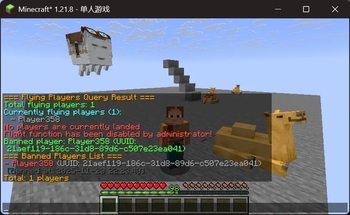
### Management Features - Permission Management: Complete ban system supporting name and UUID bans - Configuration System: Real-time adjustable experience consumption rate - Status Query: Administrators can query all flying player status - Safety Detection: Multiple safety checks to prevent state abnormalities
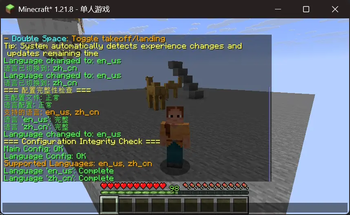
### Multi-language Support - Bilingual Interface: Full support for Chinese and English - Real-time Switching: Supports in-game language switching commands - Complete Translation: All prompt messages have bilingual versions - Custom Extension: Supports adding new language configurations
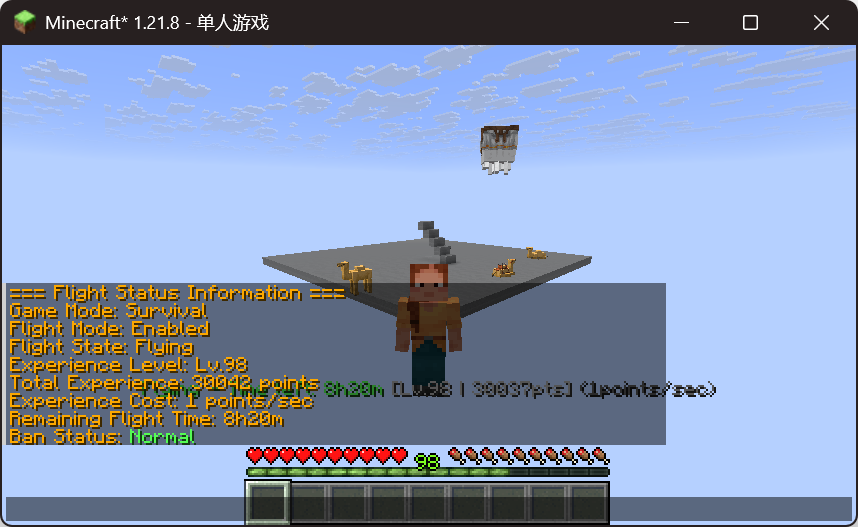
### User Experience - Real-time Display: Continuously shows remaining time and experience information during flight - Smart Tips: Rich status prompts and operation guidance - Auto Protection: Automatically handles flight status during death, mode switching, and riding - Easy Operation: Supports double-tap spacebar for quick takeoff/landing
### Safety & Stability - State Repair: Automatically detects and fixes flight state abnormalities - Riding Protection: Automatically pauses flight when riding vehicles, resumes after dismounting - Experience Monitoring: Monitors experience deduction intervals to prevent abnormal deductions - Config Check: Automatically checks configuration integrity and fixes missing items
## Installation Requirements
### Required Dependencies - Minecraft: 1. 21. 8 - Fabric Loader: ≥ 0. 16. 9 - Fabric API: Latest version - Java: ≥ 21
### Recommended Environment - Server Environment: Fabric Server - Client: Fabric Client - Memory: ≥ 2GB RAM
## Command List
### Player Commands | Command | Permission | Description | |---------|------------|-------------| | `/fly` | All players | Enable/disable experience flight mode | | `/flystatus` | All players | View own flight status information |
### Administrator Commands
| Command | Permission | Description |
|---------|------------|-------------|
| `/fly reload` | OP Level 4 | Reload configuration files |
| `/fly cost
## Operation Methods
### Basic Operation Flow 1. Enable Flight: Use `/fly` command to enable flight mode 2. Takeoff: Double-tap spacebar to start flying 3. Flight Control: - Spacebar: Ascend - Shift: Descend - WASD: Move forward/backward/left/right 4. Landing: Double-tap spacebar again to land 5. Disable Flight: Use `/fly` command to disable flight mode
### Flight Status Description - Flying: Continuously consumes experience points, shows remaining time - Landed: Pauses experience consumption, shows remaining experience - Riding Paused: Automatically pauses when riding vehicles, resumes after dismounting - Auto Protection: Automatically disables when dying or switching to adventure mode
## Configuration System
### Configuration File Location
Configuration files are located in the server's `config/hyskexpfly/` directory:
``` config/ └── hyskexpfly/ ├── hyskexpfly.json # Main configuration file └── lang.json # Language configuration file ```
### Main Configurati
📊 Mod Details
- Game
- Minecraft Mods
- Author
- YkinLing
- Version
- 26.2
- Downloads
- 527
- Endorsements
- 4
- Category
- fabric
- Created
- 11/20/2025
- Updated
- 9/2/2026
- Game Versions
- 26.1.2
- Tags
- game-mechanics, management, utility
🔧 How to Install Minecraft Mods Mods
Download from Modrinth. Use Prism Launcher or drop into your mods folder.
📖 Full step-by-step install guide for Minecraft Mods →
Visit the official mod page for specific installation instructions for this mod.
🎮 Need cheat codes or console commands? Check ur gaming wiki for Minecraft Mods commands, item IDs, and more.
❓ Frequently Asked Questions
Which Minecraft Mods versions does HyskExpFly support?
The author lists 26.1.2. Other versions may work but are untested by the author.
What is the latest version of HyskExpFly?
Version 26.2, published 2026-09-02 with 527 downloads recorded at the source.
Keep browsing — more Minecraft Mods mods await