Hyperlink
🟡 Updated this year⚠️ Install Order · 2 steps
Install in this order, then this mod last — most mods fail to load without their framework and dependencies in place.
Preview

🔍 Analysis
- 👍 0.2% endorsement rate
- 🏆 #156 of 188 cursed mods in this game by downloads
📋 About This Mod
**<span style="color:#236fa1"><em><strong>All descriptions are written by DeepL translation</strong></em></span>** !(https://media.forgecdn.net/attachments/description/null/description_51373c86-89c1-48cf-b246-43aa8e7fea78.png) **<span style="color:#0ff"><em><strong><a href="https://github.com/Sakurafuld/Hyperlink/wiki" target="_blank" rel="nofollow">Hyperlink Wiki</a></strong></em></span>** **Resource pack with minor changes** * (https://github.com/Sakurafuld/Hyperlink/releases/tag/ResourcePack-1182.2.0) * (https://github.com/Sakurafuld/Hyperlink/releases/tag/ResourcePack-1201.2.0) **Version 2.0 adds new recipes and a workbench with GUI animation!** !(https://github.com/user-attachments/assets/090cac9f-06ec-4b99-b0b5-e36d60d3a60c)!(https://github.com/user-attachments/assets/d333ccd6-0a23-448f-896d-c6372b699b46) **All can be configured or disabled in config/hyperdaimc-common.toml** **_Complete damage nullification!_ !(https://media.forgecdn.net/attachments/description/null/description_e6907b42-11ea-4e4f-9d80-e1c0b6b4935b.png)** 「Muteki Star」 * This item is activated by placing it on a hotbar, in an armor slot (from command, etc.), or in an additional slot dedicated to it if the Curios mod is installed. * Health does not decrease. * Not selected by the command selector. (configurable) * Gives resistance to robbery of items by some mods. (Ice and Fire, IntegratedDynamics, PneumaticCraft and Extra Botany) *** **_Instant death attack!_ !(https://media.forgecdn.net/attachments/description/null/description_f509e1c2-8ac5-48a5-bddd-afd7be4d3e7a.png)** 「Novelcalibur」 * Holding this item in your hand and clicking on it will kill all entities in the vicinity of your line of sight. * Clicking while crouching kills only the one that overlaps your line of sight. (configurable) * Enchantment ability works. *** **_Absolute block protection!_ !(https://media.forgecdn.net/attachments/description/null/description_200e4e5c-7ffd-4bb8-88ab-80245321807b.png)** 「Chroniclock」 * Holding this item in your hand and right-clicking on the start and end points will protect that area. * Right-clicking while crouching allows selection of offset points on the face of the block. (configurable) * Holding this item in your hand and clicking on the protected area will remove the protection. * Stops non-owner block placement and destroying. (configurable) * Depending on the configuration, stop interacting with the block as in adventure mode. (configurable, disabled by default) *** **_Ultimate block destruction!_ !(https://media.forgecdn.net/attachments/description/null/description_7549d005-c06a-48b2-8e11-2648856d97b7.png)** 「Pickdox」 * Holding this item in your hand and clicking on it destroys the block in front of you. * Clicking while crouching destroys the blocks one by one. (configurable) * Can destroy fluids. (configurable) * Enchantment ability works. *** **_Infinite resource supply!_ !(https://media.forgecdn.net/attachments/description/null/description_9a0ac7d4-8e00-4b24-88da-b08abec02186.png)** 「V.R.X.」 * Holding this item in your hand and right-clicking on a block or entity opens the GUI. * !(https://media.forgecdn.net/attachments/description/null/description_ff3eb8b1-ac9e-45f1-bb3d-ba0e259e3897.png) * Right-clicking on your player model in inventory will open a GUI for yourself. * Closing the GUI will cause the configured items, fluids, energy, and even gases if Mekanism mod has been introduced, to be supplied to the Capability of the targeted block or entity from the specified direction. * Change the supply direction on the current page to by clicking on the text to the right. * Change pages by clicking on the text to the left. * Clicking on an item overlaid on the upper slot allows it to be registered. * If the item is a container of energy, fluid, or gas, it will be given priority for registration, but a middle-click will register the item itself. * Registration can be done through JEI or REI, even if you do not have the actual item. (if it is an item, you can place it directly in your inventory) * Clicking on the same item over and over with the same item increases the item being placed by the number of items you are holding. (or ten times that number if you hold down the shift key) * Mouse scrolling can increase or decrease the number of items one by one. (in larger units if you hold down the shift key) * Right-clicking can be used to set the number of items to half the number of items. * Middle-clicking on a registered item allows you to copy the actual item as in creative mode. (if it is a fluid, then the bucket containing it) * Left-clicking on a block or entity with V.R.X. to delete it. *** **_Godly immortal boss!_ !(https://media.forgecdn.net/attachments/description/null/description_b9c57298-27dd-4a8d-a130-dc1f61306f7f.png)** 「Fumetsu Wither」 !(https://media.forgecd
All descriptions are written by DeepL translation

Resource pack with minor changes
(https://github.com/Sakurafuld/Hyperlink/releases/tag/ResourcePack-1182. 2. 0) (https://github.com/Sakurafuld/Hyperlink/releases/tag/ResourcePack-1201. 2. 0)
Version 2. 0 adds new recipes and a workbench with GUI animation!

All can be configured or disabled in config/hyperdaimc-common.toml
*_Complete damage nullification!_ **
「Muteki Star」
This item is activated by placing it on a hotbar, in an armor slot (from command, etc.), or in an additional slot dedicated to it if the Curios mod is installed. Health does not decrease. Not selected by the command selector. (configurable) Gives resistance to robbery of items by some mods. (Ice and Fire, IntegratedDynamics, PneumaticCraft and Extra Botany)
_Instant death attack!_ **
「Novelcalibur」
Holding this item in your hand and clicking on it will kill all entities in the vicinity of your line of sight. Clicking while crouching kills only the one that overlaps your line of sight. (configurable) Enchantment ability works.
_Absolute block protection!_ **
「Chroniclock」
Holding this item in your hand and right-clicking on the start and end points will protect that area. Right-clicking while crouching allows selection of offset points on the face of the block. (configurable) Holding this item in your hand and clicking on the protected area will remove the protection. Stops non-owner block placement and destroying. (configurable) Depending on the configuration, stop interacting with the block as in adventure mode. (configurable, disabled by default)
_Ultimate block destruction!_ **
Holding this item in your hand and clicking on it destroys the block in front of you. Clicking while crouching destroys the blocks one by one. (configurable) Can destroy fluids. (configurable) Enchantment ability works.
_Infinite resource supply!_ **
Holding this item in your hand and right-clicking on a block or entity opens the GUI. 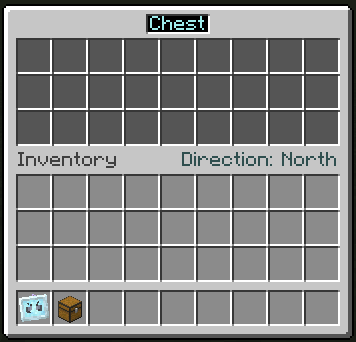 Right-clicking on your player model in inventory will open a GUI for yourself. Closing the GUI will cause the configured items, fluids, energy, and even gases if Mekanism mod has been introduced, to be supplied to the Capability of the targeted block or entity from the specified direction. Change the supply direction on the current page to by clicking on the text to the right. Change pages by clicking on the text to the left. Clicking on an item overlaid on the upper slot allows it to be registered. If the item is a container of energy, fluid, or gas, it will be given priority for registration, but a middle-click will register the item itself. Registration can be done through JEI or REI, even if you do not have the actual item. (if it is an item, you can place it directly in your inventory) Clicking on the same item over and over with the same item increases the item being placed by the number of items you are holding. (or ten times that number if you hold down the shift key) Mouse scrolling can increase or decrease the number of items one by one. (in larger units if you hold down the shift key) Right-clicking can be used to set the number of items to half the number of items. Middle-clicking on a registered item allows you to copy the actual item as in creative mode. (if it is a fluid, then the bucket containing it) Left-clicking on a block or entity with V. R. X. to delete it.
_Godly immortal boss!_ **
「Fumetsu Wither」
![](https://media.forgecd
📊 Mod Details
- Game
- Minecraft Mods
- Author
- Sakurafuld
- Version
- 1201.2.4
- Downloads
- 1,678
- Endorsements
- 3
- Category
- cursed
- Created
- 10/5/2025
- Updated
- 10/1/2025
- Game Versions
- 1.20.1
- Tags
- cursed, equipment, mobs
🔧 How to Install Minecraft Mods Mods
Download from Modrinth. Use Prism Launcher or drop into your mods folder.
📖 Full step-by-step install guide for Minecraft Mods →
Visit the official mod page for specific installation instructions for this mod.
🎮 Need cheat codes or console commands? Check ur gaming wiki for Minecraft Mods commands, item IDs, and more.
❓ Frequently Asked Questions
Which Minecraft Mods versions does Hyperlink support?
The author lists 1.20.1. Other versions may work but are untested by the author.
What is the latest version of Hyperlink?
Version 1201.2.4, published 2025-10-01 with 1,678 downloads recorded at the source.
Keep browsing — more Minecraft Mods mods await