HyperGrave
🟡 Updated this year⚠️ Install Order · 2 steps
Install in this order, then this mod last — most mods fail to load without their framework and dependencies in place.
🖼️ Gallery (1 images)
🔍 Analysis
- 👍 0.9% endorsement rate
- 🏆 #338 of 551 adventure mods in this game by downloads
📋 About This Mod
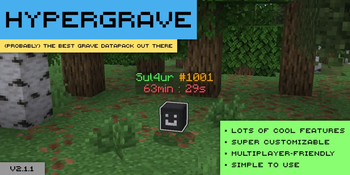
HyperGrave is a very high-quality grave data pack / mod. It is super customizable, has a lot of cool features, supports multiplayer and yet it's simple to use. ## Resource pack You don't *need* a resource pack to use HyperGrave. However, if you don't like the default look of graves in HyperGrave, you might want to use (https://modrinth.com/resourcepack/sul4ur-global-respack). ## Quick Tutorial When a player dies, HyperGrave generates a grave for that player. The grave takes the player's items and XP and stores it. This is what a grave looks like: !(https://i.postimg.cc/FFBsBzw2/hypergrave-grave2.gif) The number after '#' represents the GID (grave ID) of the grave, which is unique amongst all other graves. You need this GID to be able to run commands on this grave. Right-click on the grave to retrieve the items and XP in the appropriate slots: !(https://i.postimg.cc/yY3Y4BHK/hypergrave-unpack.gif) or left-click on the grave to drop all of the items and XP: !(https://i.postimg.cc/hPQPWgB4/hypergrave-pop.gif) By default, graves despawn in 90 minutes. That's all you need to know! To learn about some of HyperGrave's useful commands (you will need to know those too), use this command: ``` /trigger hygrave.help ``` And whatever you do, don't execute commands that begin with `/function hygrave:internal/`! ## Features ### Customizable! !(https://cdn.modrinth.com/data/cached_images/eebae4d0b555901fb472e7c10cf1d5368f0029eb_0.webp) HyperGrave is super customizable! In fact, that image just shows like 15% of HyperGrave's customizabiliy! You will also see a bunch of other cool features of HyperGrave. If you didn't like any of these features or the way they work, don't worry! You can most likely change that! ### Grave Info Display! You can view the information of any grave (even the ones that were already broken). You can see the items and amount of XP stored in the grave, when the grave was generated, the owner of the grave, the status of the grave, etc. !(https://cdn.modrinth.com/data/cached_images/a90f4813480da5b6b266f247cfddc44bde6b86b6.png) In the Items field, you can hover over any square and get its info: !(https://cdn.modrinth.com/data/cached_images/502b131c26b06be14254c64f10875cfa4a5a6466.png) Pretty cool, right? Hold on, you haven't seen anything yet... ### ICD! ICD (Item Cycle Display) is a really cool feature. Here is how it works: When you sneak near a grave, the grave's ICD "activates"; in other words, the player head changes to show the items stored in the grave and the text display changes to show the info of the item. It cycles through the items one by one each second, a lot like how items are cycled in a trials chamber vault. !(https://i.postimg.cc/vHxHFMdJ/hypergrave-icd(1).gif) While an item is being displayed, you can even take that single item out of the grave. ICD is really useful to take a quick peek at the items in the grave and to take a single item out of grave. ### Remotely looting graves! Tired of walking all the way to the destination of your grave just to get your items back? Don't worry, because HyperGrave also allows* you to loot a grave from anywhere. About that image of grave info display, look at the bottom part of the image. Do you see a button that says 'loot'? You can use the button to loot and break the grave from anywhere in the world! **NOTE:** Don't get too excited! <u>This feature is disabled by default</u> and it's up to the admin to enable this feature if they want to. ### Item backups! A second layer of protection to your items! Along with a grave, an item backup (simply called 'backup' in-game) is also generated when you die.
HyperGrave is a very high-quality grave data pack / mod. It is super customizable, has a lot of cool features, supports multiplayer and yet it's simple to use.
## Resource pack You don't need a resource pack to use HyperGrave. However, if you don't like the default look of graves in HyperGrave, you might want to use (https://modrinth.com/resourcepack/sul4ur-global-respack).
## Quick Tutorial When a player dies, HyperGrave generates a grave for that player. The grave takes the player's items and XP and stores it. This is what a grave looks like:
!(https://i.postimg.cc/FFBsBzw2/hypergrave-grave2.gif)
The number after '#' represents the GID (grave ID) of the grave, which is unique amongst all other graves. You need this GID to be able to run commands on this grave.
Right-click on the grave to retrieve the items and XP in the appropriate slots:
!(https://i.postimg.cc/yY3Y4BHK/hypergrave-unpack.gif)
or left-click on the grave to drop all of the items and XP:
!(https://i.postimg.cc/hPQPWgB4/hypergrave-pop.gif)
By default, graves despawn in 90 minutes.
That's all you need to know! To learn about some of HyperGrave's useful commands (you will need to know those too), use this command:
``` /trigger hygrave.help ```
And whatever you do, don't execute commands that begin with `/function hygrave:internal/`!
## Features ### Customizable!
!(https://cdn.modrinth.com/data/cached_images/eebae4d0b555901fb472e7c10cf1d5368f0029eb_0.webp)
HyperGrave is super customizable! In fact, that image just shows like 15% of HyperGrave's customizabiliy!
You will also see a bunch of other cool features of HyperGrave. If you didn't like any of these features or the way they work, don't worry! You can most likely change that!
### Grave Info Display! You can view the information of any grave (even the ones that were already broken). You can see the items and amount of XP stored in the grave, when the grave was generated, the owner of the grave, the status of the grave, etc.
!(https://cdn.modrinth.com/data/cached_images/a90f4813480da5b6b266f247cfddc44bde6b86b6.png)
In the Items field, you can hover over any square and get its info:
!(https://cdn.modrinth.com/data/cached_images/502b131c26b06be14254c64f10875cfa4a5a6466.png)
Pretty cool, right? Hold on, you haven't seen anything yet...
### ICD! ICD (Item Cycle Display) is a really cool feature. Here is how it works:
When you sneak near a grave, the grave's ICD "activates"; in other words, the player head changes to show the items stored in the grave and the text display changes to show the info of the item. It cycles through the items one by one each second, a lot like how items are cycled in a trials chamber vault.
!(https://i.postimg.cc/vHxHFMdJ/hypergrave-icd(1).gif)
While an item is being displayed, you can even take that single item out of the grave.
ICD is really useful to take a quick peek at the items in the grave and to take a single item out of grave.
### Remotely looting graves! Tired of walking all the way to the destination of your grave just to get your items back? Don't worry, because HyperGrave also allows* you to loot a grave from anywhere.
About that image of grave info display, look at the bottom part of the image. Do you see a button that says 'loot'? You can use the button to loot and break the grave from anywhere in the world!
### Item backups! A second layer of protection to your items! Along with a grave, an item backup (simply called 'backup' in-game) is also generated when you die.
📊 Mod Details
- Game
- Minecraft Mods
- Author
- Sul4ur
- Version
- 2.1.1+fabric
- Downloads
- 1,028
- Endorsements
- 9
- Category
- adventure
- Created
- 2/2/2026
- Updated
- 7/19/2026
- Game Versions
- 1.21.5, 1.21.6, 1.21.7, 1.21.8, 1.21.9
- Tags
- adventure, game-mechanics, utility
🔧 How to Install Minecraft Mods Mods
Download from Modrinth. Use Prism Launcher or drop into your mods folder.
📖 Full step-by-step install guide for Minecraft Mods →
Visit the official mod page for specific installation instructions for this mod.
🎮 Need cheat codes or console commands? Check ur gaming wiki for Minecraft Mods commands, item IDs, and more.
❓ Frequently Asked Questions
Which Minecraft Mods versions does HyperGrave support?
The author lists 1.21.5, 1.21.6, 1.21.7, 1.21.8, 1.21.9, 1.21.10. Other versions may work but are untested by the author.
What is the latest version of HyperGrave?
Version 2.1.1+fabric, published 2026-07-19 with 1,028 downloads recorded at the source.
Keep browsing — more Minecraft Mods mods await