Hurt Tint
🟡 Updated this year⚠️ Install Order · 2 steps
Install in this order, then this mod last — most mods fail to load without their framework and dependencies in place.
🖼️ Gallery (2 images)
🔍 Analysis
- 🏆 #37 of 63 game-mechanics mods in this game by downloads
📋 About This Mod
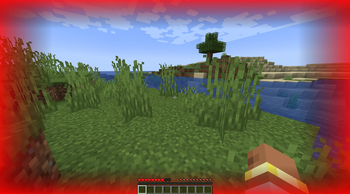
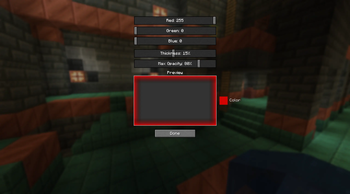
Hurt Tint – Custom Damage Vignette Hurt Tint adds a colored vignette at the edges of the screen whenever your player takes damage. The vignette appears on top of Minecraft's default hurt effect, giving you a clear and customizable visual cue that fits your personal style. ✨ Features Adjustable color – RGB sliders for any vignette tint (red, blue, green, etc.). Thickness control – from barely visible to a wide border. Brightness control – set the vignette's starting opacity from subtle to intense. Smooth fade – appears instantly on damage and fades out over 2 seconds. 🎮 How to configure Open the Mods menu → select Hurt Tint. Click the Config button. Adjust the Red, Green, Blue, Thickness, and Max Opacity sliders — changes take effect immediately. Press «Done» — your settings are saved for the next session. You can also edit config/hurt_tint-client.toml manually.
Hurt Tint – Custom Damage Vignette
Hurt Tint adds a colored vignette at the edges of the screen whenever your player takes damage. The vignette appears on top of Minecraft's default hurt effect, giving you a clear and customizable visual cue that fits your personal style.
Adjustable color – RGB sliders for any vignette tint (red, blue, green, etc.).
Thickness control – from barely visible to a wide border.
Brightness control – set the vignette's starting opacity from subtle to intense.
Smooth fade – appears instantly on damage and fades out over 2 seconds.
🎮 How to configure
Open the Mods menu → select Hurt Tint.
Click the Config button.
Adjust the Red, Green, Blue, Thickness, and Max Opacity sliders — changes take effect immediately.
Press «Done» — your settings are saved for the next session.
You can also edit config/hurt_tint-client.toml manually.
📊 Mod Details
- Game
- Minecraft Mods
- Author
- okuyama
- Version
- 1.0.0
- Downloads
- 268
- Endorsements
- 0
- Category
- game-mechanics
- Created
- 5/7/2026
- Updated
- 5/4/2026
- Game Versions
- 1.21.1
- Tags
- game-mechanics
🔧 How to Install Minecraft Mods Mods
Download from Modrinth. Use Prism Launcher or drop into your mods folder.
📖 Full step-by-step install guide for Minecraft Mods →
Visit the official mod page for specific installation instructions for this mod.
🎮 Need cheat codes or console commands? Check ur gaming wiki for Minecraft Mods commands, item IDs, and more.
❓ Frequently Asked Questions
Which Minecraft Mods versions does Hurt Tint support?
The author lists 1.21.1. Other versions may work but are untested by the author.
What is the latest version of Hurt Tint?
Version 1.0.0, published 2026-05-04 with 268 downloads recorded at the source.
Keep browsing — more Minecraft Mods mods await