Hulis Z-Crystals
🟠 Updated over a year ago⚠️ Install Order · 2 steps
Install in this order, then this mod last — most mods fail to load without their framework and dependencies in place.
🖼️ Gallery (2 images)
🔍 Analysis
- 👍 0.1% endorsement rate
- 🏆 #430 of 983 fabric mods in this game by downloads
📋 About This Mod
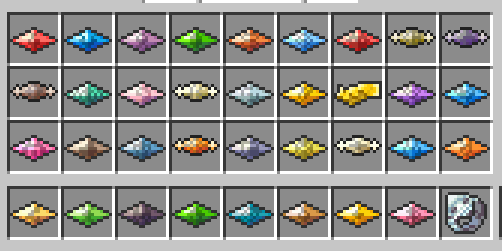
# Hulis Z-Crystals > Hulis Z-Crystals is a mod that adds Z-Crystals to Minecraft<br> > If you like my work consider supporting me on (https://ko-fi.com/huligani123)<br> > Thanks to Sanji for making the Textures ## Configuration > The Configuration file for this mod is located in the `config` folder under `zcrystals`<br> >> COMMAND_Z_RING_PERMISSION_LEVEL: The Permission Level required to use the `/keyitem` command<br> >> Default: `4`<br> > >> SERVERSIDE: If the Mod should be launched Serverside only or require it to be installed on clients<br> >> Default: `false`<br> ## Getting Started > To get started you need 2 things: >>Some Blank Z-Crystals !(https://i.imgur.com/neM2KgG_d.webp?maxwidth=760&fidelity=grand)<br> >>A Z-Ring !(https://i.imgur.com/B7kWRbp_d.webp?maxwidth=760&fidelity=grand) Once you have the Z-Ring you need to right-click in the Air to enable using Z-Moves<br> > Once you do that you will have a button for Z-Moves in your Battle GUI when<br> > a Pokémon is holding a Z-Crystal that can use a Z-Move.<br> ## Obtaining Z-Crystals > Z-Crystals are obtained by right-clicking certain Blocks/Entities with a Blank Z-Crystal<br> > The Z-Crystal will be consumed, and you will get a Z-Crystal<br> > ### Normalium Z > Made by crafting a Blank Z-Crystal with nothing in a shapeless recipe<br> > !(https://i.imgur.com/A1Keq1U_d.webp?maxwidth=760&fidelity=grand)<br> > ### Fightinium Z > Made by right-clicking a Bamboo Block with a Blank Z-Crystal<br> > ### Firium Z > Made by right-clicking a Magma Block with a Blank Z-Crystal<br> > ### Waterium Z > Made by right-clicking a Wet Sponge with a Blank Z-Crystal<br> > ### Electrium Z > Made by right-clicking a Copper Block with a Blank Z-Crystal<br> > ### Grassium Z > Made by right-clicking a Wheat Crop with a Blank Z-Crystal<br> > ### Icium Z > Made by right-clicking Powder Snow with a Blank Z-Crystal<br> > ### Rockium Z > Made by right-clicking Bedrock with a Blank Z-Crystal<br> > ### Steelium Z > Made by right-clicking an Iron Golem with a Blank Z-Crystal<br> > ### Poisonium Z > Made by right-clicking a Potato Crop with a Blank Z-Crystal **(Peaceful Mode Only)**<br> > Made by right-clicking a Cave Spider with a Blank Z-Crystal **(Every Mode except Peaceful)**<br> > ### Ghostium Z > Made by right-clicking Soul Sand with a Blank Z-Crystal<br> > ### Darkinium Z > Made by right-clicking Reinforced Deepslate with a Blank Z-Crystal<br> > ### Fairium Z > Made by right-clicking an Allay with a Blank Z-Crystal **(Peaceful Mode Only)**<br> > Made by right-clicking a Vex with a Blank Z-Crystal **(Every Mode except Peaceful)**<br>~~~~ > ### Dragonium Z > Made by right-clicking an End Portal Frame with a Blank Z-Crystal<br> > ### Buginium Z > Made by right-clicking a Beehive with a Blank Z-Crystal<br> > ### Psychium Z > Made by right-clicking an End Gateway with a Blank Z-Crystal<br> > ### Groundium Z > Made by right-clicking a Mud Block with a Blank Z-Crystal<br> > ### Flyinium Z > Made by right-clicking a Chicken with a Blank Z-Crystal<br> ## Pokémon Specific Z-Crystals > ### Aloraichium Z > Made by right-clicking an Alolan Raichu with an Electrium Z<br> > ### Decidium Z > Made by right-clicking a Decidueye with a Grassium Z<br> > ### Incinium Z > Made by right-clicking an Incineroar with a Firium Z<br> > ### Primarium Z > Made by right-clicking a Primarina with a Waterium Z<br> > ### Pikanium Z > Made by right-clicking a Pikachu with an Electrium Z<br> > ### Pikashunium Z > Made by right-clicking a Hat Pikachu with an Electrium Z<br> > ### Tapunium Z > Made by right-clicking any Tapu with a Fairium Z<br> > ### Marshadium Z > Made by right-clicking a Marshadow with a Ghostium Z<br> > ### Mimikium Z > Made by right-clicking a Mimikyu with a Ghostium Z<br> > ### Lycanium Z > Made by right-clicking a Lycanroc with a Rockium Z<br> > ### Kommonium Z > Made by right-clicking a Kommo-o with a Dragonium Z<br> > ### Solganium Z > Made by right-clicking a Solgaleo with a Psychium Z<br> > ### Lunalium Z > Made by right-clicking a Lunala with a Psychium Z<br> > ### Ultranecrozium Z > Made by right-clicking a Necrozma with a Psychium Z (Currently not working in battle)<br> > ### Eevium Z > Made by right-clicking an Eevee with a Normalium Z<br> > ### Mewnium Z > Made by right-clicking a Mew with a Psychium Z<br> > ### Snorlium Z > Made by right-clicking a Snorlax with a Normalium Z<br> ## Serverside Resource Pack > The Mod comes with a Serverside Resource Pack that changes the Z-Crystals to look like the ones from the games<br> > You will need to merge the resource pack with your own Server Resource Pack if you have one<br> > You can find the Resource Pack in this GitHub Repository (https://github.com/dujmovic-d/HulisZCrystals/blob/master/HulisZCrystalsResourcePack.zip)<br>
# Hulis Z-Crystals > Hulis Z-Crystals is a mod that adds Z-Crystals to Minecraft
> If you like my work consider supporting me on (https://ko-fi.com/huligani123)
> Thanks to Sanji for making the Textures
## Configuration > The Configuration file for this mod is located in the `config` folder under `zcrystals`
>> COMMAND_Z_RING_PERMISSION_LEVEL: The Permission Level required to use the `/keyitem` command
>> Default: `4`
> >> SERVERSIDE: If the Mod should be launched Serverside only or require it to be installed on clients
>> Default: `false`
## Getting Started
> To get started you need 2 things: >>Some Blank Z-Crystals !(https://i.imgur.com/neM2KgG_d.webp?maxwidth=760&fidelity=grand)
>>A Z-Ring !(https://i.imgur.com/B7kWRbp_d.webp?maxwidth=760&fidelity=grand) Once you have the Z-Ring you need to right-click in the Air to enable using Z-Moves
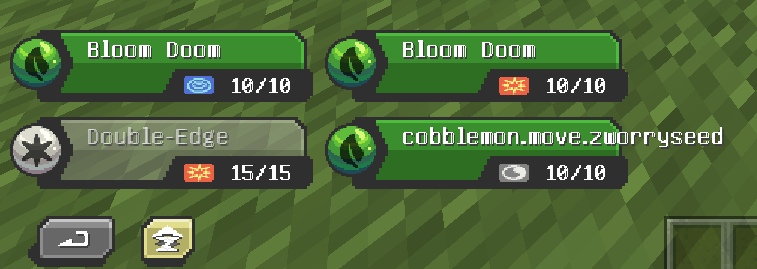
> Once you do that you will have a button for Z-Moves in your Battle GUI when
> a Pokémon is holding a Z-Crystal that can use a Z-Move.
## Obtaining Z-Crystals > Z-Crystals are obtained by right-clicking certain Blocks/Entities with a Blank Z-Crystal
> The Z-Crystal will be consumed, and you will get a Z-Crystal
> ### Normalium Z > Made by crafting a Blank Z-Crystal with nothing in a shapeless recipe
> !(https://i.imgur.com/A1Keq1U_d.webp?maxwidth=760&fidelity=grand)
> ### Fightinium Z > Made by right-clicking a Bamboo Block with a Blank Z-Crystal
> ### Firium Z > Made by right-clicking a Magma Block with a Blank Z-Crystal
> ### Waterium Z > Made by right-clicking a Wet Sponge with a Blank Z-Crystal
> ### Electrium Z > Made by right-clicking a Copper Block with a Blank Z-Crystal
> ### Grassium Z > Made by right-clicking a Wheat Crop with a Blank Z-Crystal
> ### Icium Z > Made by right-clicking Powder Snow with a Blank Z-Crystal
> ### Rockium Z > Made by right-clicking Bedrock with a Blank Z-Crystal
> ### Steelium Z > Made by right-clicking an Iron Golem with a Blank Z-Crystal
> ### Poisonium Z > Made by right-clicking a Potato Crop with a Blank Z-Crystal (Peaceful Mode Only)
> Made by right-clicking a Cave Spider with a Blank Z-Crystal (Every Mode except Peaceful)
> ### Ghostium Z > Made by right-clicking Soul Sand with a Blank Z-Crystal
> ### Darkinium Z > Made by right-clicking Reinforced Deepslate with a Blank Z-Crystal
> ### Fairium Z > Made by right-clicking an Allay with a Blank Z-Crystal (Peaceful Mode Only)
> Made by right-clicking a Vex with a Blank Z-Crystal (Every Mode except Peaceful) ~~~~ > ### Dragonium Z > Made by right-clicking an End Portal Frame with a Blank Z-Crystal
> ### Buginium Z > Made by right-clicking a Beehive with a Blank Z-Crystal
> ### Psychium Z > Made by right-clicking an End Gateway with a Blank Z-Crystal
> ### Groundium Z > Made by right-clicking a Mud Block with a Blank Z-Crystal
> ### Flyinium Z > Made by right-clicking a Chicken with a Blank Z-Crystal
## Pokémon Specific Z-Crystals > ### Aloraichium Z > Made by right-clicking an Alolan Raichu with an Electrium Z
> ### Decidium Z > Made by right-clicking a Decidueye with a Grassium Z
> ### Incinium Z > Made by right-clicking an Incineroar with a Firium Z
> ### Primarium Z > Made by right-clicking a Primarina with a Waterium Z
> ### Pikanium Z > Made by right-clicking a Pikachu with an Electrium Z
> ### Pikashunium Z > Made by right-clicking a Hat Pikachu with an Electrium Z
> ### Tapunium Z > Made by right-clicking any Tapu with a Fairium Z
> ### Marshadium Z > Made by right-clicking a Marshadow with a Ghostium Z
> ### Mimikium Z > Made by right-clicking a Mimikyu with a Ghostium Z
> ### Lycanium Z > Made by right-clicking a Lycanroc with a Rockium Z
> ### Kommonium Z > Made by right-clicking a Kommo-o with a Dragonium Z
> ### Solganium Z > Made by right-clicking a Solgaleo with a Psychium Z
> ### Lunalium Z > Made by right-clicking a Lunala with a Psychium Z
> ### Ultranecrozium Z > Made by right-clicking a Necrozma with a Psychium Z (Currently not working in battle)
> ### Eevium Z > Made by right-clicking an Eevee with a Normalium Z
> ### Mewnium Z > Made by right-clicking a Mew with a Psychium Z
> ### Snorlium Z > Made by right-clicking a Snorlax with a Normalium Z
## Serverside Resource Pack > The Mod comes with a Serverside Resource Pack that changes the Z-Crystals to look like the ones from the games
> You will need to merge the resource pack with your own Server Resource Pack if you have one
> You can find the Resource Pack in this GitHub Repository (https://github.com/dujmovic-d/HulisZCrystals/blob/master/HulisZCrystalsResourcePack.zip)
📊 Mod Details
- Game
- Minecraft Mods
- Author
- dujmovic-d
- Version
- 1.2
- Downloads
- 57,716
- Endorsements
- 40
- Category
- fabric
- Created
- 7/12/2024
- Updated
- 12/25/2024
- Game Versions
- 1.21.1
- Tags
- game-mechanics, utility
🔧 How to Install Minecraft Mods Mods
Download from Modrinth. Use Prism Launcher or drop into your mods folder.
📖 Full step-by-step install guide for Minecraft Mods →
Visit the official mod page for specific installation instructions for this mod.
🎮 Need cheat codes or console commands? Check ur gaming wiki for Minecraft Mods commands, item IDs, and more.
❓ Frequently Asked Questions
Which Minecraft Mods versions does Hulis Z-Crystals support?
The author lists 1.21.1. Other versions may work but are untested by the author.
What is the latest version of Hulis Z-Crystals?
Version 1.2, published 2024-12-25 with 57,716 downloads recorded at the source.
Keep browsing — more Minecraft Mods mods await