Hudifine
🟡 Updated this year⚠️ Install Order · 2 steps
Install in this order, then this mod last — most mods fail to load without their framework and dependencies in place.
🖼️ Gallery (1 images)
🔍 Analysis
- 🏆 #92 of 258 decoration mods in this game by downloads
📋 About This Mod
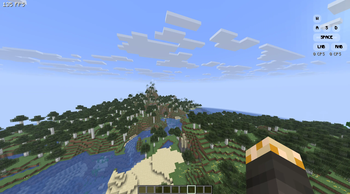
Hudifine is an HUD mod that allows anyone to make HUDs easily via HUD Script, which displays the metrics you choose.
Open the chat up to add and configure them.
Below is a documentation for HUDScript, the scripting language of Hudifine.
HUDScript Documentation
# HUD Script Developer Documentation
> HUD Script is a safe, sandboxed scripting format for creating fully customizable in-game HUD overlays in Minecraft (Fabric). Scripts are paste-and-run; no mod dev environment required.
## Table of Contents
1. Overview 2. Script Structure 3. Screen Budget (30% Rule) 4. Data Sources - Player - World - Performance - Combat - Inventory - Input - Environment - Game State - Multiplayer - Time 5. Layout System - Ordering & Layering 6. Styling 7. Elements 8. Conditionals & Logic 9. Events 10. Accessibility Toggles 11. Player Settings API 12. Animations 13. CPS Implementation Guide 14. Full Examples
## Overview
HUD Script is a declarative + event-driven scripting format. Scripts define:
- What data to display (from a fixed set of allowed data sources)
- How to display it (full visual freedom within the screen budget)
- Player-configurable settings (accessibility, toggles, colors, etc.)
Scripts are sandboxed by design. They can only:
- ✅ Read from allowed data sources
- ✅ Render to the HUD overlay
- ✅ React to player input visually
- ❌ Make network requests
- ❌ Access the file system
- ❌ Interact with anything outside the widget
## Script Structure
Every script has three optional top-level blocks:
```hud meta { name: "My Widget" author: "yourname" version: "1. 0. 0" description: "A short description of what this widget does." }
settings { // Player-configurable options exposed in the right-click menu }
widget { // Layout, elements, styling, logic } ```
Only the `widget` block is required.
## Screen Budget (30% Rule)
A widget may occupy no more than 30% of the player's screen area at any time.
- Screen area is calculated as `screenWidth × screenHeight`
- Your widget's bounding box (all elements combined) must not exceed `screenWidth × screenHeight × 0. 30`
- This is enforced at runtime; if your widget exceeds 30%, it will be scaled down automatically and a warning will appear in the widget editor
- Widgets that are toggled off or fully transparent do not count toward the budget
- Multiple widgets each have their own 30% budget independently
> Tip: Use the `size` property wisely and test at different resolutions. Design for 1920×1080 as your baseline.
## Data Sources
All data sources are read-only. Call them inside element values using `get()`.
| Source | Returns | Description | |--------|---------|-------------| | `player.health` | `float` | Current health (0. 0–20. 0) | | `player.maxHealth` | `float` | Max health including absorption | | `player.absorption` | `float` | Absorption hearts | | `player.hunger` | `int` | Food level (0–20) | | `player.saturation` | `float` | Saturation level (0. 0–20. 0) | | `player.exhaustion` | `float` | Exhaustion value (0. 0–4. 0) | | `player.air` | `int` | Air supply ticks (0–300) | | `player.xp` | `int` | Total XP points | | `player.xpLevel` | `int` | Current XP level | | `player.xpProgress` | `float` | XP progress to next level (0. 0–1. 0) | | `player.speed` | `float` | Current movement speed (blocks/sec) | | `player.isSprinting` | `bool` | Whether player is sprinting | | `player.isSneaking` | `bool` | Whether player is sneaking | | `player.isSwimming` | `bool` | Whether player is swimming | | `player.isFlying` | `bool` | Whether player is flying (creative/elytra) | | `player.isFalling` | `bool` | Whether player is falling | | `player.isOnGround` | `bool` | Whether player is on the ground | | `player.isInWater` | `bool` | Whether player is in water | | `player.isInLava` | `bool` | Whether player is in lava | | `player.fallDistance` | `float` | Current fall distance in blocks | | `player.reachDistance` | `float` | Current reach distance | | `player.name` | `string` | Player's username | | `player.uuid` | `string` | Player UUID | | `player.gamemode` | `string` | `survival`, `creative`, `adventure`, `spectator` | | `player.score` | `int` | Player's current scoreboard score | | `player.ping` | `int` | Latency in ms (multiplayer only) |
| Source | Returns | Description | |--------|---------|-------------| | `world.x` | `float` | Player X coordinate | | `world.y` | `float` | Player Y coordinate | | `world.z` | `float` | Player Z coordinate | | `world.blockX` | `int` | Player block X (floored) | | `world.blockY` | `int` | Player block Y (floored) | | `world.blockZ` | `int` | Player block Z (floored) | | `world.chunkX` | `int` | Current chunk X | | `world.chunkZ` | `int` | Current chunk Z | | `world.facing` | `string` | Cardinal direction: `N`, `NE`, `E`, `SE`, `S`, `SW`, `W`, `NW` | | `world.facingDegrees` | `float` | Yaw in degrees (0–
📊 Mod Details
- Game
- Minecraft Mods
- Author
- Pacsy
- Version
- 2.0.1
- Downloads
- 439
- Endorsements
- 4
- Category
- decoration
- Created
- 5/22/2026
- Updated
- 6/18/2026
- Game Versions
- 26.2
- Tags
- decoration, game-mechanics, library
🔧 How to Install Minecraft Mods Mods
Download from Modrinth. Use Prism Launcher or drop into your mods folder.
📖 Full step-by-step install guide for Minecraft Mods →
Visit the official mod page for specific installation instructions for this mod.
🎮 Need cheat codes or console commands? Check ur gaming wiki for Minecraft Mods commands, item IDs, and more.
❓ Frequently Asked Questions
Which Minecraft Mods versions does Hudifine support?
The author lists 26.2. Other versions may work but are untested by the author.
What is the latest version of Hudifine?
Version 2.0.1, published 2026-06-18 with 439 downloads recorded at the source.
Keep browsing — more Minecraft Mods mods await