HUD+
🟡 Updated this year⚠️ Install Order · 2 steps
Install in this order, then this mod last — most mods fail to load without their framework and dependencies in place.
🖼️ Gallery (5 images)
🔍 Analysis
- 👍 0.0% endorsement rate
- 🏆 #151 of 874 fabric mods in this game by downloads
📋 About This Mod
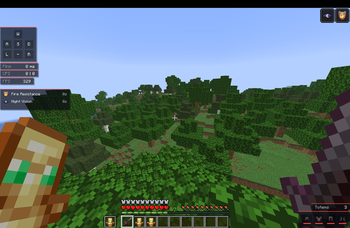
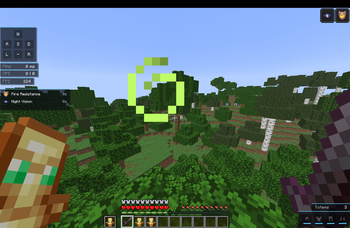
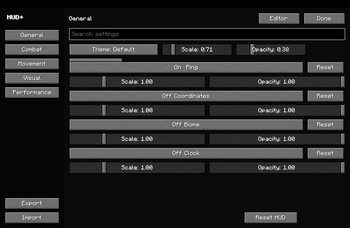
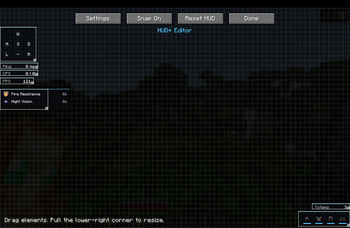
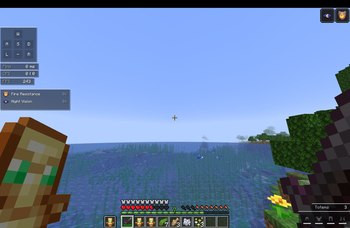
HUD+ is a lightweight, modern HUD overhaul for Fabric 1.21.x. It brings together the useful parts of FPS counters, keystrokes mods, armor HUDs, PvP utility overlays, and clean debug-style information into one polished client-side mod. Designed for everyday survival, PvP, practice servers, and content creation, HUD+ gives you a customizable overlay without needing multiple separate HUD mods. Features - FPS counter - Ping display - CPS counter - BPS movement speed - Coordinates - Direction display - Biome display - Clock - Armor HUD - Armor durability - Item durability - Potion effects with real Minecraft effect icons - Totem counter - Arrow counter - Keystrokes - Custom crosshair - HUD editor opened with Right Shift - Drag and drop HUD elements - Resize HUD elements - Snap to grid - Live preview - Auto-saving JSON config - Themes and opacity/scale controls HUD Editor: Press Right Shift in-game to open the HUD editor. From there you can move, resize, reset, and preview HUD elements live. Compatibility: HUD+ is client-side only and built for Fabric. Supported Minecraft versions: 1.21, 1.21.1, 1.21.2, 1.21.3, 1.21.4, 1.21.5, 1.21.6, 1.21.7, 1.21.8, 1.21.9, 1.21.10, 1.21.11 Compatible with: 1. Fabric API 2. Mod Menu 3. Sodium 4. Iris Requirements: 1. Fabric Loader 2. Fabric API 3. Java 21+ 4. Minecraft 1.21.x Notes: HUD + is client-side only. It does not need to be installed on servers.
HUD+ is a lightweight, modern HUD overhaul for Fabric 1. 21.x. It brings together the useful parts of FPS counters, keystrokes mods, armor HUDs, PvP utility overlays, and clean debug-style information into one polished client-side mod.
Designed for everyday survival, PvP, practice servers, and content creation, HUD+ gives you a customizable overlay without needing multiple separate HUD mods.
- FPS counter
- Ping display
- CPS counter
- BPS movement speed
- Coordinates
- Direction display
- Biome display
- Clock
- Armor HUD
- Armor durability
- Item durability
- Potion effects with real Minecraft effect icons
- Totem counter
- Arrow counter
- Keystrokes
- Custom crosshair
- HUD editor opened with Right Shift
- Drag and drop HUD elements
- Resize HUD elements
- Snap to grid
- Live preview
- Auto-saving JSON config
- Themes and opacity/scale controls
- HUD Editor:
- Press Right Shift in-game to open the HUD editor. From there you can move, resize, reset, and preview HUD elements live.
Compatibility: HUD+ is client-side only and built for Fabric.
Supported Minecraft versions: 1. 21, 1. 21. 1, 1. 21. 2, 1. 21. 3, 1. 21. 4, 1. 21. 5, 1. 21. 6, 1. 21. 7, 1. 21. 8, 1. 21. 9, 1. 21. 10, 1. 21. 11
Compatible with:
1. Fabric API 2. Mod Menu 3. Sodium 4. Iris Requirements:
1. Fabric Loader 2. Fabric API 3. Java 21+ 4. Minecraft 1. 21.x Notes: HUD + is client-side only. It does not need to be installed on servers.
📊 Mod Details
- Game
- Minecraft Mods
- Author
- kinggaming2010
- Version
- 1.21.11
- Downloads
- 2,006
- Endorsements
- 1
- Category
- fabric
- Created
- 6/6/2026
- Updated
- 6/6/2026
- Game Versions
- 1.21.11
- Tags
- game-mechanics, technology, utility
🔧 How to Install Minecraft Mods Mods
Download from Modrinth. Use Prism Launcher or drop into your mods folder.
📖 Full step-by-step install guide for Minecraft Mods →
Visit the official mod page for specific installation instructions for this mod.
🎮 Need cheat codes or console commands? Check ur gaming wiki for Minecraft Mods commands, item IDs, and more.
❓ Frequently Asked Questions
Which Minecraft Mods versions does HUD+ support?
The author lists 1.21.11. Other versions may work but are untested by the author.
What is the latest version of HUD+?
Version 1.21.11, published 2026-06-06 with 2,006 downloads recorded at the source.
Keep browsing — more Minecraft Mods mods await