HUD Lib
🟡 Updated this year⚠️ Install Order · 2 steps
Install in this order, then this mod last — most mods fail to load without their framework and dependencies in place.
🖼️ Gallery (3 images)
🔍 Analysis
- 👍 0.0% endorsement rate
- 🏆 #1001 of 1032 fabric mods in this game by downloads
📋 About This Mod
# Hud Lib This mod is a library for other mods to register their own HUD Elements. These HUD Elements has inbuilt repositioning, anchoring, and configuration. They can all be edited after pressing `RIGHT SHIFT` (Can be rebinded in Key Binds). **This mod has no default elements**, you will need a mod such as Generic Hud (mentioned below) if you want any features. ## Mods using this library Currently there are 3 mods that uses this library: - (https://modrinth.com/mod/generic-hud) - (https://modrinth.com/mod/w-armor-hud) - (https://modrinth.com/mod/status-effect-hud) ## The Editor The editor allows you to reposition and disable any HUD Elements. If you want to hide the Settings button or **stop snapping, hold CTRL**. The settings menu will allow you to configure each HUD Element, and disable them/reset their position in the 'Generic HUD Options' tab. !(https://cdn.modrinth.com/data/dWIHwNEE/images/64322aa4bef7beda735bbf10ef4d5186f6c4c9fb.png) ## For Developers Currently no documentation exists, but you can use (https://github.com/woooferz/generic-hud), (https://github.com/woooferz/armor-hud) or the internal (https://github.com/woooferz/hudlib/tree/master/src/testmod) as an example, because they are all open source. ### What is offered in the library? - A simple way to render HUD elements, using `DrawContext`, when rendering it you are also given an X and a Y coordinate which is where on the screen it should be rendered. - With minimal extra setup they can be repositioned in the editor. - The repositioning also anchors to the screen (e.g. If you put it in the top right corner, it will stay there with any screen size) - A way to register your own configuration in the "HUD Lib" configuration screen, this is done with (https://modrinth.com/mod/yacl) - They can also be hidden to only show in the editor, or completely disabled in the configuration. ## Versions The mod has been ported to all 1.21.X versions.
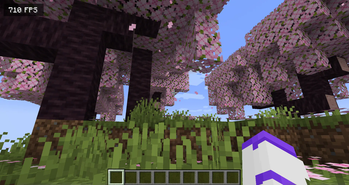
This mod is a library for other mods to register their own HUD Elements. These HUD Elements has inbuilt repositioning, anchoring, and configuration. They can all be edited after pressing `RIGHT SHIFT` (Can be rebinded in Key Binds). This mod has no default elements, you will need a mod such as Generic Hud (mentioned below) if you want any features.
## Mods using this library
Currently there are 3 mods that uses this library: - (https://modrinth.com/mod/generic-hud) - (https://modrinth.com/mod/w-armor-hud) - (https://modrinth.com/mod/status-effect-hud)
## The Editor
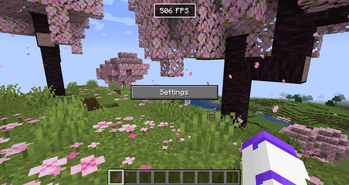
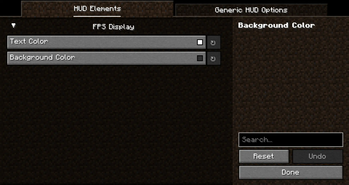
The editor allows you to reposition and disable any HUD Elements. If you want to hide the Settings button or stop snapping, hold CTRL. The settings menu will allow you to configure each HUD Element, and disable them/reset their position in the 'Generic HUD Options' tab.
!(https://cdn.modrinth.com/data/dWIHwNEE/images/64322aa4bef7beda735bbf10ef4d5186f6c4c9fb.png)
## For Developers
Currently no documentation exists, but you can use (https://github.com/woooferz/generic-hud), (https://github.com/woooferz/armor-hud) or the internal (https://github.com/woooferz/hudlib/tree/master/src/testmod) as an example, because they are all open source.
### What is offered in the library?
- A simple way to render HUD elements, using `DrawContext`, when rendering it you are also given an X and a Y coordinate which is where on the screen it should be rendered.
- With minimal extra setup they can be repositioned in the editor.
- The repositioning also anchors to the screen (e.g. If you put it in the top right corner, it will stay there with any screen size)
- A way to register your own configuration in the "HUD Lib" configuration screen, this is done with (https://modrinth.com/mod/yacl)
- They can also be hidden to only show in the editor, or completely disabled in the configuration.
## Versions
The mod has been ported to all 1. 21. X versions.
📊 Mod Details
- Game
- Minecraft Mods
- Author
- wooferz
- Version
- 1.2.1+1.21.9
- Downloads
- 93,677
- Endorsements
- 20
- Category
- fabric
- Created
- 11/17/2024
- Updated
- 12/7/2025
- Game Versions
- 1.21.9, 1.21.10, 1.21.11
- Tags
- library, management, utility
🔧 How to Install Minecraft Mods Mods
Download from Modrinth. Use Prism Launcher or drop into your mods folder.
📖 Full step-by-step install guide for Minecraft Mods →
Visit the official mod page for specific installation instructions for this mod.
🎮 Need cheat codes or console commands? Check ur gaming wiki for Minecraft Mods commands, item IDs, and more.
❓ Frequently Asked Questions
Which Minecraft Mods versions does HUD Lib support?
The author lists 1.21.9, 1.21.10, 1.21.11. Other versions may work but are untested by the author.
What is the latest version of HUD Lib?
Version 1.2.1+1.21.9, published 2025-12-07 with 93,677 downloads recorded at the source.
Keep browsing — more Minecraft Mods mods await