⚠️ Install Order · 2 steps
Install in this order, then this mod last — most mods fail to load without their framework and dependencies in place.
🖼️ Gallery (3 images)
🔍 Analysis
- 👍 1.6% endorsement rate — high engagement, a strong quality signal
- 🏆 #816 of 874 fabric mods in this game by downloads
📋 About This Mod
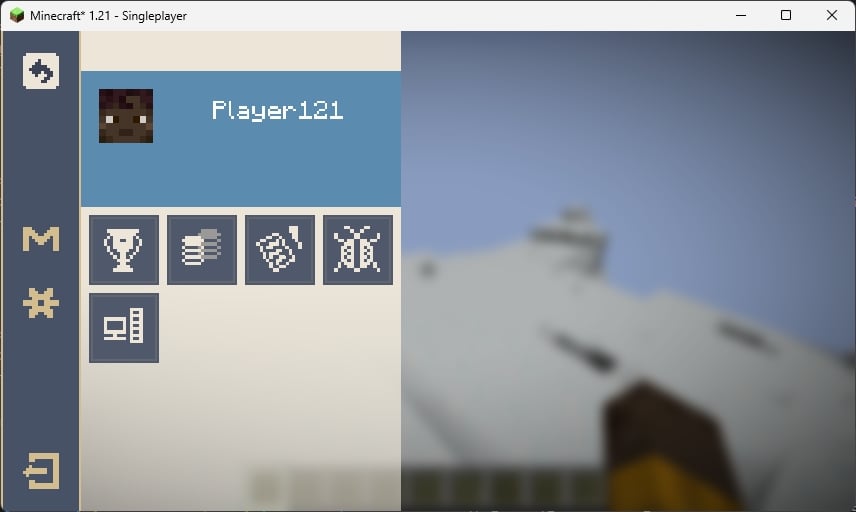
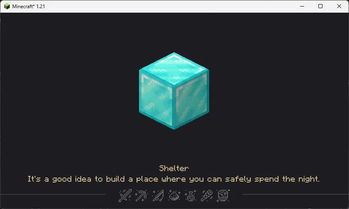
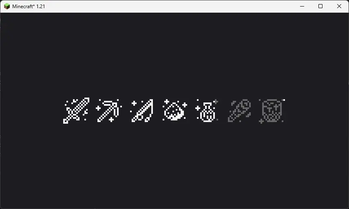
# HoYoI (Aka. HoYo UI, HoUI) ## Introduction This mod simply adds miHoYo/HoYoVerse games UI for Minecraft (like Genshin Impact, Honkai: Star Rial) with vanilla-like style. Now HoYoI only implemented Genshin Style, Star Rail Style is still working in progress. Genshin style loading screen has two theme: light and dark. In reallife time 19:00 ~ 7:00 next day the ui will be dark theme. ## Screenshots ### Genshin Style !(https://cdn.modrinth.com/data/cached_images/7055e4140676da4418473d64ecc5dd6323a0701f.jpeg) This loading screen will only show once when the game starting. Because NeoForge has an early display, so this feature is broken on NeoForge platform. !(https://cdn.modrinth.com/data/cached_images/5c5dde7a7d87e188d4780619e76bc0dd1ca61c63.jpeg) This loading screen will be normally seen in the game, the picture in the center and the tips at the bottom are all random, customizable and localized (I'll talk about how to customize below). !(https://cdn.modrinth.com/data/cached_images/303a82fc6d43104791af6ba24e44811e489d1458.jpeg) The ESC pause screen in the game, the "M" button in the sidebar is Mod List button, for Fabric, you need install Mod Menu to open the Mod List screen. ### Star Rail Style **WIP** ## Customization You can customize the center picture and bottom tips in loading screen. **FIRST**: Create a resource pack (Check (https://minecraft.wiki/w/Resource_pack)) ### Tips **SECOND**: Create a file in assets/{yourpack}/tips folder with name {languageCode}.json like "en_us.json" **THIRD**: Edit the file like the example shown below ```json }, { "title": "Example Tip 2", "desc": }, ... ] ``` **FOURTH**: Load your resource pack ### Center picture **SECOND**: Put pictures with png format in assets/{yourpack}/textures/ui/regions folder with any filename you like **THIRD**: Load your resource pack ## Credits - (https://modrinth.com/user/7777777_4547), loading screen ui textures. - (https://modrinth.com/user/DeeChael), programming and pause screen ui textures. Some tips.
# HoYoI (Aka. HoYo UI, HoUI) ## Introduction This mod simply adds miHoYo/HoYoVerse games UI for Minecraft (like Genshin Impact, Honkai: Star Rial) with vanilla-like style. Now HoYoI only implemented Genshin Style, Star Rail Style is still working in progress. Genshin style loading screen has two theme: light and dark. In reallife time 19:00 ~ 7:00 next day the ui will be dark theme. ## Screenshots ### Genshin Style !(https://cdn.modrinth.com/data/cached_images/7055e4140676da4418473d64ecc5dd6323a0701f.jpeg) This loading screen will only show once when the game starting. Because NeoForge has an early display, so this feature is broken on NeoForge platform. !(https://cdn.modrinth.com/data/cached_images/5c5dde7a7d87e188d4780619e76bc0dd1ca61c63.jpeg) This loading screen will be normally seen in the game, the picture in the center and the tips at the bottom are all random, customizable and localized (I'll talk about how to customize below). !(https://cdn.modrinth.com/data/cached_images/303a82fc6d43104791af6ba24e44811e489d1458.jpeg) The ESC pause screen in the game, the "M" button in the sidebar is Mod List button, for Fabric, you need install Mod Menu to open the Mod List screen. ### Star Rail Style WIP
## Customization You can customize the center picture and bottom tips in loading screen.
FIRST: Create a resource pack (Check (https://minecraft.wiki/w/Resource_pack))
- SECOND
- Create a file in assets/{yourpack}/tips folder with name {languageCode}.json like "en_us.json"
- THIRD
- Edit the file like the example shown below
- FOURTH
- Load your resource pack
- SECOND
- Put pictures with png format in assets/{yourpack}/textures/ui/regions folder with any filename you like
- THIRD
- Load your resource pack
## Credits - (https://modrinth.com/user/7777777_4547), loading screen ui textures. - (https://modrinth.com/user/DeeChael), programming and pause screen ui textures. Some tips.
📊 Mod Details
- Game
- Minecraft Mods
- Author
- DeeChael
- Version
- 0.0.3-beta
- Downloads
- 1,617
- Endorsements
- 26
- Category
- fabric
- Created
- 7/1/2024
- Updated
- 7/6/2024
- Game Versions
- 1.21
- Tags
- utility
🔧 How to Install Minecraft Mods Mods
Download from Modrinth. Use Prism Launcher or drop into your mods folder.
📖 Full step-by-step install guide for Minecraft Mods →
Visit the official mod page for specific installation instructions for this mod.
🎮 Need cheat codes or console commands? Check ur gaming wiki for Minecraft Mods commands, item IDs, and more.
❓ Frequently Asked Questions
Which Minecraft Mods versions does HoYoI support?
The author lists 1.21. Other versions may work but are untested by the author.
What is the latest version of HoYoI?
Version 0.0.3-beta, published 2024-07-06 with 1,617 downloads recorded at the source.
Keep browsing — more Minecraft Mods mods await