HoloPath
🟡 Updated this year⚠️ Install Order · 2 steps
Install in this order, then this mod last — most mods fail to load without their framework and dependencies in place.
🖼️ Gallery (2 images)
🔍 Analysis
- 👍 0.4% endorsement rate
- 🏆 #214 of 257 decoration mods in this game by downloads
📋 About This Mod
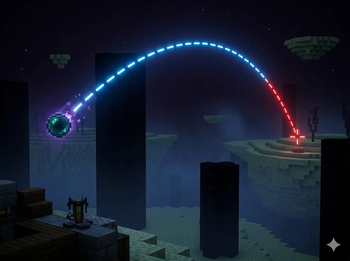
**HoloPath** — Trajectory Visualizer for Minecraft 1.21.1-1.21.11 Ever wondered exactly where your ender pearl will land? HoloPath renders a real-time holographic trajectory line showing the exact path of your throwables and projectiles before you release them. Supported Items: - Ender Pearl - Bow (draw strength sensitive — the line updates as you pull back) - Snowball Features: - Real-time 3D trajectory line that updates as you move and aim - Color changes to red when the path passes through a living entity — so you know if your shot will hit before you throw - Dashed line style for clear visibility without cluttering your screen - Toggle the display on or off at any time with a keybind (default: K) - Keybind is fully rebindable from Options → Controls → HoloPath - A reminder message appears in chat when you join a world, telling you the current keybind How to Use: - Hold an ender pearl, bow, or snowball - Aim — the trajectory line appears automatically - Pull back your bow to see the arc adjust in real time based on draw strength - If the line turns red, a living entity is in the path - Press K to hide the display when you don't need it Client-side only — works in singleplayer and on any server without requiring the mod to be installed server-side.
HoloPath — Trajectory Visualizer for Minecraft 1. 21. 1-1. 21. 11
Ever wondered exactly where your ender pearl will land? HoloPath renders a real-time holographic trajectory line showing the exact path of your throwables and projectiles before you release them.
Supported Items:
- Ender Pearl
- Bow (draw strength sensitive — the line updates as you pull back)
- Snowball
- Real-time 3D trajectory line that updates as you move and aim
- Color changes to red when the path passes through a living entity — so you know if your shot will hit before you throw
- Dashed line style for clear visibility without cluttering your screen
- Toggle the display on or off at any time with a keybind (default: K)
- Keybind is fully rebindable from Options → Controls → HoloPath
- A reminder message appears in chat when you join a world, telling you the current keybind
How to Use:
- Hold an ender pearl, bow, or snowball
- Aim — the trajectory line appears automatically
- Pull back your bow to see the arc adjust in real time based on draw strength
- If the line turns red, a living entity is in the path
- Press K to hide the display when you don't need it
- Client-side only — works in singleplayer and on any server without requiring the mod to be installed server-side.
📊 Mod Details
- Game
- Minecraft Mods
- Author
- farefenerbahce3
- Version
- 1.4.0
- Downloads
- 978
- Endorsements
- 4
- Category
- decoration
- Created
- 3/29/2026
- Updated
- 3/19/2026
- Game Versions
- 1.21.11
- Tags
- decoration, equipment, game-mechanics
🔧 How to Install Minecraft Mods Mods
Download from Modrinth. Use Prism Launcher or drop into your mods folder.
📖 Full step-by-step install guide for Minecraft Mods →
Visit the official mod page for specific installation instructions for this mod.
🎮 Need cheat codes or console commands? Check ur gaming wiki for Minecraft Mods commands, item IDs, and more.
❓ Frequently Asked Questions
Which Minecraft Mods versions does HoloPath support?
The author lists 1.21.11. Other versions may work but are untested by the author.
What is the latest version of HoloPath?
Version 1.4.0, published 2026-03-19 with 978 downloads recorded at the source.
Keep browsing — more Minecraft Mods mods await