HexLands
⚪ Last updated 2024⚠️ Install Order · 2 steps
Install in this order, then this mod last — most mods fail to load without their framework and dependencies in place.
🖼️ Gallery (5 images)
🔍 Analysis
- 👍 1.6% endorsement rate — high engagement, a strong quality signal
- 🏆 #885 of 901 fabric mods in this game by downloads
📋 About This Mod
!(https://raw.githubusercontent.com/alcatrazEscapee/hexlands/1. 19.x/img/splash.png)
This mod is an updated and rewritten version of the original (https://www.curseforge.com/minecraft/mc-mods/hex-lands) mod by superfluke, et. al. It has been rewritten completely for new Minecraft versions.
### Features
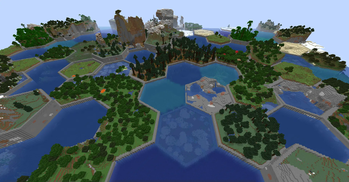
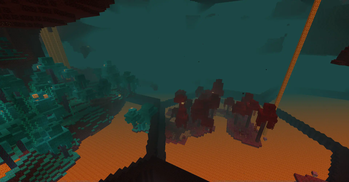
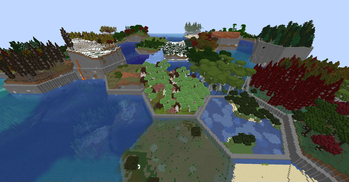
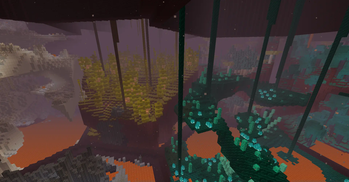
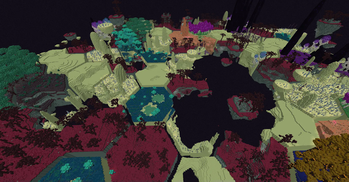
- Adds two world type presets: "HexLands", and "HexLands (Overworld)". The former which enables hexagonal terrain generation in both the overworld and the nether, the latter which only enables it in the overworld.
- Each hex contains a single biome. Hexes of different types are bordered by walls.
- Automatic compatibility with mods that add biomes to the overworld or other world generation.
- Many options for world customization via data packs.
### Configuration (Data Packs - 1. 19.x - 1. 20.x)
Worlds are now specified by (https://minecraft.fandom.com/wiki/World_preset) due to a change from Mojang. HexLands can be customized by adding a new world preset. The default HexLands world presets can be found here, for (https://github.com/alcatrazEscapee/hexlands/tree/1. 19.x/Common/src/main/resources/data/hexlands/worldgen/world_preset/hexlands.json), and (https://github.com/alcatrazEscapee/hexlands/tree/1. 19.x/Common/src/main/resources/data/hexlands/worldgen/world_preset/hexlands_overworld_only.json). They both make use of the `hexlands:hexlands` chunk generator.
In order to use a HexLands world for a specific dimension, you must change the `generator` field. It must be an object with the following properties:
- `type` is a string identifying what generator to use. It should be `hexlands:hexlands`.
- `settings` is a (https://minecraft.fandom.com/wiki/Custom_world_generation#Noise_settings) used by the dimension.
- `biome_source` is the biome source, as in vanilla. It can be a known preset, such as `"minecraft:overworld"`, or `"minecraft:nether"`, or it can be a JSON object following the vanilla biome source format.
- `hex_settings` is an object with parameters defining how the hexagonal grid works. It can either be a known preset, which must be one of `"hexlands:overworld"`, `"hexlands:nether"`, or `"hexlands:the_end"`, or it can be an object with the following fields:
- - `biome_scale` (Default: 8) is the scale at which biomes are sampled to create hexes. Higher values create more random biome layouts.
- - `hex_size` (Default: 40) is the size of an individual hex.
- - `hex_border_threshold` (Default: 0. 92) is a number between `0` and `1` representing how much of a hex should be covered by the border. Larger values will lead to thinner borders.
- - `top_border` and `bottom_border` are both border settings which define how the top and bottom borders of the world are built. The borders between hexes consist of a bottom border, air, and a top border. If not present, this section of the border will consist entirely of air. If present, it must have the following fields:
- - `min_height`: The minimum height of the border.
- - `max_height`: The maximum height of the border.
- - `state`: A block state to generate as the border state. As in vanilla formats, this must be an object with a `Name` and `Properties` field. The `Properties` must be an object containing all possible block state properties in key-value pairs, and the `Name` field must be the name of the block.
Example
Below is an example object which can be used in the `generator` field of a world preset.
```json5 // Below is an example object which can be used in the `generator` field of a world preset. { "type": "hexlands:hexlands", "settings": "minecraft:overworld", "biome_source": { "type": "minecraft:multi_noise", "preset": "minecraft:overworld" }, "hex_settings": "hexlands:overworld" } ```
📊 Mod Details
- Game
- Minecraft Mods
- Author
- alcatrazEscapee
- Version
- 6.0.0
- Downloads
- 9,770
- Endorsements
- 161
- Category
- fabric
- Created
- 5/7/2023
- Updated
- 6/28/2024
- Game Versions
- 1.21, 1.21.1
- Tags
- worldgen
🔧 How to Install Minecraft Mods Mods
Download from Modrinth. Use Prism Launcher or drop into your mods folder.
📖 Full step-by-step install guide for Minecraft Mods →
Visit the official mod page for specific installation instructions for this mod.
🎮 Need cheat codes or console commands? Check ur gaming wiki for Minecraft Mods commands, item IDs, and more.
❓ Frequently Asked Questions
Which Minecraft Mods versions does HexLands support?
The author lists 1.21, 1.21.1. Other versions may work but are untested by the author.
What is the latest version of HexLands?
Version 6.0.0, published 2024-06-28 with 9,770 downloads recorded at the source.
Keep browsing — more Minecraft Mods mods await