Hex Banners
⚪ Last updated 2024⚠️ Install Order · 2 steps
Install in this order, then this mod last — most mods fail to load without their framework and dependencies in place.
🖼️ Gallery (2 images)
🔍 Analysis
- 👍 0.7% endorsement rate
- 🏆 #48 of 243 decoration mods in this game by downloads
📋 About This Mod
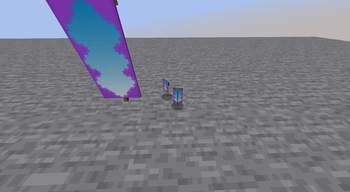
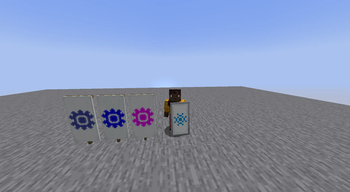
# Hex Banners Adds the ability to use RGB codes for banner colors. This does not change any gameplay feature, but allows only to render more colors. Any pattern color ID between 0 and 15 (unless Dye Depot is loaded, in which case up to 32) will still provide the vanilla colors. Otherwise, replacing the banner data's pattern color for either a hex string or a number bigger (matching the hexadecimal value) will allow to render more detailed colors. Accepted values are: * Any number between 16\* and 16777215 included * Any hexadecimal string up to six characters long * Any hexadecimal string starting with a `#` with up to six hexadecimal characters (e.g. `#ABC123` \*: in vanilla. Mods such as Dye Depot tweak the numbers of dye colors, and in order to not break using them on banners, these are dynamically accepted as well when parsing number values. The banner rendering is purely client-side, and thus, this mod can be used solely on the clients. However, the data handling logic also is loaded on the server, for mods that do rely on it for additional features. However, there is no added way to craft banners with more detailed colors. As such, you need to manually create them using commands. Don't hesitate to look up the (https://minecraft.wiki/w/Banner#Block_data) for more info about how to do that. Additionally, please note that on 1.20.1, the banner pattern color data key is not `color`, but `Color`, with an uppercase `C`.
# Hex Banners
Adds the ability to use RGB codes for banner colors.
This does not change any gameplay feature, but allows only to render more colors.
Any pattern color ID between 0 and 15 (unless Dye Depot is loaded, in which case up to 32) will still provide the vanilla colors. Otherwise, replacing the banner data's pattern color for either a hex string or a number bigger (matching the hexadecimal value) will allow to render more detailed colors.
Accepted values are: Any number between 16\ and 16777215 included Any hexadecimal string up to six characters long Any hexadecimal string starting with a `#` with up to six hexadecimal characters (e.g. `#ABC123`
\*: in vanilla. Mods such as Dye Depot tweak the numbers of dye colors, and in order to not break using them on banners, these are dynamically accepted as well when parsing number values.
The banner rendering is purely client-side, and thus, this mod can be used solely on the clients. However, the data handling logic also is loaded on the server, for mods that do rely on it for additional features.
However, there is no added way to craft banners with more detailed colors. As such, you need to manually create them using commands. Don't hesitate to look up the (https://minecraft.wiki/w/Banner#Block_data) for more info about how to do that.
Additionally, please note that on 1. 20. 1, the banner pattern color data key is not `color`, but `Color`, with an uppercase `C`.
📊 Mod Details
- Game
- Minecraft Mods
- Author
- Nerjal_Nosk
- Version
- 1.0-1.20
- Downloads
- 708
- Endorsements
- 5
- Category
- decoration
- Created
- 8/5/2024
- Updated
- 8/4/2024
- Game Versions
- 1.20.1, 1.20.2, 1.20.3, 1.20.4
- Tags
- decoration, social
🔧 How to Install Minecraft Mods Mods
Download from Modrinth. Use Prism Launcher or drop into your mods folder.
📖 Full step-by-step install guide for Minecraft Mods →
Visit the official mod page for specific installation instructions for this mod.
🎮 Need cheat codes or console commands? Check ur gaming wiki for Minecraft Mods commands, item IDs, and more.
❓ Frequently Asked Questions
Which Minecraft Mods versions does Hex Banners support?
The author lists 1.20.1, 1.20.2, 1.20.3, 1.20.4. Other versions may work but are untested by the author.
What is the latest version of Hex Banners?
Version 1.0-1.20, published 2024-08-04 with 708 downloads recorded at the source.
Keep browsing — more Minecraft Mods mods await