Halfbright
🟡 Updated this year⚠️ Install Order · 2 steps
Install in this order, then this mod last — most mods fail to load without their framework and dependencies in place.
🖼️ Gallery (12 images)
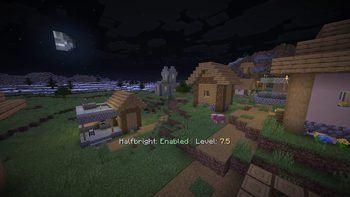
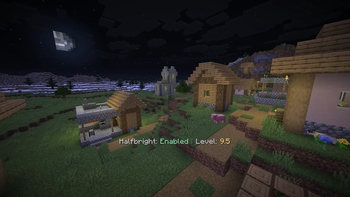
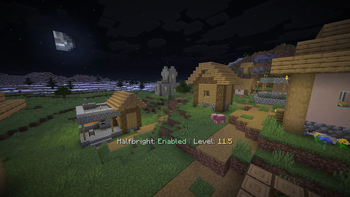
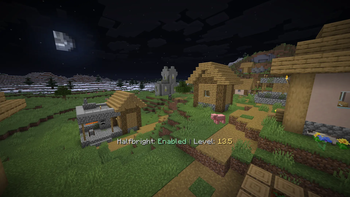
🔍 Analysis
- 👍 0.2% endorsement rate
- 🏆 #544 of 874 fabric mods in this game by downloads
📋 About This Mod
# Halfbright A fundamentally different approach to fullbright in modern Minecraft that looks great at any brightness level! Brighten up your world without loosing shadows and light sources! This is the Fullbright Mod I always wanted to have, but never managed to find. !(https://cdn.modrinth.com/data/cached_images/5b474adadc513835c1efd9967203100097cdf25f.webp) ## About Halfbright brightens up your world only half-way. This means that it makes dark spots brighter, while still having a perfect light transition going from 0 to 15 smoothly. Halfbright avoids all kind of yellow light artifacts, brightness jumps and clamping. With Halfbright enabled, you can turn up the brightness just a bit so that you can see more in caves while not making everything 100% bright. This allows you to still see Lamps and Torches light up your world, even though the world is already brighter. You can configure any value between 0.0 and 15.0 in steps of 0.5, and Halfbright will look great at any level. This means you can still have 'Full Brightness' when you really need it, but also have the option to just make the world just a little bit brighter. You can configure it just like you want! ## Why? Traditional fullbright mods often attempt to raise the game's gamma levels to extreme values (e.g., 1200%). While this makes things visible, it introduces severe visual issues: - **Poor Light Curves:** Smooth lighting is completely broken, resulting in flat, unnatural transitions. - **Color Distortion:** Intermediate light levels look washed out or shift toward a harsh yellow tint. - **Sodium Incompatibilities:** On modern Minecraft versions (like 1.21.x), performance mods like Sodium completely bypass the vanilla shader pipeline (`lightmap.fsh`), rendering shader-based fullbright mods inactive or broken. ## Features - **Sodium Options Menu Integration:** Configurable via Sodium's Options interface with a toggle button and a slider to adjust the minimum light level. - **Command Support:** Use `/halfbright` (with subcommands `toggle`, `enable`, `disable`, and `level <value>`). - **Default Keybindings:** - `H` - Toggle Halfbright on/off. - `Arrow Up` - Increase the minimum light level. - `Arrow Down` - Decrease the minimum light level. ## Incompatabilities While I don't know of any imcompatible mod yet, I'm sure there might be some problems with some other mods, so please let me know if you run into any issues! Works with and without Sodium on both Fabric and Neoforge! ## How Halfbright Works Instead of raising the global gamma, **Halfbright scales the lightmap directly on the CPU**. 1. **Lightmap Scaling:** The mod captures the 16x16 lightmap texture on the CPU. 2. **Dynamic Range Remapping:** It remaps the lower bounds of the light levels to start at a configurable minimum value (defaults to `8.0`). 3. **Curve Preservation:** By keeping all 16 steps in the lightmap and scaling them smoothly, the mod preserves Minecraft's smooth lighting curve. Shadows and caves remain visually pleasing, and nights stay dark and atmospheric while ensuring you can still clearly see your surroundings. 4. **Universal Compatibility:** By writing directly to the lightmap texture before uploading to the GPU, it works seamlessly with both vanilla rendering and custom rendering engines like **Sodium** on both **Fabric** and **NeoForge**.
# Halfbright
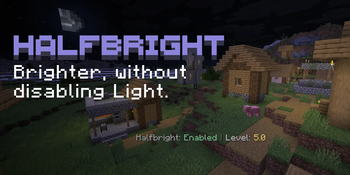
A fundamentally different approach to fullbright in modern Minecraft that looks great at any brightness level!
Brighten up your world without loosing shadows and light sources!
This is the Fullbright Mod I always wanted to have, but never managed to find.
!(https://cdn.modrinth.com/data/cached_images/5b474adadc513835c1efd9967203100097cdf25f.webp)
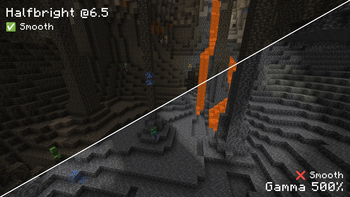
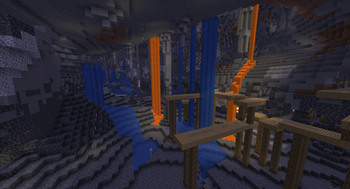
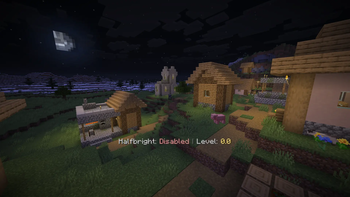
Halfbright brightens up your world only half-way. This means that it makes dark spots brighter, while still having a perfect light transition going from 0 to 15 smoothly.
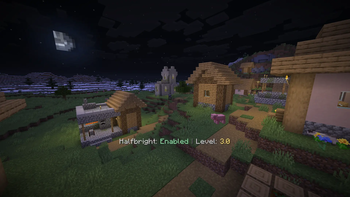
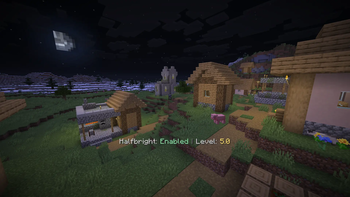
Halfbright avoids all kind of yellow light artifacts, brightness jumps and clamping. With Halfbright enabled, you can turn up the brightness just a bit so that you can see more in caves while not making everything 100% bright. This allows you to still see Lamps and Torches light up your world, even though the world is already brighter.
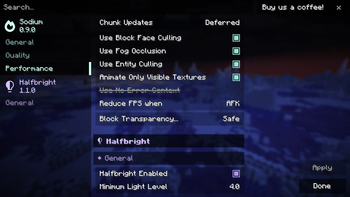
You can configure any value between 0. 0 and 15. 0 in steps of 0. 5, and Halfbright will look great at any level. This means you can still have 'Full Brightness' when you really need it, but also have the option to just make the world just a little bit brighter. You can configure it just like you want!
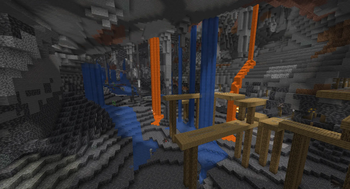
Traditional fullbright mods often attempt to raise the game's gamma levels to extreme values (e.g., 1200%). While this makes things visible, it introduces severe visual issues: - Poor Light Curves: Smooth lighting is completely broken, resulting in flat, unnatural transitions. - Color Distortion: Intermediate light levels look washed out or shift toward a harsh yellow tint. - Sodium Incompatibilities: On modern Minecraft versions (like 1. 21.x), performance mods like Sodium completely bypass the vanilla shader pipeline (`lightmap.fsh`), rendering shader-based fullbright mods inactive or broken.
## Features
- Sodium Options Menu Integration: Configurable via Sodium's Options interface with a toggle button and a slider to adjust the minimum light level.
- Command Support: Use `/halfbright` (with subcommands `toggle`, `enable`, `disable`, and `level
`). - Default Keybindings:
- - `H` - Toggle Halfbright on/off.
- - `Arrow Up` - Increase the minimum light level.
- - `Arrow Down` - Decrease the minimum light level.
## Incompatabilities
While I don't know of any imcompatible mod yet, I'm sure there might be some problems with some other mods, so please let me know if you run into any issues!
Works with and without Sodium on both Fabric and Neoforge!
## How Halfbright Works
Instead of raising the global gamma, Halfbright scales the lightmap directly on the CPU.
1. Lightmap Scaling: The mod captures the 16x16 lightmap texture on the CPU. 2. Dynamic Range Remapping: It remaps the lower bounds of the light levels to start at a configurable minimum value (defaults to `8. 0`). 3. Curve Preservation: By keeping all 16 steps in the lightmap and scaling them smoothly, the mod preserves Minecraft's smooth lighting curve. Shadows and caves remain visually pleasing, and nights stay dark and atmospheric while ensuring you can still clearly see your surroundings. 4. Universal Compatibility: By writing directly to the lightmap texture before uploading to the GPU, it works seamlessly with both vanilla rendering and custom rendering engines like Sodium on both Fabric and NeoForge.
📊 Mod Details
- Game
- Minecraft Mods
- Author
- L3_N0X
- Version
- 1.1.0
- Downloads
- 1,770
- Endorsements
- 3
- Category
- fabric
- Created
- 6/28/2026
- Updated
- 6/19/2026
- Game Versions
- 26.2
- Tags
- game-mechanics
🔧 How to Install Minecraft Mods Mods
Download from Modrinth. Use Prism Launcher or drop into your mods folder.
📖 Full step-by-step install guide for Minecraft Mods →
Visit the official mod page for specific installation instructions for this mod.
🎮 Need cheat codes or console commands? Check ur gaming wiki for Minecraft Mods commands, item IDs, and more.
❓ Frequently Asked Questions
Which Minecraft Mods versions does Halfbright support?
The author lists 26.2. Other versions may work but are untested by the author.
What is the latest version of Halfbright?
Version 1.1.0, published 2026-06-19 with 1,770 downloads recorded at the source.
Keep browsing — more Minecraft Mods mods await