GUI Shop
⚪ Last updated 2024⚠️ Install Order · 2 steps
Install in this order, then this mod last — most mods fail to load without their framework and dependencies in place.
🖼️ Gallery (3 images)
🔍 Analysis
- 👍 0.5% endorsement rate
- 🏆 #20 of 38 economy mods in this game by downloads
📋 About This Mod
# GUI Shop A fabric server-side mod to create and manage GUI shops. They can be later opened by using commands, allowing integration with NPC mods like (https://www.curseforge.com/minecraft/mc-mods/taterzens). <br>The mod supports (https://www.curseforge.com/minecraft/mc-mods/luckperms) for permissions. <br><br> ## Installation Put the .jar file in the "mods" folder **(Requires (https://www.curseforge.com/minecraft/mc-mods/fabric-api) and (#supported-economies))** <br><br> ## Commands and permissions All commands can be used by admins (permission level 3) or by users/groups with the specific permission | Description | Command | Permission | |----------------------------|------------------------------------------------------------------------------------------------------|--------------------------| | Main command | `/guishop` | `automessage.main` | | Create a shop | `/guishop create <shopName>` | `automessage.create` | | Delete a shop | `/guishop delete <shopName> ` | `automessage.delete` | | Add an item in a shop | `/guishop additem <shopName> <itemMaterial> <buyPrice> <sellPrice> <description> <nbt> <quantities>` | `automessage.additem` | | Remove an item from a shop | `/guishop removeitem <shopName> <itemName>` | `automessage.removeitem` | | Open a shop for a player | `/guishop open <shopName> <playerName>` | `automessage.open` | | List all shops | `/guishop list` | `automessage.list` | | List all items in a shop | `/guishop list <shopName>` | `automessage.list` | | Force save config | `/guishop forcesave` | `automessage.forcesave` | | Reload config file | `/automessage reload` | `automessage.reload` | ### Commands examples Create a shop: `/guishop create "Test shop"`" Add item in a shop: `/guishop additem "Diamond" "minecraft:diamond" 250.00 100.00 "This is a Diamond\\An expensive diamond\\Shiny" "{}" "1:10:32:64"` *(you can split each description line by using "\\\\", and you can input up to 4 quantities splitted by ":")* Remove item from shop: `/guishop removeitem "Test shop" "Diamond"` Open a shop and show it to a specific player: `/guishop open "Test shop" "Steve"` ## Configuration You can find the config file in `./config/guishop.json` <br>Both items' names and descriptions support (https://placeholders.pb4.eu/user/text-format/). You can even add items from the JSON file (check (#json-example)). This can be useful when your `additem` command would be very long, or to easily set a NBT *(remember to reload the mod using `/guishop reload` after editing the config file)* ### JSON example ```json5 { "shops": , "buyPrice": 50.0, "sellPrice": 25.0, "nbt": "{}", "quantityList": }, { "name": "BBQ Sword", "material": "minecraft:diamond_sword", "description": , "buyPrice": 0.0, "sellPrice": 0.0, "nbt": "{Damage:0,Enchantments:,display:{Lore:'],Name:''}}", "quantityList": }, { "name": "Amethyst", "material": "minecraft:large_amethyst_bud", "description": , "buyPrice": 200.0, "sellPrice": 100.0, "nbt": "{}", "quantityList": } ] }, { "shopName": "A second shop", "items": } ] } ``` ## Supported Economies: - [Impactor
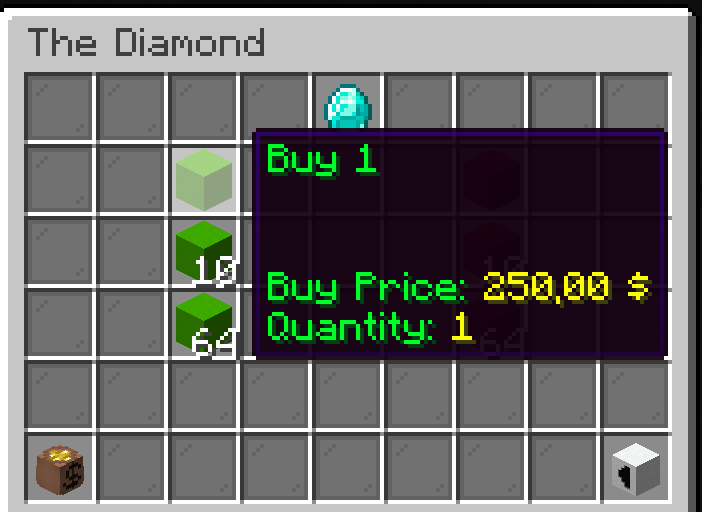
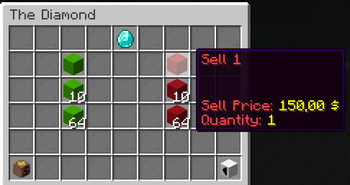
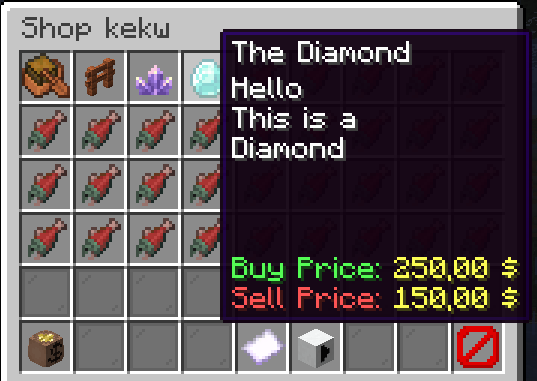
A fabric server-side mod to create and manage GUI shops. They can be later opened by using commands, allowing integration with NPC mods like (https://www.curseforge.com/minecraft/mc-mods/taterzens).
The mod supports (https://www.curseforge.com/minecraft/mc-mods/luckperms) for permissions.
## Installation Put the .jar file in the "mods" folder
(Requires (https://www.curseforge.com/minecraft/mc-mods/fabric-api) and (#supported-economies))
## Commands and permissions All commands can be used by admins (permission level 3) or by users/groups with the specific permission
| Description | Command | Permission |
|----------------------------|------------------------------------------------------------------------------------------------------|--------------------------|
| Main command | `/guishop` | `automessage.main` |
| Create a shop | `/guishop create
### Commands examples Create a shop: `/guishop create "Test shop"`"
Add item in a shop: `/guishop additem "Diamond" "minecraft:diamond" 250. 00 100. 00 "This is a Diamond\\An expensive diamond\\Shiny" "{}" "1:10:32:64"` (you can split each description line by using "\\\\", and you can input up to 4 quantities splitted by ":")
Remove item from shop: `/guishop removeitem "Test shop" "Diamond"`
Open a shop and show it to a specific player: `/guishop open "Test shop" "Steve"`
## Configuration You can find the config file in `./config/guishop.json`
Both items' names and descriptions support (https://placeholders.pb4.eu/user/text-format/).
You can even add items from the JSON file (check (#json-example)). This can be useful when your `additem` command would be very long, or to easily set a NBT (remember to reload the mod using `/guishop reload` after editing the config file)
### JSON example
```json5
{
"shops": [
{
"shopName": "Shop number one",
"items": [
{
"name": "The boat",
"material": "minecraft:acacia_chest_boat",
"description": [
"This is a nice boat",
"Very beautiful"
],
"buyPrice": 50. 0,
"sellPrice": 25. 0,
"nbt": "{}",
"quantityList": [
1
]
},
{
"name": "BBQ Sword",
"material": "minecraft:diamond_sword",
"description": [],
"buyPrice": 0. 0,
"sellPrice": 0. 0,
"nbt": "{Damage:0,Enchantments:[{id:\"fire_aspect\",lvl:2},{id:\"sweeping\",lvl:2}],display:{Lore:['[{\"text\":\"Crispy and tasty\",\"italic\":false}]'],Name:'[{\"text\":\"The BBQ\",\"italic\":false}]'}}",
"quantityList": [
1
]
},
{
"name": "Amethyst",
"material": "minecraft:large_amethyst_bud",
"description": [
"
## Supported Economies: - [Impactor
📊 Mod Details
- Game
- Minecraft Mods
- Author
- UnsafeDodo
- Version
- 1.4.0+1.20.1
- Downloads
- 7,508
- Endorsements
- 34
- Category
- economy
- Created
- 8/7/2023
- Updated
- 4/7/2024
- Game Versions
- 1.20.1
- Tags
- economy, utility
🔧 How to Install Minecraft Mods Mods
Download from Modrinth. Use Prism Launcher or drop into your mods folder.
📖 Full step-by-step install guide for Minecraft Mods →
Visit the official mod page for specific installation instructions for this mod.
🎮 Need cheat codes or console commands? Check ur gaming wiki for Minecraft Mods commands, item IDs, and more.
❓ Frequently Asked Questions
Which Minecraft Mods versions does GUI Shop support?
The author lists 1.20.1. Other versions may work but are untested by the author.
What is the latest version of GUI Shop?
Version 1.4.0+1.20.1, published 2024-04-07 with 7,508 downloads recorded at the source.
Keep browsing — more Minecraft Mods mods await