GTCEu Greenhouse
🟠 Updated over a year ago⚠️ Install Order · 2 steps
Install in this order, then this mod last — most mods fail to load without their framework and dependencies in place.
🖼️ Gallery (1 images)
🔍 Analysis
- 🏆 #55 of 338 forge mods in this game by downloads
📋 About This Mod
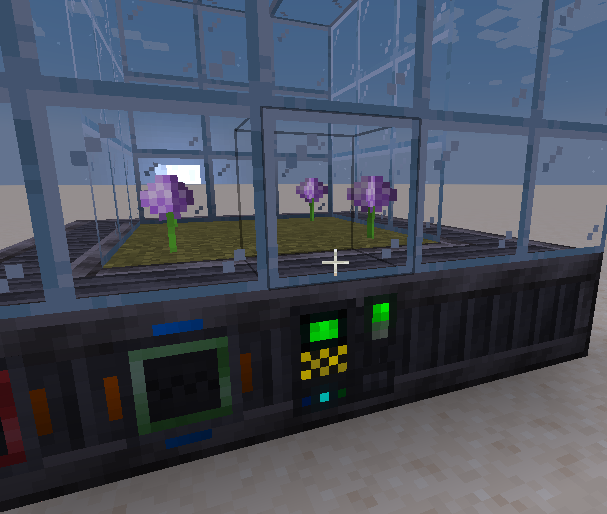
> **This mod does not add a greenhouse multibock**. It adds a system that allows you to create a greenhouse multiblock using KubeJS or Java. Why use this mod? It adds a custom renderer that makes plants appear and grow when a recipe is running. ## Usage ### KubeJS You can create a greenhouse multiblock machine by using the `"greenhouse"` type in the `"gtceu:machine"` startup event. All methods are the same as the ones for `"multiblock"`, except the ones for renderers are omitted, and you must call the following methods: * `textures(base: string, overlay: string)`, which acts like a workable casing renderer with the base and overlay; * `offsets(offsets: )`, which specifies the positions where the plants will grow with respect to the controller. Example: ```js GTCEuStartupEvents.registry('gtceu:machine', event => { event.create('greenhouse', 'greenhouse') .rotationState(RotationState.NON_Y_AXIS) .recipeTypes(GTRecipeTypes.COMPRESSOR_RECIPES) .recipeModifiers() .appearanceBlock(GTBlocks.CASING_STEEL_SOLID) .pattern(definition => FactoryBlockPattern.start() .aisle('CCCCC', 'ggggg', 'ggggg', 'ggggg', 'ggggg') .aisle('CGGGC', 'gpppg', 'gpppg', 'gpppg', 'ggggg') .aisle('CGGGC', 'gpppg', 'gpppg', 'gpppg', 'ggggg') .aisle('CGGGC', 'gpppg', 'gpppg', 'gpppg', 'ggggg') .aisle('CC@CC', 'ggggg', 'ggggg', 'ggggg', 'ggggg') .where('@', Predicates.controller(Predicates.blocks(definition.get()))) .where('p', Predicates.air()) .where('g', Predicates.blocks(Blocks.GLASS)) .where('G', Predicates.blocks(Blocks.GRASS_BLOCK)) .where('C', Predicates.blocks(GTBlocks.CASING_STEEL_SOLID.get()) .or(Predicates.autoAbilities(definition.getRecipeTypes()))) .build()) .offsets(, , , ]) .textures("gtceu:block/casings/solid/machine_casing_solid_steel", "gtceu:block/multiblock/gcym/large_mixer") }); ``` ### Java First, add the JitPack repository: ```gradle repositories { // ... maven { url 'https://jitpack.io' } } ``` Next, add a dependency to the project: ```gradle dependencies { // ... implementation fg.deobf("com.github.RubenVerg:GTCEu-Greenhouse:main-SNAPSHOT") } ``` There are two main exported classes which you will need: `GreenhouseMachineRenderer` and `SyncedProgressElectricMultiblockMachine`. When registering a multiblock, use the synced progress machine as the machine class and the renderer as a renderer. You will need to enable TESR. Example: ```js GREENHOUSE = MyMod.REGISTRATE .multiblock("greenhouse", SyncedProgressElectricMultiblockMachine::new) .rotationState(RotationState.NON_Y_AXIS) .recipeType(GregPackRecipeTypes.GREENHOUSE_RECIPES) .recipeModifiers(GTRecipeModifiers.PARALLEL_HATCH) .appearanceBlock(GTBlocks.CASING_STEEL_SOLID) .pattern(definition -> FactoryBlockPattern.start() .aisle("CCCCC", "CgggC", "CgggC", "CCCCC") .aisle("CdddC", "g g", "g g", "CgggC") .aisle("CdddC", "g g", "g g", "CgggC") .aisle("CdddC", "g g", "g g", "CgggC") .aisle("CC#CC", "CgggC", "CgggC", "CCCCC") .where('C', Predicates.blocks(GTBlocks.CASING_STEEL_SOLID.get()) .or(Predicates.autoAbilities(definition.getRecipeTypes())) .or(Predicates.autoAbilities(true, false, false))) .where('#', Predicates.controller(Predicates.blocks(definition.getBlock()))) .where('d', Predicates.blocks(Blocks.DIRT)) .where('g', Predicates.blocks(GTBlocks.CASING_TEMPERED_GLASS.get())) .build()) .renderer(() -> new GreenhouseMachineRenderer(GTCEu.id("block/casings/solid/machine_casing_solid_steel"), GTCEu.id("block/multiblock/gcym/large_mixer"))) .hasTESR(true) .register(); ``` If you do not want your machine to be electric, you can implement `ISyncedProgress` and use that as a machine instead: ```java public class MySyncedProgress extends Whatever implements ISyncedProgress { protected static final ManagedFieldHolder MANAGED_FIELD_HOLDER = new ManagedFieldHolder(SyncedProgressElectricMultiblockMachine.class, Whatever.MANAGED_FIELD_HOLDER); @Persisted @DescSynced @RequireRerender private double progressPercent; public SyncedProgressElectricMultiblockMachine(IMachineBlockEntity holder, Object... args) { super(holder, args); } { subscribeServerTick(() -> { progressPercent = recipeLogic.getProgressPercent(); }); } @Override public @NotNull ManagedFieldHolder getFieldHolder() { return MANAGED_FIELD_HOLDER; } @Override public double getProgressPercent() { return progressPercent; } } ```
> This mod does not add a greenhouse multibock. It adds a system that allows you to create a greenhouse multiblock using KubeJS or Java.
Why use this mod? It adds a custom renderer that makes plants appear and grow when a recipe is running.
You can create a greenhouse multiblock machine by using the `"greenhouse"` type in the `"gtceu:machine"` startup event.
All methods are the same as the ones for `"multiblock"`, except the ones for renderers are omitted, and you must call the following methods:
`textures(base: string, overlay: string)`, which acts like a workable casing renderer with the base and overlay; `offsets(offsets: [])`, which specifies the positions where the plants will grow with respect to the controller.
```js GTCEuStartupEvents.registry('gtceu:machine', event => { event.create('greenhouse', 'greenhouse') .rotationState(RotationState. NON_Y_AXIS) .recipeTypes(GTRecipeTypes. COMPRESSOR_RECIPES) .recipeModifiers() .appearanceBlock(GTBlocks. CASING_STEEL_SOLID) .pattern(definition => FactoryBlockPattern.start() .aisle('CCCCC', 'ggggg', 'ggggg', 'ggggg', 'ggggg') .aisle('CGGGC', 'gpppg', 'gpppg', 'gpppg', 'ggggg') .aisle('CGGGC', 'gpppg', 'gpppg', 'gpppg', 'ggggg') .aisle('CGGGC', 'gpppg', 'gpppg', 'gpppg', 'ggggg') .aisle('CC@CC', 'ggggg', 'ggggg', 'ggggg', 'ggggg') .where('@', Predicates.controller(Predicates.blocks(definition.get()))) .where('p', Predicates.air()) .where('g', Predicates.blocks(Blocks. GLASS)) .where('G', Predicates.blocks(Blocks. GRASS_BLOCK)) .where('C', Predicates.blocks(GTBlocks. CASING_STEEL_SOLID.get()) .or(Predicates.autoAbilities(definition.getRecipeTypes()))) .build()) .offsets([ , [-1, -1, -1], , [-1, -3, -1] ]) .textures("gtceu:block/casings/solid/machine_casing_solid_steel", "gtceu:block/multiblock/gcym/large_mixer") }); ```
First, add the JitPack repository:
```gradle repositories { // ... maven { url 'https://jitpack.io' } } ```
Next, add a dependency to the project:
```gradle dependencies { // ... implementation fg.deobf("com.github. RubenVerg:GTCEu-Greenhouse:main-SNAPSHOT") } ```
There are two main exported classes which you will need: `GreenhouseMachineRenderer` and `SyncedProgressElectricMultiblockMachine`. When registering a multiblock, use the synced progress machine as the machine class and the renderer as a renderer. You will need to enable TESR.
```js GREENHOUSE = MyMod. REGISTRATE .multiblock("greenhouse", SyncedProgressElectricMultiblockMachine::new) .rotationState(RotationState. NON_Y_AXIS) .recipeType(GregPackRecipeTypes. GREENHOUSE_RECIPES) .recipeModifiers(GTRecipeModifiers. PARALLEL_HATCH) .appearanceBlock(GTBlocks. CASING_STEEL_SOLID) .pattern(definition -> FactoryBlockPattern.start() .aisle("CCCCC", "CgggC", "CgggC", "CCCCC") .aisle("CdddC", "g g", "g g", "CgggC") .aisle("CdddC", "g g", "g g", "CgggC") .aisle("CdddC", "g g", "g g", "CgggC") .aisle("CC#CC", "CgggC", "CgggC", "CCCCC") .where('C', Predicates.blocks(GTBlocks. CASING_STEEL_SOLID.get()) .or(Predicates.autoAbilities(definition.getRecipeTypes())) .or(Predicates.autoAbilities(true, false, false))) .where('#', Predicates.controller(Predicates.blocks(definition.getBlock()))) .where('d', Predicates.blocks(Blocks. DIRT)) .where('g', Predicates.blocks(GTBlocks. CASING_TEMPERED_GLASS.get())) .build()) .renderer(() -> new GreenhouseMachineRenderer(GTCEu.id("block/casings/solid/machine_casing_solid_steel"), GTCEu.id("block/multiblock/gcym/large_mixer"))) .hasTESR(true) .register(); ```
If you do not want your machine to be electric, you can implement `ISyncedProgress` and use that as a machine instead:
```java public class MySyncedProgress extends Whatever implements ISyncedProgress { protected static final ManagedFieldHolder MANAGED_FIELD_HOLDER = new ManagedFieldHolder(SyncedProgressElectricMultiblockMachine.class, Whatever. MANAGED_FIELD_HOLDER);
@Persisted @DescSynced @RequireRerender private double progressPercent;
public SyncedProgressElectricMultiblockMachine(IMachineBlockEntity holder, Object... args) { super(holder, args); }
{ subscribeServerTick(() -> { progressPercent = recipeLogic.getProgressPercent(); }); }
@Override public @NotNull ManagedFieldHolder getFieldHolder() { return MANAGED_FIELD_HOLDER; }
@Override public double getProgressPercent() { return progressPercent; } } ```
📊 Mod Details
- Game
- Minecraft Mods
- Author
- rubenverg
- Version
- 0.1.0
- Downloads
- 232
- Endorsements
- 0
- Category
- forge
- Created
- 7/18/2025
- Updated
- 7/5/2025
- Game Versions
- 1.20.1
- Tags
- technology
🔧 How to Install Minecraft Mods Mods
Download from Modrinth. Use Prism Launcher or drop into your mods folder.
📖 Full step-by-step install guide for Minecraft Mods →
Visit the official mod page for specific installation instructions for this mod.
🎮 Need cheat codes or console commands? Check ur gaming wiki for Minecraft Mods commands, item IDs, and more.
❓ Frequently Asked Questions
Which Minecraft Mods versions does GTCEu Greenhouse support?
The author lists 1.20.1. Other versions may work but are untested by the author.
What is the latest version of GTCEu Greenhouse?
Version 0.1.0, published 2025-07-05 with 232 downloads recorded at the source.
Keep browsing — more Minecraft Mods mods await